

How to Set Up Apple Pay and Add Credit Cards - MacRumorsOpen MenuShow RoundupsShow Forums menuVisit ForumsOpen Sidebar
Skip to Content

How to Set Up Apple Pay and Add Credit Cards

Now that iOS 8.1 has been released to the public, we're getting our first look at what Apple Pay looks like on the iPhone 6 and the iPhone 6 Plus. Apple Pay isn't immediately obvious when iOS 8.1 is installed -- users will need to open up Settings or Passbook to see various Apple Pay features.

The initial setup for Apple Pay can be done through Passbook. Tapping the "+" icon in Passbook will allow users to add a card. If a card is already associated with an iTunes account, users can tap choose to use that card, or enter another one using the camera.
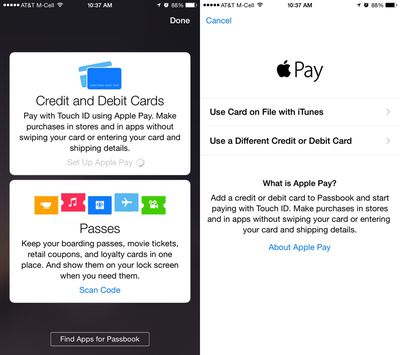
applepaysetup1
The camera roll will capture a card number, expiration date, and user's name, requiring the security code on the card to verify the number with the bank.

The verification process takes just a few seconds for most cards that are currently working with Apple Pay, after which the card can immediately be used for purchases. Some cards require additional verification steps, such as phone calls and emails. All cards stored in Passbook will be stacked on top of each other in Passbook's traditional style, with tap pulling a specific card to the forefront of the app.
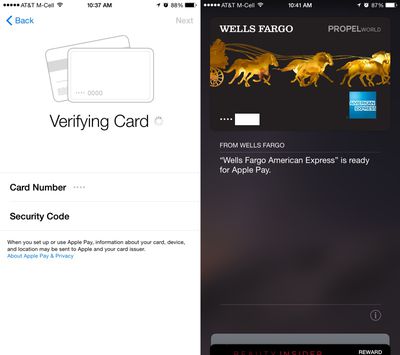
verifyingcardapplepay
Apple Pay's neatest features are buried in the Settings menu, located under the new "Passbook and Apple Pay" section. Each credit card listed added to Passbook is listed here, along with Transaction Defaults like billing address, shipping address, email, and phone number.
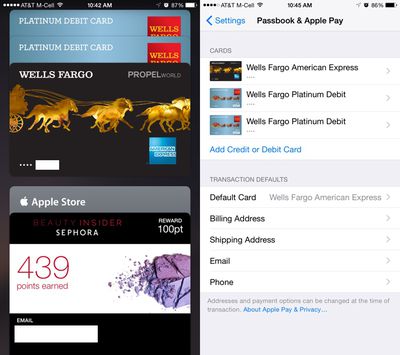
applepaysettingspassbook
Tapping on one of the cards provides specific information about the card, allowing users to see the last digits of the card number, the last digits of the Device Account Number that replaces the card number in transactions, and it also provides contact information for the bank behind the card, as well as an app download.

Each card also includes a list of recent transactions that have been made, and with some cards, transactions made in stores that don't support Apple Pay will be listed right alongside Apple Pay transactions. This settings area is also where a card can be removed from Apple Pay.
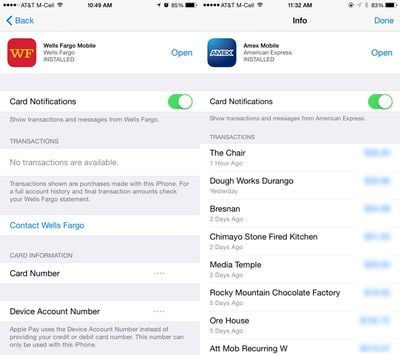
applepaysettings
After being set up, Apple Pay can be used within stores and within participating apps to make purchases with a single touch. When in a store, making a purchase is as simple as holding an iPhone 6 or 6 Plus near a contactless payment terminal with a finger on Touch ID, can be seen in the demo video below from The Verge.


According to Apple, Apple Pay will work with more than 200,000 stores that support contactless payments, and it has partnered with several retailers like Walgreens, Macy's, and Whole Foods to ensure support in those locations. Apple Pay also works for purchases made in participating apps like Uber, Starbucks, and Apple's own Apple Store app.

Related Roundup: Apple Pay

Popular Stories

macOS 27 on MacBook Pro

Apple Says macOS 27 Won't Be Compatible With These Macs

Wednesday June 3, 2026 8:29 am PDT by
During WWDC 2025, Apple revealed that macOS 26 Tahoe would be the final major macOS version for Intel-based Macs. macOS 27 will be compatible with Apple silicon Macs only, meaning that you will need a Mac with an M-series chip or a MacBook Neo with an A18 Pro chip in order to install the software update. Apple will unveil macOS 27 during its WWDC 2026 keynote this Monday, June 8, and the...
MacBook Neo on Yellow Feature

MacBook Neo is So Popular That Apple Reportedly Doubled Production

Wednesday June 3, 2026 9:24 am PDT by
On an earnings call in late April, Apple's CEO Tim Cook said that customer response to the MacBook Neo was "off the charts," and the popularity of the laptop has reportedly led the company to significantly boost production. Apple supply chain analyst Ming-Chi Kuo this week said he believes that MacBook Neo shipments to Apple were doubled from an initial target of 5 million units to 10...
iphone 18 pro blue%402x

iPhone 18 Pro: Dark Cherry, Light Blue, and Dark Gray Chassis Leaked [Update]

Thursday June 4, 2026 5:18 am PDT by
Update: Since publication, new information has come to light suggesting the images have been AI-manipulated and are not in fact iPhone 18 Pro chassis parts. The original article follows. The color options Apple is reportedly planning for the upcoming iPhone 18 Pro and ‌iPhone 18 Pro‌ Max have appeared online today in the form of images of chassis parts of unknown authenticity....

Top Rated Comments

152 months ago
Lol @ trusting apple with secure data
Yeah it's not like they've been trusted with hundreds of millions of credit cards for several years...
Score: 41 Votes (Like | Disagree)
152 months ago
Now that my wallet is obsolete, where am i supposed to put these now?
Score: 12 Votes (Like | Disagree)
urda Avatar
152 months ago
Uhm... your DEBIT card?

Seriously, who does that? Whoever it is gets an all-caps FANBOI.


Because people use Debit cards more offten than credit at times? The hell is wrong with you.
Score: 10 Votes (Like | Disagree)
RA1N1 Avatar
152 months ago
UK please, kthxbai.
Score: 8 Votes (Like | Disagree)
bbeagle Avatar
152 months ago
My bank doesn't support it, useless update for me. Google wallet worked fine with my Visa debit card on my Nexus.
Of course Google wallet works fine with any card - it doesn't use bank-verified tokens, it uses your ACTUAL credit card numbers. This makes Apple Pay much more secure than Google Wallet.
Score: 7 Votes (Like | Disagree)
152 months ago
Lol @ trusting apple with secure data
Apparently you have no idea how Apple Pay works. Apple has 0% of your data. They just provide the mechanism to transfer your encrypted key to the bank from the merchant for authorization.
Score: 7 Votes (Like | Disagree)














