iOS 8.1 Brings iCloud Photo Library to All Users, With Images Accessible on iOS Devices, iCloud.com - MacRumorsOpen MenuShow RoundupsShow Forums menuVisit ForumsOpen Sidebar
Skip to Content

iOS 8.1 Brings iCloud Photo Library to All Users, With Images Accessible on iOS Devices, iCloud.com

iOS 8.1, released to the public earlier today, included Apple Pay support as its most notable feature, but it also brought several other updates to the mobile operating system, including iCloud Photo Library. With iOS 8.1, the iCloud Photo Library beta is now available to all iOS 8 users, as is a new iCloud Photos app that can be found within iCloud.com.

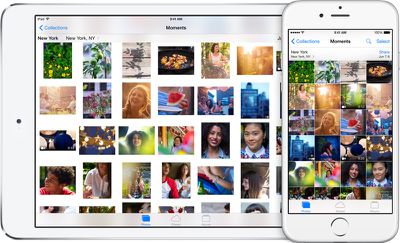
First introduced during WWDC, iCloud Photo Library stores all of the photos and videos that a user takes in iCloud, making them available on the iPhone, iPad, iPod touch, and Macs through iCloud.com. It will also work with the Photos app that Apple is creating for the Mac, which is expected in early 2015.
icloudphotolibraryhero

iCloud Photo Library. You’re never without your camera. Now you’ll never be without your photos. Every photo and video you take now lives in iCloud — giving you the freedom to access your library from any device, anytime you want. So you can view a photo from last week or last year no matter where you are.

iCloud Photo Library is designed to keep all of a user's photos synced on all of their devices at all times. When an image is edited on an iOS device in the Photos app with Apple's built-in editing tools, those changes are immediately uploaded to iCloud and visible on other devices right away.

iCloud Photo Library is also designed to free up valuable storage space on iOS devices. Full high-resolution photos and videos are stored in the cloud, while smaller versions of the images are displayed on devices, taking up far less storage space. iCloud Photo Library uses the iCloud storage space of each user, with 20GB of storage space available for $0.99 per month. Apple's iCloud storage plans go up to 1TB, which is priced at $19.99 per month.

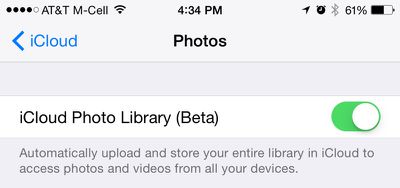
iCloud Photo Library can be enabled on iOS devices in the Settings app by going to iCloud > Photos and toggling on "iCloud Photo Library." The Settings app also lets users choose whether to optimize iPhone storage or download and keep original full-sized photos on their devices.
icloudphotolibrarysettings
Once iCloud Photo Library is enabled, images and videos stored on iOS devices will be automatically uploaded to the cloud. They can be viewed as usual within the Photos app for iOS, and on the web, they can be viewed through the new iCloud Photos app on iCloud.com.

icloudphotosapp
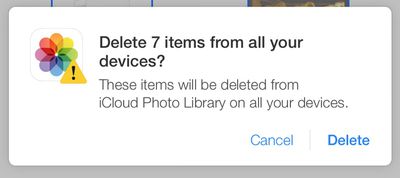
In the iCloud Photos app, users can perform several actions that are also available in the iOS version of the Photos app. Images can be favorited, which sends them to a special "Favorites" album, they can be downloaded in full resolution, or deleted, which removes the photos from iCloud Photo Library on all devices. From the main "Moments" view, it's also possible to click on the "Select Photos" option to delete or download multiple images at once.
deleteitemsicloudcom
iCloud Photo Library does not appear to be working flawlessly at the current point in time, which is likely why it's still given "beta" status. In MacRumors own testing, deleting some photos from the iCloud Photos app did not delete the photos from the iPhone 6 Plus they were taken on. A later sync even returned the photos to iCloud.com.

While iCloud Photo Library was available to developers during the iOS 8 beta testing period, Apple opted to pull it from the iOS 8 golden master ahead of iOS 8's public release and demote it to beta status.

The reason behind iCloud Photo Library's removal from the release version of iOS 8 was unclear, but it is possible Apple delayed the release in light of the negative press iCloud received in early September due to the celebrity photo leak.

With Apple having taken significant steps to bolster the security of iCloud, adding two-step verification and sending security emails when changes are made to iCloud or a device is restored, the company appears ready to let the public have full access to the new photo storage feature.


Tag: iOS 8.1
Related Forum: iOS 8

Popular Stories

duo aquarium

More Fun iPhone Duo Apps: 30 New Picks to Try

Friday November 6, 2026 3:27 pm PST by
When the iPhone Duo launched, we shared a list of some of the fun apps developers created for the new form factor. Two weeks out, developers are continuing to come up with fresh ideas, so we thought we'd share some of our favorites. Games Marbles Unhinged ($2.99) - Marbles Unhinged is a marble maze designed for the Duo. When you fold it, the floor turns into a ramp. If you stand the top...
iOS 28 AI

Apple Taking New Approach to Developing iOS 28 and macOS 28

Sunday November 8, 2026 7:42 am PST by
Apple has made a change to its development process for iOS 28, macOS 28, and corresponding software updates, according to Bloomberg's Mark Gurman. In his Power On newsletter today, he said Apple separates development of each year's new operating systems into three major stages. Typically, he said each stage consists of four weeks of coding followed by a four-week "convergence" period where...
apple pro tell logo

Apple Launching Five New Products Today

Thursday November 5, 2026 12:59 am PST by
Apple is launching five new products on Friday, November 6, following pre-orders that opened last week, including its first touchscreen MacBook Pro models. The following new products will be available from today: iPad mini with OLED display and A20 Pro chip iMac with M6 chip 14-inch MacBook Pro with M6 chip 14-inch MacBook Pro with OLED touchscreen 16-inch MacBook Pro with OLED...

Top Rated Comments

Kariya Avatar
157 months ago
celebrities will love this....hackers will love this even more!
Tired joke.

Celebs with Android phones, BlackBerries were victims too. iCloud wasn't hacked, it was social engineering.

Score: 35 Votes (Like | Disagree)
157 months ago
celebrities will love this....hackers will love this even more!
Score: 7 Votes (Like | Disagree)
157 months ago
Let's hope Apple does not decide to buy dropbox and try to "icloudify" them. They have truly made the "cloud"services area really really confusing. It should be much simplier and much less confusing than it is currently. Have used dropbox for years now, it works, it works well, and I don't get confused and stumped about what it's doing with my documents.
Score: 5 Votes (Like | Disagree)
157 months ago
Me shudders with memories of very beta "MobileMe" that was not quite ready for prime time. This camper passing until the kinks are worked out and it's more bug free.

Once burned, twice shy as they say!


"If one wants to live on the edge of high technology, you gotta be prepared to bleed.......been there, dome that, got the tee-shirt!"
Score: 5 Votes (Like | Disagree)
157 months ago
There is nothing respectful about tossing aside the gift of human intellect and choosing to ignore the truth.


If you can handle using Pages, Numbers, Keynote, etc. than what makes you think this is so bad? It's exactly the same.


The message pops up EVERY SINGLE time and clearly states "This photo will be deleted from iCloud Photo Library on ALL of your devices". It is ignorant and deceitful to pretend otherwise.


Yeah, if you want to use this service for >5GB you pay money. NOBODY IS MAKING YOU USE THIS. You can still do whatever you were doing up until now.


You downloaded an OPTIMIZED version. What don't you understand? The full version is on iCloud, and if you turn the full version setting on you can access it. Maybe it the future the web app will download full versions. ITS A BETA (any idea what that means or is the term confusing?).


Let's see, you are wrong about iCloud apps being confusing, you are wrong about the delete warning, you are wrong about what size is stored in iCloud, and you are wrong about this using up all a device's storage when in fact it doesn't require (do you know the difference between use if available and require?) any storage whatsoever. I'd call that pretty darn ignorant and mistaken.
Proline, you are incorrect. I hope that others reading this realize that you are making statements that are simply not true. It is not opinion, it is fact, at least in how the system is working for me (I point that out in the case that maybe I have some odd setting, but I don't believe I do).

1) I just took a photo using an iPhone 5.
2) I logged into iCloud.com, and within about 30 seconds the photo disappeared.
3) I picked up my iPhone and deleted the photo...THERE WAS NO WARNING WHATSOEVER. The photo was deleted instantly (albeit moved to the "Recently Deleted" album, not deleted, but I hope I am not being ignorant and I do realize you can restore from the recently deleted album if you'd like). The message DOES NOT pop up every single time as you so contend (at least on my phone).
4) I returned to iCloud.com and within 30 seconds the photo was removed.

There was no message. If you want to assert that it wasn't "officially deleted and you can restore from the recently deleted album", I'll give you that. And recovering the photo from recently deleted does put it back into All Photos and back into iCloud. (From what I can tell there is no recently deleted album on iCloud.com, so you would need to use the device you deleted from to recover.)

In terms of the optimized version being downloaded, that again is something I confirmed through actually taking a photo, viewing its EXIF data from the original on the phone, downloading the uploaded copy from iCloud, and then viewing that version's EXIF data. I did not "accidentally" download any optimized version. I downloaded the 1 and only version that was on iCloud, and it is not a full resolution file as Apple has indicated.

If you would re-read the initial posting I made, the one you emphatically attacked, you will see that I in fact stated, and I quote from the original post: "I am not sure if this is related to the service being a beta". I realize it is a beta. I also wrote in my initial post "Let's hope that Apple has plans to really improve this service."

This thread is currently 8 pages and 178 postings. But when comment about this being confusing, you assert, and I quote again, "No it isn't. Only to you." Ok.

To the others that come to this site for constructive commenting, learning, and assistance, I hope that you find what you are after without being attacked by such condescending members as proline.
Score: 4 Votes (Like | Disagree)
157 months ago
apperently i dont get it ...

wasn't the iCloud Photo Libary supposed to store ALL of your Photos and Videos so you can "make up valuable room on your iOS devices"?

But when i want to delete certain photos from my iPhone they are sent to the "recently deleted fotos folder" and will be deleted from iCloud within 30days too???

sorry but that doesn't make sense to me ... am i doing it right?

Exactly my thoughts. It seems like the total opposite! Now you need a 64GB+ iPhone besides your 64GB+ iPad to be able to use iCloud Photo Library and upload ALL your photos.

There should be an option to not download photos locally, just upload new ones. And be able to see your photos in iCloud when your are connected to Internet.

Sometimes I hate apple.
Score: 4 Votes (Like | Disagree)
Latest Stories
Apple Store Subscription Sign-Up Controversy Exposed
8 hours ago
Siri AI Rumored to Become 'More Like an Agent' as Early as Next Year
18 hours ago
Apple Taking New Approach to Developing iOS 28 and macOS 28
19 hours ago
Early Apple Black Friday Deals on Apple Watch, MacBook Air, and More
2 days ago
'Backglow' Lets You Customize New MacBook Pro's Glowing Apple Logo
2 days ago
Top Stories: Apple Product Launches, iOS 27.3 Beta, and More
2 days ago
More Fun iPhone Duo Apps: 30 New Picks to Try
3 days ago
Hands-On With Apple's New OLED Touchscreen MacBook Pro
3 days ago
Apple Store With All-New Design Opening Soon in Southern California
3 days ago
Control the Glowing Apple Logo on Your New MacBook Pro
3 days ago
Apple Shares New 'Apple Card: Apply and Use in Minutes' Ad
3 days ago
Apple Says More Than 100,000 Apps Optimized for iPhone Duo, Here's What's Still Missing
3 days ago
Early Black Friday Deals Kickoff With Steep Discounts on Apple Watch Ultras and More
3 days ago
The MacRumors Show: iOS 27.3 Looks Like a Huge Update
3 days ago
Best Buy's Black Friday Event Begins With Sitewide Savings on Apple, TVs, More
3 days ago
Apple Releasing Yet Another Two New Products Next Week
3 days ago
MacBook Air Drops to Lowest Price in Months With Amazon's $250 Discount
3 days ago
Apple Rumored to Drop the iPhone's Action Button Next Year
3 days ago
Apple's Extended Return Policy Now in Effect for 2026 Holiday Season
3 days ago
Apple Music Classical Updated With New Icon and Refreshed Design
3 days ago
OLED iPad Mini, M6 iMac, and New MacBook Pros Available From Today
3 days ago
Apple Surveys iPhone Duo Buyers About Crease and Camera
3 days ago
Apple's First Touchscreen Mac is Now Arriving to Customers
4 days ago
Claude Gets Personal Finance Feature With Bank Account Linking
4 days ago
Apple Arcade Adds Crossy Road Rush and NBA 2K27
4 days ago
Apple's New HomeView Smart Home Hub: Here's How Much RAM It Has
4 days ago
iPad Mini vs. iPad Air Buyer's Guide: Now Just $50 Apart
4 days ago
First iOS 27.3 and macOS Golden Gate 27.3 Public Betas Now Available
4 days ago
Apple Announces a New Mac Sales Record
4 days ago
Paid $200 for Logic Pro? Apple Says You Won't Get This New Feature
4 days ago








































