

Pixelmator, a popular Photoshop replacement on the Mac, was released for the iPad today. The image editing iOS app is similar to the Mac app, incorporating many of the same tools to allow users to retouch and enhance photos and images.
The app includes a complete set of painting tools and a painting engine that can take advantage of a range of brushes from crayon and marker to pencil and paintbrush to create works of art from scratch or improve photos.
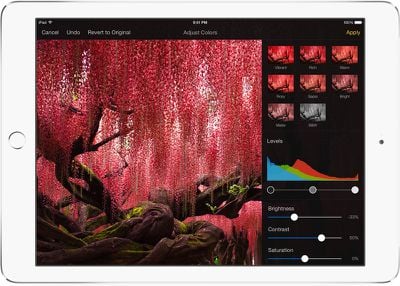
It offers several photo editing tools, including advanced retouching tools that let users remove unwanted objects from images in just a few minutes. There are color adjustment tools (including levels, brightness/contrast, curves, white balance, and more) to improve the look of photos, and a selection of more than 14 pre-created effects can be applied to images.
Pixelmator for iOS supports non-destructive layer styles and it includes powerful selection tools along with image straightening and cropping tools. There are also built-in shape and text tools.
Pixelmator comes with a set of top-quality retouching tools so you can easily make every picture absolutely stunning. With the innovative repair tool, quickly and easily get rid of unwanted image elements simply by painting on them or, with just a simple tap fix red eyes, brush away blemishes, smudge to smooth out hard lines, paint to boost the colors, bring in some light and so much more. Advanced technologies used in retouching tools make them incredibly fast and accurate, so that you can seamlessly bring an image to perfection.
Loaded with dozens of breathtaking effects, Pixelmator for iPad gives even more ways to enhance pictures. Add gorgeous effects like blur, vignette, vintage, black & white, light leak, bokeh, miniaturize and many more -- in an instant. You can even combine different effects for unique, near-effortless artistic creations and see the stunning results in real time.
The app has been designed from the ground up for iOS 8 and it fully supports several different iOS 8 features. It uses iCloud Drive to store images, for example, and with Handoff, it's possible to start editing an image on the iPad and pick it up on the Mac.
There's Document Picker support to allow users to edit images in other apps, and there's a Pixelmator Photo Editing extension designed for the Photos app. It's also possible to share images with other apps with Share extensions.
When Apple unveiled the new iPad Air 2 on October 16, it invited the Pixelmator team to take the stage to demo the Pixelmator app for the iPad Air 2, as it is designed to take advantage of the tablet's powerful 64-bit processor. Though created to utilize a 64-bit processor, Pixelmator for iPad is compatible with iPad 2, iPad 3, iPad 4, iPad Air, iPad Air 2, iPad mini, iPad mini 2, and iPad mini 3. iPad 4 or later is recommended for the best performance, however.
Pixelmator can be downloaded from the App Store for $4.99. [Direct Link]



















Top Rated Comments
Why does that matter? You obviously visit this site, and it doesn't ask you for money.
In some ways it's even more user friendly than on the Mac. I like the rotary dial controls. Very cool.
The only gripe I have is fonts. It's so close to the Mac version that I want to use it for real projects, but without the ability to add fonts from my Mac, I can't do that. Even opening old projects isn't possible because the fonts aren't supported.
I'm sure this will get better in time.