

Dropbox for iOS Gains File Renaming Capabilities - MacRumorsOpen MenuShow RoundupsShow Forums menuVisit ForumsOpen Sidebar
Skip to Content

Dropbox for iOS Gains File Renaming Capabilities

by

Dropbox for iOS has been updated to version 3.6 today, adding the ability to rename files and folders. Navigating to an individual file and then tapping on the new "more" action button next to the share sheet button will reveal a set of file management options that includes renaming capabilities.

Along with files, folders can also be renamed directly within the Dropbox app for iOS, with a quick swipe to the right to reveal the new renaming function.
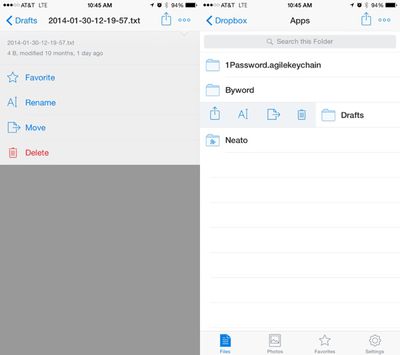
dropboxappupdate
The addition of file renaming functionality follows a recent update that saw Microsoft and Dropbox partnering up to add Dropbox support to Microsoft's suite of Office apps, allowing documents in Word, PowerPoint, and Excel to be saved to a user's Dropbox account.

- You can now rename your files and folders!
- Swipe right on a folder to see more actions, including rename.
- We've moved a few things around - there's a new more actions button (⋯) when viewing files
- On iPhones, the more actions button (⋯) also includes the full file name, size and other details.
- Edit Office documents and save them back to your Dropbox

Dropbox can be downloaded from the App Store for free. [Direct Link]

Top Rated Comments

154 months ago
yet another thing iCloud Drive cant do properly :D

iCloud Drive is so disappointing. I was very excited about it, was happy to purchase the 200GB plan; it sits there empty because it's just useless. Guess I'll cancel at some point.

I have no idea who thought it'd be a good idea to have to cache the same amount of storage locally as in the cloud - multiplied by how many devices you have using the iCloud account. Worthless and doesn't scale.

Oh well, good job Dropbox.
Score: 11 Votes (Like | Disagree)
bushido Avatar
154 months ago
iCloud Drive is so disappointing. I was very excited about it, was happy to purchase the 200GB plan; it sits there empty because it's just useless. Guess I'll cancel at some point.

I have no idea who thought it'd be a good idea to have to cache the same amount of storage locally as in the cloud - multiplied by how many devices you have using the iCloud account. Worthless and doesn't scale.

Oh well, good job Dropbox.

Apples cloud is the worst thing they have ever done.

iCloud pre-iOS7 that doesn't work well together with ios 8 devices, Photostream that's not part of the iCloud space, iCloud Photos that's part of iCloud, iCloud Drive for iOS 8. iCloud Photo Library that's part of iOS8 with an mac app that's not due til 2015, iPhoto that doesn't work properly with iCloud Photo. Then there's Photostream Sharing but also iCloud Photo Sharing. We also have the stuff like contacts that get synced but what is it actually called? "iCloud too?" Oh and then we also got iTunes Match that's for music like wtf apple. Apps need to be updated to gain access to your iCloud Drive files and you have to know what app may be able to open certain types instead of giving me an app like Dropbox with the files where I can PICK the app to open it with instead of guessing which one has been updated and can actually support the type. So confusing and I am a computer science / online marketing student. How are regular people like my family supposed to understand that lol

Oh and like you said it takes up local space which makes the whole purpose of a cloud redundant and if you just want to get rid of a picture to save some local space it gets deleted eeeeverywheeeere
Score: 9 Votes (Like | Disagree)
bushido Avatar
154 months ago
yet another thing iCloud Drive cant do properly :D
Score: 7 Votes (Like | Disagree)
Agent-P Avatar
154 months ago
People complain when Apple copies stuff from other companies, but for the love of everything Apple really needs to take some hints from Dropbox/OneDrive to make iCloud Drive a worthwhile alternative. As of now it's only useful for device backups.
Score: 4 Votes (Like | Disagree)
pdaholic Avatar
154 months ago
About time! I had to use another app to rename Dropbox files on my phone, amazing it took this long to add that feature.
Score: 4 Votes (Like | Disagree)
154 months ago
I use it for device backups, app data sync, and syncing of Contacts and Calendars. I don't trust it for anything else.
Score: 3 Votes (Like | Disagree)

Popular Stories

iOS 27 Next to iPhone

Here's When iOS 27 Rolls Out Today in Every Time Zone [Update: It's Out]

Sunday September 13, 2026 3:00 am PDT by
Update 10:04 a.m.: iOS 27 is rolling out now, though it may take a bit for all users to see it, so keep checking! Apple is about to release iOS 27, which will finally deliver more advanced Siri AI capabilities as well as a variety of other refinements, improvements, and new features to iPhones. It's Apple's biggest software update of the year, and Apple announced at Wednesday's iPhone event...
iOS 27 Icon iPhone

iOS 27 Available Now With These 8 New Features

Monday September 14, 2026 9:00 am PDT by
Update — 10 a.m. Pacific Time: Apple has released iOS 27. During its iPhone 18 Pro and iPhone Duo event last week, Apple announced that iOS 27 will be released widely on Monday, September 14. iOS 27 should be available around 10 a.m. Pacific Time / 1 p.m. Eastern Time today via the Settings app, under General → Software Update. Below, we have highlighted eight new features and...
Apple iCloud Plus expansion hero

iCloud+ Now Includes Apple TV, Apple Arcade, and Curated Apple Music Stations in Over 100 Countries

Tuesday September 15, 2026 1:43 am PDT by
Apple today announced a new subscription initiative that turns paid iCloud+ subscriptions into a broader services bundle in more than 100 countries. In select countries, Apple says every paid iCloud+ plan, including the cheapest 50GB tier, now includes Apple TV and Apple Arcade "at no additional cost," while family sharing extends the storage, TV and Arcade access to up to five people....














