

Fleksy Keyboard for iOS Gains New Extensions, Theme Packs - MacRumorsOpen MenuShow RoundupsShow Forums menuVisit ForumsOpen Sidebar
Skip to Content

Fleksy Keyboard for iOS Gains New Extensions, Theme Packs

With iOS 8, Apple began allowing third-party keyboards for the first time, and over the last few months, dozens of feature-rich keyboards have hit the market. With an ever-increasing number of keyboard options available, it's becoming increasingly difficult for keyboard developers to stand out

Fleksy, a company that has long had an Android-based keyboard and was one of the first to launch a keyboard for iOS, is aiming to get itself back into the public eye with a major 5.0 update. The new version of Fleksy introduces a slew of features, including several customizable extensions and dozens of premium themes. With Extensions, Fleksy is now able to go beyond simple text insertion, offering additional features that extend Fleksy's functionality.

iOS extensions being offered include GIFs, one-handed typing (for iPhone 6 and 6 Plus), a Number Row, Cursor Control, and Rainbow Key Pops. The GIF feature allows users to browse and share animated images, while Cursor Control allows users to move the cursor using the spacebar.
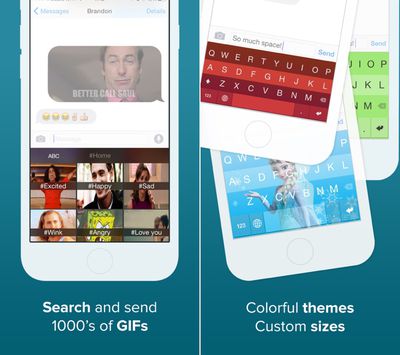
fleksyupdate
The Number Row adds numbers to the top of the keyboard, Rainbow Key Pops add a pop of color with each key press, and the one-handed typing feature moves the keyboard to the side of the screen. Users can install up to three extensions at once via the Fleksy app, and Extensions can be changed out at any tie. It's also possible for users to purchase additional slots for $0.99.

"We're unlocking the keyboard's true potential with this update," said Kosta Eleftheriou, Fleksy CEO and Co-Founder. "Keyboards are our primary input method. With Extensions we mean to revolutionize not only text input, but all input; making it faster, easier, and more fun. Why switch back and forth between apps to do things that can be done via the keyboard?"

The updated version of Fleksy is far more customizable, with an additional 30 themes available for purchase. Themes are organized into several different classes including Personal, Trendy, Branded, Dynamic, and Translucent.

Branded themes, for example, include Frozen and Hunger Games, while other available themes offer a variety of different colors. The themes are bundled into packs of two or three and can be purchased in-app for $0.99 to $2.99. Along with the iOS version, Fleksy for Android is receiving many of the same features, along with additional Extensions that allow for text shortcuts and an invisible keyboard.

Fleksy can be downloaded from the App Store for $0.99. [Direct Link]

Popular Stories

iCloud iPhone 17 Pro

iPhone Users Who Pay for iCloud Storage Get Two New Perks on iOS 27

Thursday July 2, 2026 6:10 am PDT by
If you pay for certain iCloud+ storage plans beyond the 5GB that Apple offers for free, you will receive two more perks on iOS 27 at no additional cost. A summary of the two new iCloud+ perks on iOS 27:Increased daily usage limits for some new Apple Intelligence features, including image generation in the revamped Image Playground app. HomeKit Secure Video cameras receive generated video...
Apple Event Logo

Apple Just Released a New Product

Thursday July 2, 2026 8:04 am PDT by
Apple's first product release of summer 2026 occurred this week, but do not get too excited, as it is merely the Beats Solo Buds in a new color. Beats Solo Buds are now offered in orange through Best Buy in the U.S., with availability set to expand to 7-Eleven stores in Japan on July 4. Apple already offered orange Solo Buds in India for free with the purchase of an iPhone 15 or iPhone 15 ...
iPhone 4 on Black Feature

Apple Facing One of Its Worst Leaks Since the iPhone 4

Thursday July 2, 2026 9:53 am PDT by
Apple supplier Tata Electronics recently suffered a cyberattack that resulted in thousands of confidential files being published on the dark web, and this reportedly included some photos and documents related to the upcoming iPhone 18 Pro. We have elected not to share any of the leaked photos in this story due to the illegal nature in which they were obtained, but they can easily be found...

Top Rated Comments

Patriks7 Avatar
151 months ago
I have tried many of these keyboards and I always keep coming back to the stock one as it seems to work the best for me. Am I the only one?
Score: 23 Votes (Like | Disagree)
rsocal Avatar
151 months ago
I have tried many of these keyboards and I always keep coming back to the stock one as it seems to work the best for me. Am I the only one?

I still like the stock iOS keyboard the best as well.
Score: 8 Votes (Like | Disagree)
151 months ago
This is awesome for the kids, I think. For me, however, I will pass.

The stock keyboard works well and I dont have to worry about my data going anywhere else.
Score: 7 Votes (Like | Disagree)
ck2875 Avatar
151 months ago
What I find really dodgy is that the developer changed the IAP pricing descriptions.

Before, it listed the prices for each IAP (i.e. $0.99, etc) and with the new update they have changed it to say "GET" in the same manner that Apple now displays the price for free apps in the App Store.

This is no doubt an attempt to confuse the unattentive consumer into thinking its going to be free then tapping through the pop up without realizing they're paying for it.

Before:

MacRumors content image

After Update:

MacRumors content image

After Pressing 'GET':

MacRumors content image
Score: 6 Votes (Like | Disagree)
BeyondtheTech Avatar
151 months ago
I have tried many of these keyboards and I always keep coming back to the stock one as it seems to work the best for me. Am I the only one?

Am I the only one who's also tried many keyboards but bothered not to invest in any of them because - even at the current iOS 8.1.2 - the OS is still so buggy that the third-party keyboard occasionally won't even open, forcing me to force-quit the app and relaunch it just to get it to work?
Score: 6 Votes (Like | Disagree)
Keane16 Avatar
151 months ago
I have tried many of these keyboards and I always keep coming back to the stock one as it seems to work the best for me. Am I the only one?
Yeah it does work the best IMHO, though I'm forcing myself to use Swype for reasons I don't yet understand. I downloaded a Klingon keyboard only to remember I can't speak Klingon. So my experience with third-party keyboards has been fairly tragic, albeit self-inflicted woes.
Same here.

I tried all the popular free ones. Not much I liked. Then when Swype became free thought I'd give it a proper try. So I uninstalled the stock keyboard and tried for a full month. Swyping was novel for a couple of days. But by the end I was just frustrated by the inconsistent auto-correct, and I realised NEVER Swyped, always tapped. It was also slower having to tap and hold to access the emoji keyboard.

So I'm back on the trusty stock keyboard, for me the most accurate and the one I'm quickest with.
Score: 4 Votes (Like | Disagree)














