Duet Display Offers Tethered Solution to Turn an iPad into an Extra Display for Mac [Updated] - MacRumorsOpen MenuShow RoundupsShow Forums menuVisit ForumsOpen Sidebar
Skip to Content

Duet Display Offers Tethered Solution to Turn an iPad into an Extra Display for Mac [Updated]

While there are several apps designed to turn the iPad or iPhone into a secondary display for a Mac, the most popular options use Wi-Fi, which can render them all but unusable at times due to unavoidable lag. A new app from developer and former Apple Engineer Rahul Dewan aims to solve these lag problems with a tethered solution that turns an iOS device into a more reliable secondary display.

Duet Display, which is launching today, is the one of the first apps that transforms the iPad and the iPhone into an extra display for the Mac using a Lightning or 30-pin cable. By sending data over a cable instead of Wi-Fi, Duet Display is able to greatly improve on the lag is typically present when an iOS device is used as a secondary display.

Duet Display offers both a Retina mode and a non-Retina mode, along with options for 30 or 60 frames per second, and it's easy to install and setup, requiring just the Mac app, the iOS app, and a cable to connect the two devices.

The Duet Display app is inarguably an improvement over other options today, but it is not a perfect solution. As detailed in the video walkthrough of the app below, MacRumors experienced some issues when testing the app. On a 2012 Retina MacBook Pro, Duet Display's Retina mode caused a significant amount of cursor lag, rendering the app nearly unusable, and the CPU usage climbed to well over 200 percent.


Non-Retina mode (which is enabled in the app by default) offered a more lag free experience, but the trade off caused the secondary iPad Air 2 display to look fuzzy -- a disappointment given the inherent clarity of the screen on Apple's newest tablet. Non-Retina mode in Duet Display degrades the quality of all Retina displays to a noticeable degree.

According to the developer, performance is better on Macs released in 2013 or later, and users who only want to view one static window may not have any problems. Furthermore, many users may find the utility of a secondary iPad or iPhone display to be enough to outweigh the lack of a Retina experience.

Though the iPad Air 2 and other Retina devices don't look good in non-Retina mode, Duet Display is a great solution for older iPads that people might have little use for. An original iPad or iPad 2 does not have a Retina screen, and will work well with older Macs as secondary displays. iOS 5.1.1 is not yet compatible with Duet Display, but the developer is working on a fix.

Along with the Retina issue, potential buyers should be aware of some other small issues that we ran into. Even in non-Retina mode, on a 2012 Retina MacBook Pro, there was some slight cursor lag, and we also had problems with visual artifacts on some apps. When watching YouTube videos, for example, there were some occasional performance blips.

The developer assures us that he is working on improving Duet Display, and he plans to release iterative updates in the months to come to clear up lingering problems. As he suggests, it's better to have an app that works most of the time with just a few problems rather than one of the existing Wi-Fi solutions that can be almost non-functional.
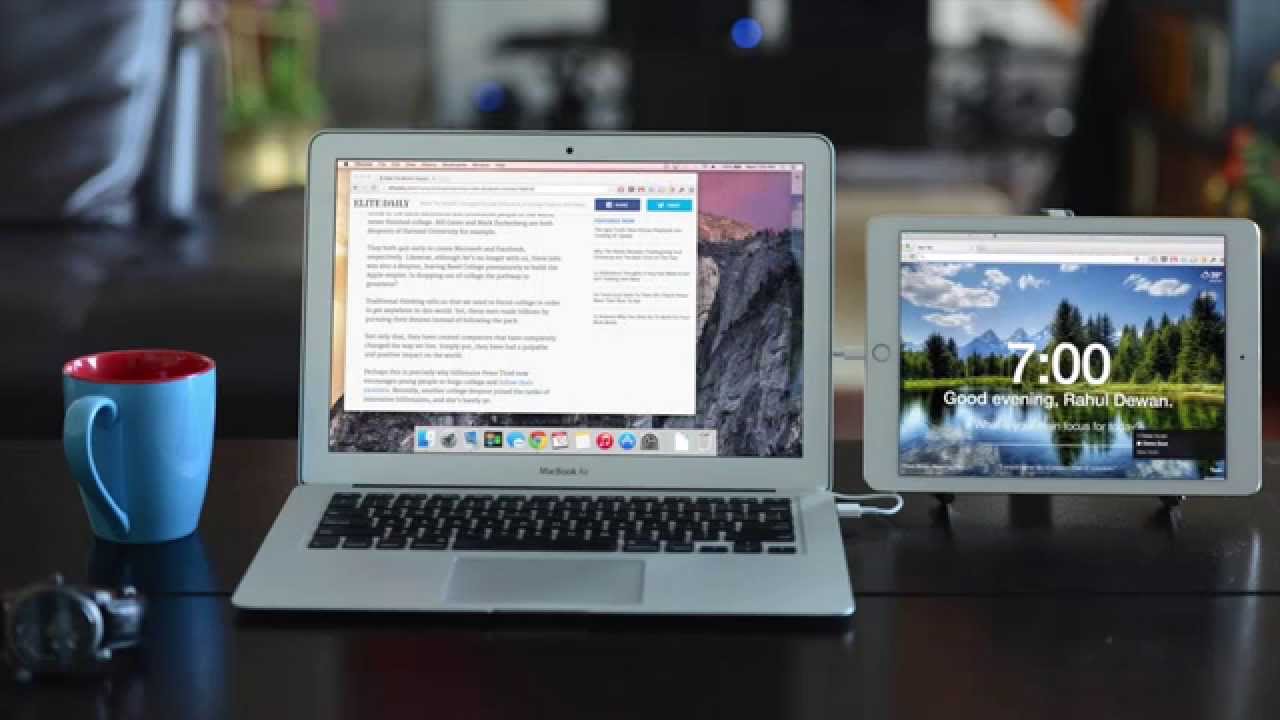

The Duet website claims that all Macs using OS X 10.9 or later work with the app, as well as all iPads and iPhones, but MacRumors was unable to get the software to work with a 2010 MacBook Air running OS X 10.10.2. According to the developer, the issue was due to the 10.10.2 beta software, which does not work with the app.

Duet Display may not provide the perfect secondary display experience, but in our testing, we found that it was more reliable than current Wi-Fi options, and we believe it's a fantastic way to make good use of older iOS devices.

Duet Display for the Mac can be downloaded from the Duet website for free. The accompanying iOS app can purchased from the App Store for $9.99 for 24 hours, and then the price will go up to $14.99. [Direct Link]

Update 12PM PT: Some of our forum members have not been able to get Duet Display to work on an iPad running iOS 5.1.1, and the developer has asked people who want to use it with an iPad running iOS 5.1.1 to wait for an upcoming update before purchasing.


Popular Stories

apple pro tell logo

Apple Launching Five New Products Today

Thursday November 5, 2026 12:59 am PST by
Apple is launching five new products on Friday, November 6, following pre-orders that opened last week, including its first touchscreen MacBook Pro models. The following new products will be available from today: iPad mini with OLED display and A20 Pro chip iMac with M6 chip 14-inch MacBook Pro with M6 chip 14-inch MacBook Pro with OLED touchscreen 16-inch MacBook Pro with OLED...

duo aquarium

More Fun iPhone Duo Apps: 30 New Picks to Try

Friday November 6, 2026 3:27 pm PST by
When the iPhone Duo launched, we shared a list of some of the fun apps developers created for the new form factor. Two weeks out, developers are continuing to come up with fresh ideas, so we thought we'd share some of our favorites. Games Marbles Unhinged ($2.99) - Marbles Unhinged is a marble maze designed for the Duo. When you fold it, the floor turns into a ramp. If you stand the top...
silver iphone 18 pro

Apple Rumored to Drop the iPhone's Action Button Next Year

Friday November 6, 2026 6:07 am PST by
Apple plans to merge the iPhone's Action button with the Camera Control starting next year, according to the leaker known as "Instant Digital." In a new post on Weibo, the leaker claimed that a single press of the combined button would open the camera, while a long press would trigger the function assigned to the Action button. They explicitly clarified that the dedicated Action button would ...

Top Rated Comments

InuNacho Avatar
155 months ago
Stupid idea for a problem that doesn't exist.
Btw why would you need 2 screens "on the go"? OSX solved this already with multiple desktops.
This setup allows you to feel important sitting at Starbucks with an Macbook Pro and an iPad Air. Your Facebook updates are now twice as engaging and interactive with your two screens.

Add your iPhone for the MacSreenOctopus for even more engagement!
Score: 21 Votes (Like | Disagree)
avanpelt Avatar
155 months ago
Stupid idea for a problem that doesn't exist.
Btw why would you need 2 screens "on the go"? OSX solved this already with multiple desktops.
It doesn't sound like you're a road warrior. This type of setup comes in handy for those of us who travel that are used to multiple displays at home/work.

Spaces is nice; but Spaces is a fundamentally different solution since it does not allow you to view the content of two Spaces simultaneously the way you can with multiple displays.
Score: 10 Votes (Like | Disagree)
jclardy Avatar
155 months ago
Stupid idea for a problem that doesn't exist.
Btw why would you need 2 screens "on the go"? OSX solved this already with multiple desktops.

As someone who works remotely, this app was built for me. I do software development and most of the time have Xcode open in fullscreen, with two panes on my main display and documentation/tasks/email open on another (virtual) desktop. At home I am fine as I use an iMac with a second display attached. While i'm working anywhere else I lose that ability. I've tried things like AirDisplay, but they are way too inconsistent and laggy, especially on crappy wifi networks.

Working at a hotel for example. Or at my works actual office space, which is in another state - I no longer have to be confined to a single display when working on my laptop.

I'm trying it out right now and it isn't perfect, there is a slight lag that you can definitely feel, but as a small secondary display for $9.99 on your existing iPad I don't see why people in this thread are complaining about this.

The multi-level marketing person who hangs out at starbucks every day isn't the only person who would use this app :rolleyes:
Score: 8 Votes (Like | Disagree)
155 months ago
Stupid idea for a problem that doesn't exist.
Btw why would you need 2 screens "on the go"? OSX solved this already with multiple desktops.
mmm let me think of a few scenarios common for me:
- working on stuff while watching email or task list on iPad screen
- developing and having documentation windows on iPad screen
- doing architecture modeling work - the current model I'm editing on the main screen, and other models I'm referencing on the smaller screen
- ... kind of an endless list really... did you really need to ask why multiple monitors can be useful?
Score: 6 Votes (Like | Disagree)
155 months ago
Stupid idea for a problem that doesn't exist.
Btw why would you need 2 screens "on the go"? OSX solved this already with multiple desktops.
Score: 6 Votes (Like | Disagree)
155 months ago
What I am pissed off about is that the developer should say, quite clearly, on his or her webpage that it does not support beta versions of the OS. That is all I care about here. Just about everyone who puts out something new like this is going to have people who run the beta software trying to use it.

"The developer says in the forums..." What am I supposed to do, read a forum in its entirety before I download a piece of software? A piece of software, by the way, that violates who knows how many Apple UI principles by being next to impossible to delete from my computer when I realize it doesn't work?

I went to the website after reading Macrumors and clicking on the link to the Duet website. I wanted to see if the Mac part of this worked before laying down $9.99 to buy the app.

All I ask is that in this case, like most developers, there is posted some detailed information about the app on the website of the app--not buried in the FAQ.

They don't have to, of course. But then they should be prepared for frustrated users like me.

I got if off my computer, finally, by running an uninstall program on it (Clean My Mac II, which does run under 10.10.2)
I feel the pain you got thats true but this is how far we come these days. Today beta software is looked from the public like its the real deal just you got it before anyone else.

I remember the days when you ran beta software it actually meant something - It can always break and no heart feelings when it breaks because - its beta for a reason. Especially running a Beta OS and trying to run a new App which is (If you are a developer running on a beta OS you know if you install an app like this which is "whanky" by the nature of it) that it can easily break the OS. I dont mean whanky as a bad thing but installing lets say "virtual" display drivers is a kind of its own.

And no, app developers do not have to write on their product page a big DONT RUN THIS ON THE NEWEST BETA RELEASES. Other Developers running a beta OS should already know it or research it. And the public doesnt have to care.
Score: 5 Votes (Like | Disagree)
Latest Stories
Early Apple Black Friday Deals on Apple Watch, MacBook Air, and More
14 hours ago
'Backglow' Lets You Customize New MacBook Pro's Glowing Apple Logo
14 hours ago
Top Stories: Apple Product Launches, iOS 27.3 Beta, and More
21 hours ago
More Fun iPhone Duo Apps: 30 New Picks to Try
1 day ago
Hands-On With Apple's New OLED Touchscreen MacBook Pro
2 days ago
Apple Store With All-New Design Opening Soon in Southern California
2 days ago
Control the Glowing Apple Logo on Your New MacBook Pro
2 days ago
Apple Shares New 'Apple Card: Apply and Use in Minutes' Ad
2 days ago
Apple Says More Than 100,000 Apps Optimized for iPhone Duo, Here's What's Still Missing
2 days ago
Early Black Friday Deals Kickoff With Steep Discounts on Apple Watch Ultras and More
2 days ago
The MacRumors Show: iOS 27.3 Looks Like a Huge Update
2 days ago
Best Buy's Black Friday Event Begins With Sitewide Savings on Apple, TVs, More
2 days ago
Apple Releasing Yet Another Two New Products Next Week
2 days ago
MacBook Air Drops to Lowest Price in Months With Amazon's $250 Discount
2 days ago
Apple Rumored to Drop the iPhone's Action Button Next Year
2 days ago
Apple's Extended Return Policy Now in Effect for 2026 Holiday Season
2 days ago
Apple Music Classical Updated With New Icon and Refreshed Design
2 days ago
OLED iPad Mini, M6 iMac, and New MacBook Pros Available From Today
2 days ago
Apple Surveys iPhone Duo Buyers About Crease and Camera
2 days ago
Apple's First Touchscreen Mac is Now Arriving to Customers
3 days ago
Claude Gets Personal Finance Feature With Bank Account Linking
3 days ago
Apple Arcade Adds Crossy Road Rush and NBA 2K27
3 days ago
Apple's New HomeView Smart Home Hub: Here's How Much RAM It Has
3 days ago
iPad Mini vs. iPad Air Buyer's Guide: Now Just $50 Apart
3 days ago
First iOS 27.3 and macOS Golden Gate 27.3 Public Betas Now Available
3 days ago
Apple Announces a New Mac Sales Record
3 days ago
Paid $200 for Logic Pro? Apple Says You Won't Get This New Feature
3 days ago
Instagram's Edits Video Editor is Now Available on Mac
3 days ago
Prevent Siri and Search From Accessing Specific iPhone Apps
3 days ago
Best Early Black Friday Deals on iPhone 18 Pro and iPhone Duo
3 days ago









































