

'DockPhone' Adds Phone Dialing to Yosemite, Bypassing FaceTime - MacRumorsOpen MenuShow RoundupsShow Forums menuVisit ForumsOpen Sidebar
Skip to Content

'DockPhone' Adds Phone Dialing to Yosemite, Bypassing FaceTime

by

DockPhone, a newly released Mac app, fixes a problem many OS X Yosemite users have faced in the months since the release of the new operating system: the inconvenience of opening FaceTime or Contacts to make a phone call on a Mac. With DockPhone app, users can now search for contacts or directly enter a number within the app, bypassing the need of opening FaceTime altogether.

Though it was one of the major new Continuity features included in OS X Yosemite when it launched earlier this year, many users lamented needing to open FaceTime or Contacts to place phone calls from their desktops or laptops. Receiving calls was simple, but making them through the video chat app designed for a different purpose or cluttered Contacts app felt unintuitive.
Screenshot (45)
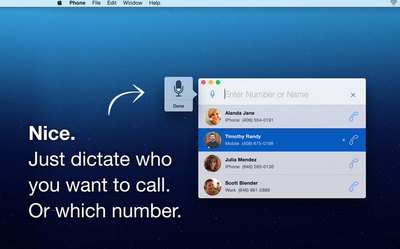
DockPhone lets users skip that step, offering a streamlined experience allowing users to easily enter a contact's name or specific phone number to start a phone call. The app interacts with FaceTime behind the scenes to connect with your iPhone, and finally get the call out to the person you dialed. As with making normal phone calls on a Mac, users still need OS X Yosemite on their Mac, an iPhone with iOS 8 or later, and both devices on the same Wi-Fi and iCloud accounts.

While DockPhone is not the first app to offer such functionality, with others such as Keypad having launched some time ago, DockPhone uniquely allows users to also use their voice to begin phone calls. After clicking the microphone button, simply saying the name of a contact or reciting a phone number will begin a call. Recent contacts also appear in widget form in the Notification Center sidebar of your Mac screen, with quick-access prompts to contact them again.

DockPhone is available for download from the Mac App Store for $0.99. [Direct Link]

Top Rated Comments

n-evo Avatar
150 months ago
You know something's wrong when a third party app fixes a first party problem.
Of course it's extremely uncommon for third-parties to extend functionality of first-party products. We definitely didn't see that happening much throughout history.
Score: 4 Votes (Like | Disagree)
150 months ago
Can't you already do this with Spotlight?
Score: 4 Votes (Like | Disagree)
150 months ago
You know something's wrong when a third party app fixes a first party problem.
Score: 3 Votes (Like | Disagree)
150 months ago
What do I have to do? I tried typing in "Call phone number" or just the phone number but neither showed up any results to make phone calls.
What I think he meant was (at least that's what I immediately thought when I saw this app, as well) is that you can open spotlight and type the contact's name. Their contact card will then pop up and you can hover over the phone number and click the phone symbol to dial. That's how I've been doing this for a while now.

Doesn't solve the lack of dialer problem but at least you don't have to launch any app when you're dialing a contact.
Score: 2 Votes (Like | Disagree)
WildCowboy Avatar
150 months ago
This doesn't have a dial pad either? One reviewer said that and another can't get it to work like you.

Do MacRumors test apps they post about?

I've tested it and it worked fine for me. It does not have a dial pad, which may be an issue for some people. Voice search is handy and worked for me as well.

Continuity's phone call stuff can be buggy, so it may be hard to tell whether failures are due to DockPhone or Continuity. But calls have gone through ok for me in limited testing.
Score: 2 Votes (Like | Disagree)
150 months ago
Just cmd+space to open spotlight and then type in the contact's name. Easy Peezy.

----------


Yep, exactly what I meant. Why bother with a dialer? Spotlight is easier. Another really nice benefit of Yosemite. Not sure about Mavericks or earlier.

My only gripe is that you can't enter phone numbers. Besides the convenience of being able to dial new numbers, it's also an issue when I call a number with an automated directory (for English press 1, etc. ). Gotta carry on the entire convo on your phone from that point on.

Unless I'm missing something.
Score: 1 Votes (Like | Disagree)

Popular Stories

Aston Martin CarPlay Ultra Screen

Apple Says CarPlay Ultra is Coming to These Vehicle Brands

Thursday May 21, 2026 11:53 am PDT by
Last year, Apple launched CarPlay Ultra, the long-awaited next-generation version of its CarPlay software system for vehicles. Nearly a year later, CarPlay Ultra is still limited to Aston Martin's latest luxury vehicles, but that should change fairly soon. In May 2025, Apple said many other vehicle brands planned to offer CarPlay Ultra, including Hyundai, Kia, and Genesis. CarPlay Ultra...
iphone 18 pro blue%402x

iPhone 18 Pro: Dark Cherry, Light Blue, and Dark Gray Chassis Leaked [Update]

Thursday June 4, 2026 5:18 am PDT by
Update: Since publication, new information has come to light suggesting the images have been AI-manipulated and are not in fact iPhone 18 Pro chassis parts. The original article follows. The color options Apple is reportedly planning for the upcoming iPhone 18 Pro and ‌iPhone 18 Pro‌ Max have appeared online today in the form of images of chassis parts of unknown authenticity....
iOS 27 All the New App Features

iOS 27: All the Rumored App Features

Wednesday June 3, 2026 3:48 pm PDT by
Siri is getting a major overhaul in iOS 27, but Apple also has some big updates planned for apps like Camera, Photos, and Wallet. There are multiple new AI features in the works, plus some non-AI upgrades. Camera Apple is moving Visual Intelligence from the Camera Control button to the Camera app in iOS 27, according to Bloomberg. There will be a Siri mode that will be available alongside...














