LastPass Password Manager Introduces New Mac App - MacRumorsOpen MenuShow RoundupsShow Forums menuVisit ForumsOpen Sidebar
Skip to Content

LastPass Password Manager Introduces New Mac App

by

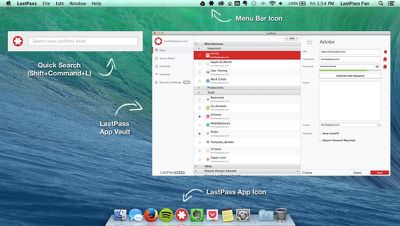
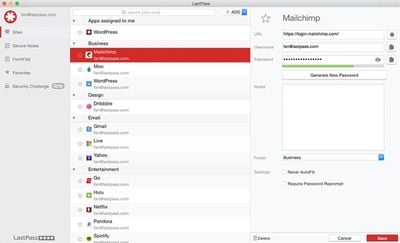
Popular free password management service LastPass today is launching a new Mac app to make it easier for Mac users to access their passwords on their laptop and desktop computers. The new LastPass Mac app offers a full-featured vault for storing login information, passwords, credit cards, and more, and it comes equipped with several other useful tools such as Quick Search and Security Check.

Quick Search, one of the Mac app's key features, lets users search for a website or keyword to quickly locate logins, notes, and passwords. Sites can be launched directly from their default browser using a keyboard shortcut, with LastPass filling in the username and password for super quick site logins.
lastpassmap
Security Check is another built-in feature of the LastPass Mac app, letting users continually monitor the strength of their passwords to make sure each one is secure enough. LastPass for Mac offers both offline access and automatic syncing between the Mac app and the iOS app.
password_management
Before the introduction of the Mac app, LastPass was web-only when used with Mac and Windows computers, offering browser plug-ins for Chrome, Safari, Firefox, and more to access password management features.

"We are living in a time when using the same password across every online account, or storing passwords for critical accounts in an insecure document on your computer, means you will inevitably get hacked. At the same time, memorizing dozens of unique passwords is virtually impossible," said LastPass CEO and Co-Founder, Joe Siegrist. "The LastPass Mac App functions as a vault that safeguards sensitive information. It allows our customers to have convenient local access to their data, saving them the distraction of recalling passwords or manually typing in their login details."

Last month, LastPass debuted Auto-Password Change, a useful feature designed to let users change their passwords for supported sites with just the click of a button.

The LastPass Mac app, much like the LastPass iOS app, will be a free download from the Mac App Store. [Direct Link]

The service is supported by ads, but ads can be removed with a $12 per year subscription fee, which also adds priority tech support and multi-factor authentication.

Update 9:52 AM: LastPass for Mac is now available in the Mac App Store. [Direct Link]

Top Rated Comments

TechZeke Avatar
154 months ago
Ads? Subscription? Over years, it'll still be cheaper just buying 1password at a one-time payment $50.

Competition is good I guess.
Score: 6 Votes (Like | Disagree)
154 months ago
Ads? Subscription? Over years, it'll still be cheaper just buying 1password at a one-time payment $50.

Competition is good I guess.

To a point, but with 1Password you're not forced to get the lastest one also. I read about people who are using 1Password 3 and 1Password 5 is out.

You can go more than 4 years before it start to become more expensive. Plus it is more versatile than 1password because it works everywhere.

Are all updates for 1password free or do you need to upgrade for major updates?
I think the last time an update was a chargeable one was going from 1Password 3 to 1Password 4, but I could be wrong. I know going from 1Password 4 to 1Password 5 was a free upgrade.

1Password also works everywhere, but that's your option. You can sync via wifi, iCloud, or Dropbox. Using Dropbox you can use 1PasswordAnywhere and you can access it from any computer you want. If you're worried about you info on someone's severs, you can sync over wifi (your own network).
I love the fact that I can use my own network for syncing if I want. Right now I use Dropbox because it works nicely, and I can sync mulitple vaults too at the same time.

1Password also had a security check also and has a program called Watchtower that tells you of vulnerablies that can affect you. It's a very nice tool.

Lastpass was one I liked, I jusr rather pay an upfront fee and upgrade if I want, and I didn't like my info on their servers. It's a nice program though.
Score: 3 Votes (Like | Disagree)
Apple_Robert Avatar
154 months ago
Another nice thing with OneSafe is that it sores the information decrypted in your cloud, not as clear text as other safe apps does.

Understand that 1Password in example is storing your bankinfo, credit cards etc. in clear text on DropBox. Nothing that you are told by the company before buying but read it from other users blogs and reviews at the App store.
Your understanding of 1Password is woefully inaccurate.

In less than 10 minutes, you could have determined (by testing 1Password) whether the information you read was true.
Score: 2 Votes (Like | Disagree)
Apple_Robert Avatar
154 months ago
They are playing catch up to 1Password.
Score: 2 Votes (Like | Disagree)
154 months ago
With Keychain, I can sit at your computer, and if you are not logged out, I can go to any site you have a password saved, keychain will input it, and I can do anything I want. With 1Password, and I'm presuming this app, you need to first enter your master 1Password to be able to auto-fill logins. Been using 1Password for years. I NEVER save any logins in the keychain. Not as secure as 1Password.

• Leaving your Mac logged in and unattended is just asking for trouble.

• You can create more than one keychain and lock them individually.
i.e. One for just web passwords that doesn't unlock at startup - and asks for the password when you go to a login page. You can also lock it again at will.
Score: 2 Votes (Like | Disagree)
tatonka Avatar
154 months ago
What's the benefit to this over using keychain?

The benefit is the browser integration with plugins available for all major browser and synchronization of the account information across systems (i.e. Home PC and Laptop). The plugins the auto fill the login fields on known pages making the login process easier and safer be allowing to use longer and more complicated password you would otherwise not use.

I guess the standalone app is just a bit nicer way to store and organize the collection.
Score: 2 Votes (Like | Disagree)

Popular Stories

duo aquarium

More Fun iPhone Duo Apps: 30 New Picks to Try

Friday November 6, 2026 3:27 pm PST by
When the iPhone Duo launched, we shared a list of some of the fun apps developers created for the new form factor. Two weeks out, developers are continuing to come up with fresh ideas, so we thought we'd share some of our favorites. Games Marbles Unhinged ($2.99) - Marbles Unhinged is a marble maze designed for the Duo. When you fold it, the floor turns into a ramp. If you stand the top...
apple pro tell logo

Apple Launching Five New Products Today

Thursday November 5, 2026 12:59 am PST by
Apple is launching five new products on Friday, November 6, following pre-orders that opened last week, including its first touchscreen MacBook Pro models. The following new products will be available from today: iPad mini with OLED display and A20 Pro chip iMac with M6 chip 14-inch MacBook Pro with M6 chip 14-inch MacBook Pro with OLED touchscreen 16-inch MacBook Pro with OLED...
iOS 28 AI

Apple Taking New Approach to Developing iOS 28 and macOS 28

Sunday November 8, 2026 7:42 am PST by
Apple has made a change to its development process for iOS 28, macOS 28, and corresponding software updates, according to Bloomberg's Mark Gurman. In his Power On newsletter today, he said Apple separates development of each year's new operating systems into three major stages. Typically, he said each stage consists of four weeks of coding followed by a four-week "convergence" period where...
Latest Stories
Apple Store Subscription Sign-Up Controversy Exposed
7 hours ago
Siri AI Rumored to Become 'More Like an Agent' as Early as Next Year
18 hours ago
Apple Taking New Approach to Developing iOS 28 and macOS 28
19 hours ago
Early Apple Black Friday Deals on Apple Watch, MacBook Air, and More
2 days ago
'Backglow' Lets You Customize New MacBook Pro's Glowing Apple Logo
2 days ago
Top Stories: Apple Product Launches, iOS 27.3 Beta, and More
2 days ago
More Fun iPhone Duo Apps: 30 New Picks to Try
2 days ago
Hands-On With Apple's New OLED Touchscreen MacBook Pro
3 days ago
Apple Store With All-New Design Opening Soon in Southern California
3 days ago
Control the Glowing Apple Logo on Your New MacBook Pro
3 days ago
Apple Shares New 'Apple Card: Apply and Use in Minutes' Ad
3 days ago
Apple Says More Than 100,000 Apps Optimized for iPhone Duo, Here's What's Still Missing
3 days ago
Early Black Friday Deals Kickoff With Steep Discounts on Apple Watch Ultras and More
3 days ago
The MacRumors Show: iOS 27.3 Looks Like a Huge Update
3 days ago
Best Buy's Black Friday Event Begins With Sitewide Savings on Apple, TVs, More
3 days ago
Apple Releasing Yet Another Two New Products Next Week
3 days ago
MacBook Air Drops to Lowest Price in Months With Amazon's $250 Discount
3 days ago
Apple Rumored to Drop the iPhone's Action Button Next Year
3 days ago
Apple's Extended Return Policy Now in Effect for 2026 Holiday Season
3 days ago
Apple Music Classical Updated With New Icon and Refreshed Design
3 days ago
OLED iPad Mini, M6 iMac, and New MacBook Pros Available From Today
3 days ago
Apple Surveys iPhone Duo Buyers About Crease and Camera
3 days ago
Apple's First Touchscreen Mac is Now Arriving to Customers
4 days ago
Claude Gets Personal Finance Feature With Bank Account Linking
4 days ago
Apple Arcade Adds Crossy Road Rush and NBA 2K27
4 days ago
Apple's New HomeView Smart Home Hub: Here's How Much RAM It Has
4 days ago
iPad Mini vs. iPad Air Buyer's Guide: Now Just $50 Apart
4 days ago
First iOS 27.3 and macOS Golden Gate 27.3 Public Betas Now Available
4 days ago
Apple Announces a New Mac Sales Record
4 days ago
Paid $200 for Logic Pro? Apple Says You Won't Get This New Feature
4 days ago











































