

'Alfred Remote' Turns iOS Devices Into Remote Controls for Macs - MacRumorsOpen MenuShow RoundupsShow Forums menuVisit ForumsOpen Sidebar
Skip to Content

'Alfred Remote' Turns iOS Devices Into Remote Controls for Macs

by

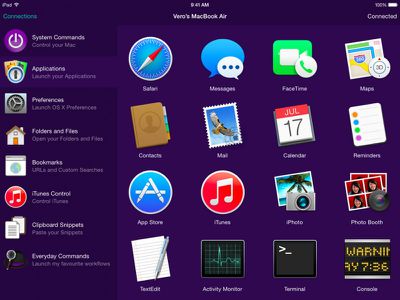
Running with Crayons today announced Alfred Remote, an iOS app that turns an iPhone or iPad into a remote control for various tasks on a user's Mac, from controlling a screensaver to launching apps (via The Verge).

Designed with parity of the Alfred app on the Mac App Store in mind, Alfred for iOS also allows users to expand into systemwide interactions with their desktop computers. Users with a Powerpack addition to their Alfred 2 experience, which costs about $25, can then use the Remote to control Powerpack-exclusive features via iOS.
applications
These include iTunes playback, copying and pasting from iOS to OS X, running user-defined scripts, AppleScripts, and terminal commands, and creating and controlling custom Workflows for enhanced productivity. Normal features like opening websites and setting a screensaver are available to all users.

With a single touch on your iOS device, you can control many Alfred 2 actions on your Mac, including:
- Show Alfred 2 on your Mac
- System Commands: Lock, restart, shut down, log out or sleep your Mac, eject all devices, quit all apps and empty trash
- Launch Applications and System Preferences on your Mac
- Open files and folders you've defined on your Mac
- Open websites and bookmarks, or pop up Alfred with a custom search filled in
- Replace hard to remember hotkey combinations and keywords with icons on iOS

To be able to fully use the features of each app, users will need both Alfred 2 for Mac and Alfred Remote for iOS, and have both of them running on the same Wi-Fi connection.

Alfred Remote can be purchased from the App Store for $4.99. [Direct Link]

Alfred 2 for Mac is a free download, with an option to upgrade with the Powerpack options.

Top Rated Comments

steve217 Avatar
152 months ago
This would be really useful for restarting iTunes from the couch when it quits responding.
Score: 4 Votes (Like | Disagree)
152 months ago
chrome

google chrome remote desktop works pretty well and is free.
Score: 3 Votes (Like | Disagree)
extricated Avatar
152 months ago
I don't want to jump on a hater's bandwagon, but I'm not seeing this as particularly useful (to me).
Does anyone have some experience with Alfred or maybe some ideas on ways it could prove useful or timesaving?
Score: 2 Votes (Like | Disagree)
roland.g Avatar
152 months ago
Sorry but this immediately makes me think of this.

Score: 2 Votes (Like | Disagree)
jayducharme Avatar
152 months ago
I'm not sure what the point of this is. Does it replace a trackpad or mouse? If it's just a launcher, I don't see how it saves me much work over simply launching apps the normal way on my Mac. I have a hotkey for Spotlight. I type the first two letters of the app and hit return, and the app launches. That seems quicker than what I can accomplish with Alfred.

As far as iTunes control goes, I have iTunes Match and can access all my media on my iPhone anyway. So controlling iTunes on my Mac would be redundant.
Score: 2 Votes (Like | Disagree)
152 months ago
I haven't used it in a while, but it had a keyboard when I used it last. I think it required selecting the text box with the remote and then the keyboard should pop up automatically (it's one of the benefits of using the app instead of the Apple remote). I'll try it again when I get home tonight.

This is still how it works. Just select the text box, and you'll be able to use your normal iOS keyboard to enter searches. In fact I'd say that's the main benefit of using the Remote app instead of the Apple TV remote, though I find navigating through menus and lists to be quicker using the Remote app as well.
Score: 1 Votes (Like | Disagree)

Popular Stories

iOS 27 Next to iPhone

Here's When iOS 27 Rolls Out Today in Every Time Zone [Update: It's Out]

Sunday September 13, 2026 3:00 am PDT by
Update 10:04 a.m.: iOS 27 is rolling out now, though it may take a bit for all users to see it, so keep checking! Apple is about to release iOS 27, which will finally deliver more advanced Siri AI capabilities as well as a variety of other refinements, improvements, and new features to iPhones. It's Apple's biggest software update of the year, and Apple announced at Wednesday's iPhone event...
iOS 27 Icon iPhone

iOS 27 Available Now With These 8 New Features

Monday September 14, 2026 9:00 am PDT by
Update — 10 a.m. Pacific Time: Apple has released iOS 27. During its iPhone 18 Pro and iPhone Duo event last week, Apple announced that iOS 27 will be released widely on Monday, September 14. iOS 27 should be available around 10 a.m. Pacific Time / 1 p.m. Eastern Time today via the Settings app, under General → Software Update. Below, we have highlighted eight new features and...
Apple iCloud Plus expansion hero

iCloud+ Now Includes Apple TV, Apple Arcade, and Curated Apple Music Stations in Over 100 Countries

Tuesday September 15, 2026 1:43 am PDT by
Apple today announced a new subscription initiative that turns paid iCloud+ subscriptions into a broader services bundle in more than 100 countries. In select countries, Apple says every paid iCloud+ plan, including the cheapest 50GB tier, now includes Apple TV and Apple Arcade "at no additional cost," while family sharing extends the storage, TV and Arcade access to up to five people....














