SwiftKey Keyboard for iOS Updated With Emoji, Flow Typing on iPad - MacRumorsOpen MenuShow RoundupsShow Forums menuVisit ForumsOpen Sidebar
Skip to Content

SwiftKey Keyboard for iOS Updated With Emoji, Flow Typing on iPad

by

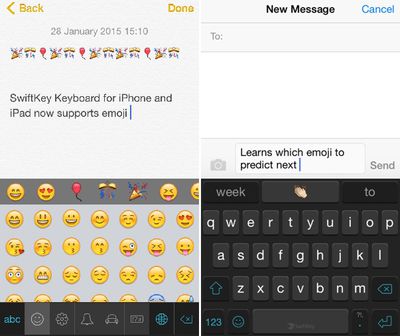
SwiftKey is one of the most popular third-party keyboard options on iOS, and today it received a major update adding a highly requested feature -- emoji. Emoji can be accessed by tapping on the smiley at the bottom of the keyboard, and there's also a new predictive emoji tool that learns the most frequently used emoji and suggests them while typing.
swiftkeykeyboard

We've built emoji right into SwiftKey Keyboard so you can now express yourself when words don't quite cut it. Just as it learns the words and phrases that matter to you, SwiftKey also learns and predicts which emoji you use most often so you can spend less time looking for that perfect smiley (or slice of pizza -- whatever you're into).

Using a lot of emoji in text will cause emoji to pop up more frequently in the word prediction box, making it easier to insert fun characters into text.

Today's update also includes SwiftKey Flow for the iPad, a feature that was previously limited to the iPhone. With SwiftKey Flow, it's possible to type faster via swiping on the screen. Finally, there are also 11 new languages available in SwiftKey, including Bulgarian, Croatian, Greek, Hinglish, Icelandic, Indonesian, Latvian, Russian, Serbian, Slovak, and Turkish.

SwiftKey Keyboard for iOS can be downloaded from the App Store for free. [Direct Link]

Top Rated Comments

CrAkD Avatar
150 months ago
I'm all done with 3rd party keyboards until apple fixes the implementation. I want to smash my 6+ in s million pieces everytime I need to type something and the keyboard doesn't pop out.
Score: 6 Votes (Like | Disagree)
Traverse Avatar
150 months ago
I'ved tried several third party keyboards (my favorite being Flesky), but I always end up back with the default Apple keyboard. 3rd party implementation is still buggy, still poses a privacy concern (albeit mild), and I've honestly never had an issues using the stock keyboard.
Score: 5 Votes (Like | Disagree)
150 months ago
Now just needs dictation and I'll be all set!
Score: 3 Votes (Like | Disagree)
avanpelt Avatar
150 months ago
Apple's implementation of third-party keyboard support has been sloppy, at best.

It's almost like Apple is being passive-aggressive with their users:

"You want third-party keyboards? We told you that we make the best keyboard and now we're going to prove it to you! Want to use dictation with third-party keyboards? Sorry, you can't do that. Want the third-party keyboard to pop up reliably every time you tap a text field? Not gonna happen. Want the text input from the third-party keyboard to be able to reliably fill out web forms? Not a chance in hell. Here, users, are the third-party keyboards you've whined about for years. But guess what? The experience sucks just like we told you it would; but hey, at least you got what you wanted!"

Of course, we didn't get what we wanted. I'm cautiously optimistic that iOS 9 will fix the third-party keyboard issues and finally let us modify which apps are the defaults for certain tasks. We'll see...
Score: 2 Votes (Like | Disagree)
Jessica Lares Avatar
150 months ago
I am enjoying the emoji bar I have in Nintype. Yes, it is crazy complicated to setup, but once you do it, it's a blast to use. I have one bar for numbers, then one bar for my favorite emoji, then another for markdown shortcuts. I'm also using the globe button to automatically insert the date, and have some other shortcuts within the shift key. I moved a lot of my TextExpander shortcuts to be within the letters too. There is a specific bit that you can write so it moves to the next line in a shortcut, but I haven't messed with that yet.

Needless to say, it replaced the majority of the keyboards I was interested in using.

I wish it had iCloud syncing and had a library of little pictures to represent shortcuts though. But that's not really an issue in general.

I have used SwiftKey on Android. I wish the iOS version was more like it. That's why I ended up deleting it when it first came out.
Score: 1 Votes (Like | Disagree)
mattopotamus Avatar
150 months ago
Would prefer SwiftKey over Swype, but SwiftKey doesn't automatically place a space after a comma or period. Heaven knows why not ...

Are you sure it is not in the settings? For android phones it is in the swiftkey settings.
Score: 1 Votes (Like | Disagree)

Popular Stories

iPhone 18 Pro Deep Red Feature

iPhone 18 Pro Launching in Two Months With These 12 New Features

Friday July 17, 2026 10:39 am PDT by
It is now mid-July, and that means the iPhone 18 Pro and iPhone 18 Pro Max are now just two months away. The devices are expected to look similar to the iPhone 17 Pro and iPhone 17 Pro Max, but there will still be many year-over-year changes, with rumored features including a smaller Dynamic Island, 5G via satellite, and more. Apple is expected to unveil the iPhone 18 Pro, iPhone 18 Pro Max, ...
iPhone 18 Pro and Pro Max Feature

'Apple Upgrade' Program Reportedly Launching Next Week

Tuesday July 21, 2026 8:30 am PDT by
Apple and Klarna are partnering on a new "Apple Upgrade" program set to launch in the U.S. on Tuesday, July 28, according to Bloomberg's Mark Gurman. The program will allow you to finance most iPhone, iPad, Mac, and Apple Watch models, with a 24-month term for iPhones and Apple Watches and a 36-month term for iPads and Macs. Customers will be able to pay off the device early during the term, ...
iPhone 18 Pro Deep Red Feature

iPhone 18 Pro Launching in Two Months With These 12 New Features

Tuesday July 21, 2026 6:22 am PDT by
It is now mid-July, and that means the iPhone 18 Pro and iPhone 18 Pro Max are now just two months away. The devices are expected to look similar to the iPhone 17 Pro and iPhone 17 Pro Max, but there will still be many year-over-year changes, with rumored features including a smaller Dynamic Island, 5G via satellite, and more. Apple is expected to unveil the iPhone 18 Pro, iPhone 18 Pro Max, ...