

OS X 10.10.3 Puts More Focus on Emoji, Lays Groundwork for Skin Tone Modifiers - MacRumorsOpen MenuShow RoundupsShow Forums menuVisit ForumsOpen Sidebar
Skip to Content

OS X 10.10.3 Puts More Focus on Emoji, Lays Groundwork for Skin Tone Modifiers

While the featured addition in yesterday's OS X 10.10.3 developer seed was the new Photos app, Apple is addressing other issues with the forthcoming update, and one of these focus areas is emoji, which is seeing several changes and improvements.

One immediately evident change is the menu option used to bring up the character palette where emoji and other symbols can be browsed and selected. The Character palette a is systemwide option generally accessed through the "Edit" menu in most Mac apps. On OS X 10.10.2 and earlier, the menu item is called "Special Characters," while on OS X 10.10.3, it is labeled "Emoji & Symbols". The change offers a clearer description of what can be accessed through the menu item while specifically giving a strong visibility boost to emoji.

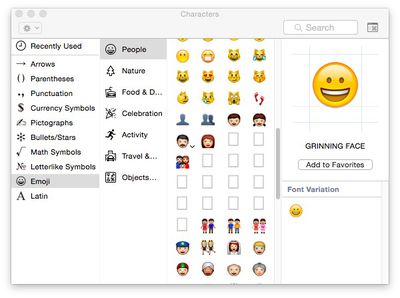
Another significant change for emoji in OS X 10.10.3 is the apparent laying of groundwork to support skin tone modifiers proposed for the Unicode 8.0 standard. Apple noted almost a year ago that it was working with the Unicode Consortium to bring more diversity to emoji, and the proposed skin tone modifiers are a significant step in that direction. OS X 10.10.3 also appears to include a number of placeholders for new emoji in the character palette, but no images or descriptions have yet been added for these entries.
emoji_placeholders

Character palette showing placeholders for new emoji and an arrow on the "Man" emoji to provide access to skin tone options

The skin tone modifier proposal would apply to certain skin-colored emoji, allowing users to select from a range of skin tones to best represent the message they wish to send via emoji. As can be seen in OS X 10.10.3, many of these skin-colored emoji now display an arrow that when clicked brings up a menu of options.
emoji_skin_tone_man

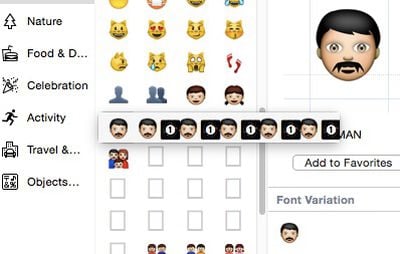
Apparent incomplete implementation of skin tone modifier options for the "Man" emoji

While the menu is currently non-functional, it does show the selected emoji followed by five instances of the emoji paired with a number one inside a black box. These are presumably incomplete implementations of skin tone modifiers, waiting for the Unicode Consortium to finalize its standards for Unicode 8.0. Just yesterday, the Unicode Technical Committee officially moved the technical report covering skin tone modifiers and other emoji changes for Unicode 8.0 to draft status, and Unicode 8.0 itself has been approved for beta release.

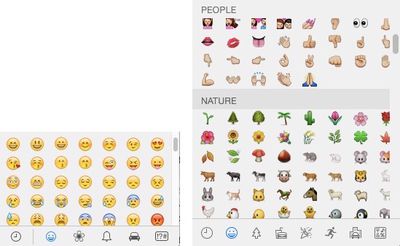
In one other change for emoji in OS X 10.10.3, the pop-up emoji picker available in many apps has been transitioned from a paginated layout to a single larger vertical-scrolling page. Under OS X 10.10.2 and earlier, the various emoji categories are contained on separate pages within the picker, with users needing to click on a toolbar along the bottom to change pages.
emoji_pickers

Emoji picker in OS X 10.10.2 (left) with paginated categories vs. OS X 10.10.3 (right) with single scrollable page and category jumps

In OS X 10.10.3, all emoji are displayed on a single page, and while they are still organized by category and users can still click toolbar buttons to quickly jump between categories, users can now also simply scroll the entire list if they wish.

All of these changes come as emoji have exploded in popularity, spreading beyond their origin in Japan to be embraced worldwide as a quick, fun, and easy way to share a variety of emotions and thoughts, most commonly within messaging apps. As a result, Apple has been working to increase support for emoji across iOS and OS X, and this first OS X 10.10.3 developer build is a clear sign of that continued interest.


(Thanks, Sachin!)

Related Forum: OS X Yosemite

Popular Stories

iOS 27 Next to iPhone

Here's When iOS 27 Rolls Out Today in Every Time Zone [Update: It's Out]

Sunday September 13, 2026 3:00 am PDT by
Update 10:04 a.m.: iOS 27 is rolling out now, though it may take a bit for all users to see it, so keep checking! Apple is about to release iOS 27, which will finally deliver more advanced Siri AI capabilities as well as a variety of other refinements, improvements, and new features to iPhones. It's Apple's biggest software update of the year, and Apple announced at Wednesday's iPhone event...
iOS 27 Icon iPhone

iOS 27 Available Now With These 8 New Features

Monday September 14, 2026 9:00 am PDT by
Update — 10 a.m. Pacific Time: Apple has released iOS 27. During its iPhone 18 Pro and iPhone Duo event last week, Apple announced that iOS 27 will be released widely on Monday, September 14. iOS 27 should be available around 10 a.m. Pacific Time / 1 p.m. Eastern Time today via the Settings app, under General → Software Update. Below, we have highlighted eight new features and...
Apple iCloud Plus expansion hero

iCloud+ Now Includes Apple TV, Apple Arcade, and Curated Apple Music Stations in Over 100 Countries

Tuesday September 15, 2026 1:43 am PDT by
Apple today announced a new subscription initiative that turns paid iCloud+ subscriptions into a broader services bundle in more than 100 countries. In select countries, Apple says every paid iCloud+ plan, including the cheapest 50GB tier, now includes Apple TV and Apple Arcade "at no additional cost," while family sharing extends the storage, TV and Arcade access to up to five people....

Top Rated Comments

Traverse Avatar
152 months ago
Really? Above all else, this takes precedence? I didn't even think emoji were supposed to look like real people, hints the unrealistic yellow skin and missing nose.
Score: 78 Votes (Like | Disagree)
SmileyBlast! Avatar
152 months ago
Why? :apple: Why?
Score: 62 Votes (Like | Disagree)
152 months ago
At last. Something for the professionals. This makes up for Final Cut X.
Score: 47 Votes (Like | Disagree)
152 months ago
Great to see Apple putting effort into emoji and not fixing the opendirectoryd bug...
Score: 31 Votes (Like | Disagree)
152 months ago
Glad to see Apple putting time and effort into the truly important features of an operating system. :rolleyes:

Seriously folks, if you were on the fence about switching to a different OS because of Apple's long string of debacles over the past few years, this should be your "table flip, exit stage left" moment.
Score: 26 Votes (Like | Disagree)
152 months ago
REALLY‽ How about Vid Driver issues‽

How about video driver issues on retina macbook pros? I've had more lockups since Fall than I've had in the previous 10 years! And while they're at it, instead of screwing around with goofy emojis, how about fixing the absolutely horrendous calculator app‽ It's really an embarrassment -- the window controls don't even line up and C/AC don't work right!
Score: 24 Votes (Like | Disagree)















