IFTTT Launches Trio of New Apps Alongside a Rebrand of Original iOS App - MacRumorsOpen MenuShow RoundupsShow Forums menuVisit ForumsOpen Sidebar
Skip to Content

IFTTT Launches Trio of New Apps Alongside a Rebrand of Original iOS App

by

Popular web service IFTTT today announced the introduction of three new apps - Do Button, Do Note, and Do Camera - to coincide with the rebranding of the original IFTTT iOS app into IF. The company says these events mark its "transition from a standalone service into a true product company."

IFTTT hopes to empower its users with the introduction of the series of "Do" apps, allowing them more control over their favorite products and applications by presenting a detailed and customizable set of tools "to pick and choose the features they use most often and turn them into their own, personalized, one-tap app."
IFTTT

"IFTTT's mission has always been to empower people with creative control over the services and devices they use every day," said Linden Tibbets, co-founder and CEO at IFTTT. "Our latest product, Do, introduces a simpler and more personal type of Recipe - one that runs with just a tap of a button."

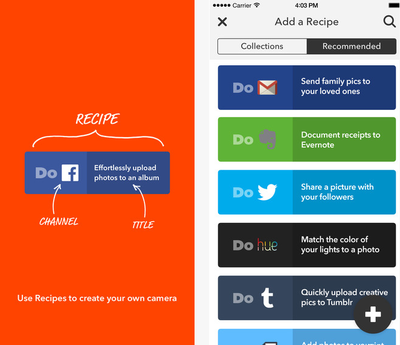
The new Do series continues IFTTT's "If this, then that" functionality with "Recipes," which require a "Channel" (an app) and "Title" (a command) to bring deep customization into each of the three apps. Do Button, for example, showcases "lightning fast access" to customized Recipes created by each user, courtesy of a widget available to install in the iOS Notification Center. Recipes can include anything from custom Nest settings to interacting with a set of Philips Hue bulbs.

Do Camera follows in the vein of instant connectivity to various services within one app, allowing users to create Recipes that upload photos to specific Facebook albums or even match the colors of a photo to a room's Hue lighting. Same goes for Do Note, which allows instant note-taking to control apps like Twitter, Evernote, and Mail.

These new apps debut alongside IFTTT's rebrand into IF, the company saying the two announcements pivot it from being a single-product focused business and pushes it into the future with multiple products and services, "with more on the way."

Do Button [Direct Link], Do Camera [Direct Link], and Do Note [Direct Link], alongside the new IF app [Direct Link], can be downloaded from the App Store for free.


Top Rated Comments

roland.g Avatar
153 months ago
I started using IFTTT a few weeks ago, and it is ok in what it can do. But very limited, mostly because of the iOS ecosystem.

The truth is it hints at what Apple can and should be doing. And that is integrating Siri with custom configurable actions. Think of the things you do many many times a day or week on your phone and if you could speed those repetitive processes up with voice commands.

Apple needs to introduce Siri scripts. Let you record commands and have your phone or iPad check those commands before going out to the servers. Otherwise you could introduce a keyword command that triggers the local search.

What I mean is that what if you could record the phrase, "Arm Security" and likewise "Disarm Security". Then record the process of launching your Alarm.com or ADT app, and setting your home security system. Essentially a script of the taps on your screen that perform an action. You can already tell Siri to launch an app, but not to do things within the app.

You'd be able to walk out your front door, hold down the home button and say "Arm Security" and have your alarm system set without having to launch the app, have it log in, and set the alarm.

I have a Yamaha receiver that has the A/V controller app. Recording scripts for that I could change the input from Satellite, to Apple TV, to game console simply by recording the command "Switch to Satellite", "Switch to Apple TV", "Switch to PS3". Then record the process on your iPhone and use Siri voice commands to engage the actions. Set another one for "Mute Receiver".

There are countless other things we do that require multiple steps by launching an app, and several taps but that are always the same, and that we do with significant frequency.

Apple needs to bring together the convenience of Siri and the enable customizable recorded scripts. At that point, who cares about HomeKit if you have voice triggered actions.
Score: 2 Votes (Like | Disagree)
153 months ago
Too bad iOS is not open enough to do some of the really cool automations that IFTTT is capable of that are accessible to andrioid devices.

iOS 8 helped, but doing things like triggered text messaging and automated settings would be great.
Score: 2 Votes (Like | Disagree)
Traverse Avatar
153 months ago
I've fallen in love with Workflow, but I'm willing to give some of these a chance.

Score: 2 Votes (Like | Disagree)
sailmac Avatar
153 months ago
Pretty sure it shouldn't vibrate for mail in DND--only calls, if specially set to be allowed, could potentially go through and have an alert of some sort, but nothing else.

Mine does this ie doesn't make any noise or vibrate when set to - do not disturb. Nothing not a thing.

Thanks for persuading me to go back and take a third look. I was wrong and I admit it.

I had Settings > Do Not Disturb > Silence > Only while iPhone is locked enabled.

I toggled it to Always and it behaves just as you described. :cool:
Score: 1 Votes (Like | Disagree)
153 months ago
I keep the mute/silent switch enabled. During the day I have Settings > Sounds > Vibrate on Ring and Vibrate on Silent enabled. Thus the phone vibrates for calls, texts, emails, etc. At night the phone automatically goes into Do Not Disturb mode. It suppresses calls and message alerts, but it still vibrates for mail.

So, in order to completely silence the phone -- even in Do Not Disturb mode -- I have to go into Settings > Sound and disable Vibrate on Silent.

Indeed, would be easier if Apple enabled profiles or scripting automation.

Pretty sure it shouldn't vibrate for mail in DND--only calls, if specially set to be allowed, could potentially go through and have an alert of some sort, but nothing else.
Score: 1 Votes (Like | Disagree)
nostaws Avatar
153 months ago
I love ifttt. Glad they are renaming it. I could never remember if it was iffft or ifttt, or how many t's.

I use it (among other things) to send me a text message anytime a craigslist posting pops up with a specific cell phone number.
Score: 1 Votes (Like | Disagree)

Popular Stories

apple pro tell logo

Apple Launching Five New Products Today

Thursday November 5, 2026 12:59 am PST by
Apple is launching five new products on Friday, November 6, following pre-orders that opened last week, including its first touchscreen MacBook Pro models. The following new products will be available from today: iPad mini with OLED display and A20 Pro chip iMac with M6 chip 14-inch MacBook Pro with M6 chip 14-inch MacBook Pro with OLED touchscreen 16-inch MacBook Pro with OLED...
duo aquarium

More Fun iPhone Duo Apps: 30 New Picks to Try

Friday November 6, 2026 3:27 pm PST by
When the iPhone Duo launched, we shared a list of some of the fun apps developers created for the new form factor. Two weeks out, developers are continuing to come up with fresh ideas, so we thought we'd share some of our favorites. Games Marbles Unhinged ($2.99) - Marbles Unhinged is a marble maze designed for the Duo. When you fold it, the floor turns into a ramp. If you stand the top...
silver iphone 18 pro

Apple Rumored to Drop the iPhone's Action Button Next Year

Friday November 6, 2026 6:07 am PST by
Apple plans to merge the iPhone's Action button with the Camera Control starting next year, according to the leaker known as "Instant Digital." In a new post on Weibo, the leaker claimed that a single press of the combined button would open the camera, while a long press would trigger the function assigned to the Action button. They explicitly clarified that the dedicated Action button would ...
Latest Stories
Siri AI Rumored to Become 'More Like an Agent' as Early as Next Year
5 hours ago
Apple Taking New Approach to Developing iOS 28 and macOS 28
7 hours ago
Early Apple Black Friday Deals on Apple Watch, MacBook Air, and More
1 day ago
'Backglow' Lets You Customize New MacBook Pro's Glowing Apple Logo
1 day ago
Top Stories: Apple Product Launches, iOS 27.3 Beta, and More
1 day ago
More Fun iPhone Duo Apps: 30 New Picks to Try
2 days ago
Hands-On With Apple's New OLED Touchscreen MacBook Pro
2 days ago
Apple Store With All-New Design Opening Soon in Southern California
2 days ago
Control the Glowing Apple Logo on Your New MacBook Pro
2 days ago
Apple Shares New 'Apple Card: Apply and Use in Minutes' Ad
2 days ago
Apple Says More Than 100,000 Apps Optimized for iPhone Duo, Here's What's Still Missing
2 days ago
Early Black Friday Deals Kickoff With Steep Discounts on Apple Watch Ultras and More
2 days ago
The MacRumors Show: iOS 27.3 Looks Like a Huge Update
2 days ago
Best Buy's Black Friday Event Begins With Sitewide Savings on Apple, TVs, More
2 days ago
Apple Releasing Yet Another Two New Products Next Week
2 days ago
MacBook Air Drops to Lowest Price in Months With Amazon's $250 Discount
2 days ago
Apple Rumored to Drop the iPhone's Action Button Next Year
2 days ago
Apple's Extended Return Policy Now in Effect for 2026 Holiday Season
2 days ago
Apple Music Classical Updated With New Icon and Refreshed Design
2 days ago
OLED iPad Mini, M6 iMac, and New MacBook Pros Available From Today
3 days ago
Apple Surveys iPhone Duo Buyers About Crease and Camera
3 days ago
Apple's First Touchscreen Mac is Now Arriving to Customers
3 days ago
Claude Gets Personal Finance Feature With Bank Account Linking
3 days ago
Apple Arcade Adds Crossy Road Rush and NBA 2K27
3 days ago
Apple's New HomeView Smart Home Hub: Here's How Much RAM It Has
3 days ago
iPad Mini vs. iPad Air Buyer's Guide: Now Just $50 Apart
3 days ago
First iOS 27.3 and macOS Golden Gate 27.3 Public Betas Now Available
3 days ago
Apple Announces a New Mac Sales Record
3 days ago
Paid $200 for Logic Pro? Apple Says You Won't Get This New Feature
3 days ago
Instagram's Edits Video Editor is Now Available on Mac
3 days ago








































