Popular 'Ulysses' Writing App for Mac Expands to the iPad, Gets Major Update - MacRumorsOpen MenuShow RoundupsShow Forums menuVisit ForumsOpen Sidebar
Skip to Content

Popular 'Ulysses' Writing App for Mac Expands to the iPad, Gets Major Update

by

Soulmen's popular Markdown text editor designed for writers, Ulysses, has long been available on the Mac and is one of the more popular Mac-based writing apps due to its clean, text-focused distraction-free interface and it's organizational system. As of today, Ulysses for Mac is getting a major update and it's also expanding to the iPad.

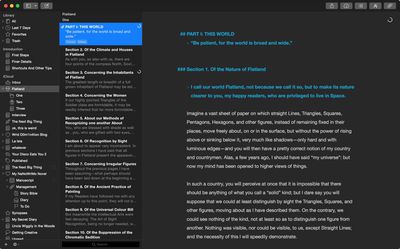
For those of you unfamiliar with the app, Ulysses sets itself apart from other similar writing apps with a three-paned sidebar that lets users see all of their files in one place and its ability to organize files using groups and filters. Writing takes place on sheets, and files are stored locally on the Mac or in iCloud. Markdown text written in Ulysses can be exported in several different file formats, including PDF, ePub, and HTML.

The newest version of Ulysses for Mac includes a new name (dropping the former III) and a new icon -- a butterfly. It's been updated with a Yosemite-style redesign that includes an attachment bar, Favorites on the sidebar, and a new Dark Mode. Quick Export and Preview have been updated, adding TXT and ePub previews, plus export optimizations.
ulyssesformac

Ulysses for Mac

The biggest change to Ulysses for Mac, aside from the redesign, is its integration with the new Ulysses app for iPad. The Mac app fully syncs with the iPad app via iCloud, making it easy to begin work on one device and pick up on another. Handoff support is also built in.
ulyssesforipad

"Our ideal conception has always been to make Ulysses a universal tool that authors can use for any writing task, at any time and everywhere. Bringing it to iPad means a great leap forward towards turning this into reality", explains Max Seelemann, head of development and co-founder of The Soulmen.

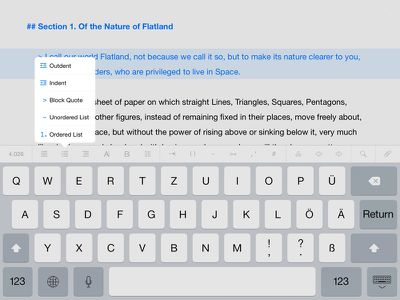
Ulysses for the iPad will be immediately familiar to anyone who has used Ulysses for Mac, as the interface and feature set are nearly identical. The iPad app uses a three-paned setup, and panes can be open or closed with swipes. A button row above the keyboard has been added to make it easier to format text, with access to special characters and shortcuts for creating headings, lists, paragraph blocks, and more. An info bar displays word count, sentences, characters, lines, and pages.

Ulysses for iPad supports filters much like the Mac version, and attachments like notes and images can be added. It also exports to all of the standard file formats the Mac app exports to, including Plain Text, HTML, ePub, PDF, and RTF. When an external keyboard is attached, Ulysses for iPad supports all standard shortcuts, and the look of the app can be customized with Themes, found in the Settings menu.


Both of the new apps are available for download today. Those who already own a copy of Ulysses for Mac can upgrade at no cost. The new Mac app is, however, exclusive to Yosemite -- it won't run on older versions of OS X.

Ulysses for iPad can be downloaded from the App Store for $19.99. [Direct Link]

Ulysses for Mac can be downloaded from the Mac App Store for $44.99. [Direct Link]

Top Rated Comments

152 months ago
Yuck. That app looks horrible. All that black.
Don't comment if you have no idea.

This is just DARK MODE. You can customise EVERY aspect of Ulysses... fonts, colors, background and so on and even save them as themes.

You can also create your own export styles and get a PDF or HTML formatted exactly the way you want with just 1 click.

It also stores all you text files in a library and syncs them to all your devices PLUS you can write different chapters as separate files and just select them and export them combined as an ebook or ibook.

Ulysses is awesome, but you can't tell that by looking at a screenshot.
Score: 10 Votes (Like | Disagree)
152 months ago
I use this app on my Mac in quite an unorthodox way: lecture notes.

The course I'm doing, matched with my general learning style, prefers a linear note taking process. Lecturers can talk so fast that writing by hand is not very viable, and there's a few reasons why Ulysses wins over Word or Pages:

On the fly formatting: I'm a bit of a cheat here in that I don't use Markup for its intended purposes. I modify the markup templates so that they look good and colourful just as they are (i.e. pre-export). For example, _Homicide Act 1957_ is what I type, but what I get is a bold, red text with a yellow highlight. This lets me quickly identify the cases and statutes that I write when I am in lectures. **Lord Denning** gives me that name in a bold font, and so on. It's also much faster than highlighting text and manually changing the fonts and colours each new line.

Everything in one place: Opening multiple word files to find what I want is a pain, right? With Ulysses I can click a folder on the sidebar in the app, enter a search term and it instantly finds me all the lectures where that word is written, and clicking on each result takes me straight there. And you can organise multiple projects into multiple layers... check out my screenshot below.

No distractions and no clutter: A lot of people I know open Word for Mac 2011, with its ugly UI and huge header / menu bars, to type their notes. In order for this to be viable on a laptop screen with the lecture slides snapped to half the screen, they have to zoom out to the point where font is barely legible. My process is simple: Snap the lecture notes left, Ulysses' 'editor only' view right, and I can see the slides and my notes clearly and neatly.

It's also super easy to print out my notes and annotate them with revision questions on the left and summaries at the footer, like the Cornell note system.

Furthermore their support are incredibly helpful: fast response times and you can tell they know exactly how to help you.

Example below;
MacRumors content image
Score: 5 Votes (Like | Disagree)
152 months ago
Never underestimate how much hipsters are willing to pay for yet another minimal markdown text editor or yet another GTD app.
Wow, there's just so much ignorance in this thread it hurts my brain.

This is neither a Markdown editor or a GTD app. -2

It can *do* Markdown, but it's one of only a few professional-grade writing apps that have made the move to iOS.

Scrivener for iOS, the one I'm personally waiting for has been in development since 2011 or 2012 I think. We'll be lucky if it comes out this year.

If you're not a writer, or you have no interest in writing, find another thread to troll.
Score: 5 Votes (Like | Disagree)
152 months ago
Never underestimate how much hipsters are willing to pay for yet another minimal markdown text editor or yet another GTD app.

Try writing a 100,000 word book in Pages or Word and let me know how you get on.
Score: 4 Votes (Like | Disagree)
152 months ago
I use this app on my Mac in quite an unorthodox way: lecture notes.

The course I'm doing, matched with my general learning style, prefers a linear note taking process. Lecturers can talk so fast that writing by hand is not very viable, and there's a few reasons why Ulysses wins over Word or Pages:

On the fly formatting: I'm a bit of a cheat here in that I don't use Markup for its intended purposes. I modify the markup templates so that they look good and colourful just as they are (i.e. pre-export). For example, _Homicide Act 1957_ is what I type, but what I get is a bold, red text with a yellow highlight. This lets me quickly identify the cases and statutes that I write when I am in lectures. **Lord Denning** gives me that name in a bold font, and so on. It's also much faster than highlighting text and manually changing the fonts and colours each new line.

Everything in one place: Opening multiple word files to find what I want is a pain, right? With Ulysses I can click a folder on the sidebar in the app, enter a search term and it instantly finds me all the lectures where that word is written, and clicking on each result takes me straight there. And you can organise multiple projects into multiple layers... check out my screenshot below.

No distractions and no clutter: A lot of people I know open Word for Mac 2011, with its ugly UI and huge header / menu bars, to type their notes. In order for this to be viable on a laptop screen with the lecture slides snapped to half the screen, they have to zoom out to the point where font is barely legible. My process is simple: Snap the lecture notes left, Ulysses' 'editor only' view right, and I can see the slides and my notes clearly and neatly.

It's also super easy to print out my notes and annotate them with revision questions on the left and summaries at the footer, like the Cornell note system.

Furthermore their support are incredibly helpful: fast response times and you can tell they know exactly how to help you.

Example below;
Image (http://i.imgur.com/4h6LB7H.png)

I use this app, and I love it! Thank you for showing a detailed use for Ulysses because a lot of people complaining about this app have never used it nor understand what it can do along with how it's built to manage your data.
Score: 3 Votes (Like | Disagree)
mw360 Avatar
152 months ago
Apple's Pages is free and even Microsoft Word is now free on the ipad. i dont know this app, but does it have anything over the other two that woulld justify the cost?
Pages can't be trusted to be the same app from year to year, and Word's complexity can be off-putting to some writers. Both use proprietary formats that don't integrate neatly into some writers' workflows e.g. syncing with Scrivener.

I'm happy to see prices go up on these things because although there's lots of choice a lot of those apps are pretty much dead through lack of money and I still haven't found the one that has the four things I need.
Score: 3 Votes (Like | Disagree)

Popular Stories

apple pro tell logo

Apple Launching Five New Products Today

Thursday November 5, 2026 12:59 am PST by
Apple is launching five new products on Friday, November 6, following pre-orders that opened last week, including its first touchscreen MacBook Pro models. The following new products will be available from today: iPad mini with OLED display and A20 Pro chip iMac with M6 chip 14-inch MacBook Pro with M6 chip 14-inch MacBook Pro with OLED touchscreen 16-inch MacBook Pro with OLED...
duo aquarium

More Fun iPhone Duo Apps: 30 New Picks to Try

Friday November 6, 2026 3:27 pm PST by
When the iPhone Duo launched, we shared a list of some of the fun apps developers created for the new form factor. Two weeks out, developers are continuing to come up with fresh ideas, so we thought we'd share some of our favorites. Games Marbles Unhinged ($2.99) - Marbles Unhinged is a marble maze designed for the Duo. When you fold it, the floor turns into a ramp. If you stand the top...
silver iphone 18 pro

Apple Rumored to Drop the iPhone's Action Button Next Year

Friday November 6, 2026 6:07 am PST by
Apple plans to merge the iPhone's Action button with the Camera Control starting next year, according to the leaker known as "Instant Digital." In a new post on Weibo, the leaker claimed that a single press of the combined button would open the camera, while a long press would trigger the function assigned to the Action button. They explicitly clarified that the dedicated Action button would ...
Latest Stories
Siri AI Rumored to Become 'More Like an Agent' as Early as Next Year
5 hours ago
Apple Taking New Approach to Developing iOS 28 and macOS 28
7 hours ago
Early Apple Black Friday Deals on Apple Watch, MacBook Air, and More
1 day ago
'Backglow' Lets You Customize New MacBook Pro's Glowing Apple Logo
1 day ago
Top Stories: Apple Product Launches, iOS 27.3 Beta, and More
1 day ago
More Fun iPhone Duo Apps: 30 New Picks to Try
2 days ago
Hands-On With Apple's New OLED Touchscreen MacBook Pro
2 days ago
Apple Store With All-New Design Opening Soon in Southern California
2 days ago
Control the Glowing Apple Logo on Your New MacBook Pro
2 days ago
Apple Shares New 'Apple Card: Apply and Use in Minutes' Ad
2 days ago
Apple Says More Than 100,000 Apps Optimized for iPhone Duo, Here's What's Still Missing
2 days ago
Early Black Friday Deals Kickoff With Steep Discounts on Apple Watch Ultras and More
2 days ago
The MacRumors Show: iOS 27.3 Looks Like a Huge Update
2 days ago
Best Buy's Black Friday Event Begins With Sitewide Savings on Apple, TVs, More
2 days ago
Apple Releasing Yet Another Two New Products Next Week
2 days ago
MacBook Air Drops to Lowest Price in Months With Amazon's $250 Discount
2 days ago
Apple Rumored to Drop the iPhone's Action Button Next Year
2 days ago
Apple's Extended Return Policy Now in Effect for 2026 Holiday Season
2 days ago
Apple Music Classical Updated With New Icon and Refreshed Design
2 days ago
OLED iPad Mini, M6 iMac, and New MacBook Pros Available From Today
3 days ago
Apple Surveys iPhone Duo Buyers About Crease and Camera
3 days ago
Apple's First Touchscreen Mac is Now Arriving to Customers
3 days ago
Claude Gets Personal Finance Feature With Bank Account Linking
3 days ago
Apple Arcade Adds Crossy Road Rush and NBA 2K27
3 days ago
Apple's New HomeView Smart Home Hub: Here's How Much RAM It Has
3 days ago
iPad Mini vs. iPad Air Buyer's Guide: Now Just $50 Apart
3 days ago
First iOS 27.3 and macOS Golden Gate 27.3 Public Betas Now Available
3 days ago
Apple Announces a New Mac Sales Record
3 days ago
Paid $200 for Logic Pro? Apple Says You Won't Get This New Feature
3 days ago
Instagram's Edits Video Editor is Now Available on Mac
3 days ago











































