

New iOS 8.3 Features: Speaker Calls With Siri, No Password Required to Download Free Apps - MacRumorsOpen MenuShow RoundupsShow Forums menuVisit ForumsOpen Sidebar
Skip to Content

New iOS 8.3 Features: Speaker Calls With Siri, No Password Required to Download Free Apps

The most recent iOS 8.3 beta was seeded to developers on March 12, but even though its been in the hands of testers for over a week, people are still discovering hidden features. Over the weekend, two new iOS 8.3 features were found, including an update to Siri and an update to app purchase settings.

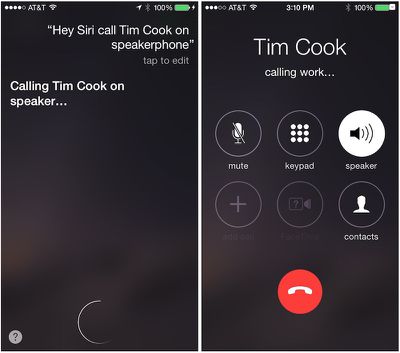
With the iOS 8.3 beta 3 installed, users can now ask Siri to make phone calls using the iPhone's speaker. If you ask Siri to "Call [name] on speaker," the call will be made via speakerphone, enhancing Siri's hands-free capabilities. If you make the same request in iOS 8.2, Siri ignores the "on speaker" part and places the call as normal.
hey_siri_speaker
The new feature makes it possible to activate Siri while plugged in by saying "Hey Siri" and make a phone call, all without needing to touch the phone or put on a headset for hands-free operation.

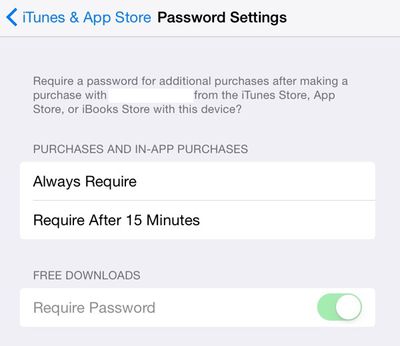
In the Settings menu of an iOS device running iOS 8.3 beta 3, there's a new option under iTunes & App Store labeled "Password Settings." In this section, there is an option to change the password settings for purchases and in-app purchases, choosing options to either "Always Require" a password when making a purchase, or to "Require After 15 Minutes."

"Always Require" and "Require After 15 Minutes" are not new settings -- the options have previously been located within the Restrictions section of the Settings app -- but a user is required to select one in order to access a new password toggle setting, which lets users toggle the password requirement for free apps on and off. When toggled on, downloads labeled as "GET" in the App Store will not require a password.
ios83beta3passwordsettings
Apple's new Password Settings are not functional right now, returning a "Cannot connect to iTunes Store" message when tapped, but it's likely they will be made available in a later beta ahead of the update's public release. The Password Settings menu can also be found under General --> Restrictions.

In addition to the newly discovered features listed above, iOS 8.3 adds quite a bit of new functionality to Apple's mobile operating system. Earlier betas have introduced a wireless CarPlay feature and several emoji changes, like a new emoji picker, diversified emoji with skin tone modifiers, new flags, and new icons for the watch, phone, and computer emoji, which now resemble an Apple Watch, an iPhone, and an iMac. Most notably, keyboard spacing has been changed to prevent users from hitting the period key when they meant to hit the space key when searching in Safari.

There's also support for Google two-factor authentication when adding Google accounts on iOS, Apple Pay support for China UnionPay, new Siri languages, filtering options for Messages, and more. We've been keeping a complete list of iOS 8.3 changes in our iOS 8 Features Roundup.


Tag: iOS 8.3
Related Forum: iOS 8

Popular Stories

Aston Martin CarPlay Ultra Screen

Apple Says CarPlay Ultra is Coming to These Vehicle Brands

Thursday May 21, 2026 11:53 am PDT by
Last year, Apple launched CarPlay Ultra, the long-awaited next-generation version of its CarPlay software system for vehicles. Nearly a year later, CarPlay Ultra is still limited to Aston Martin's latest luxury vehicles, but that should change fairly soon. In May 2025, Apple said many other vehicle brands planned to offer CarPlay Ultra, including Hyundai, Kia, and Genesis. CarPlay Ultra...
iphone 18 pro blue%402x

iPhone 18 Pro: Dark Cherry, Light Blue, and Dark Gray Chassis Leaked [Update]

Thursday June 4, 2026 5:18 am PDT by
Update: Since publication, new information has come to light suggesting the images have been AI-manipulated and are not in fact iPhone 18 Pro chassis parts. The original article follows. The color options Apple is reportedly planning for the upcoming iPhone 18 Pro and ‌iPhone 18 Pro‌ Max have appeared online today in the form of images of chassis parts of unknown authenticity....
iOS 27 All the New App Features

iOS 27: All the Rumored App Features

Wednesday June 3, 2026 3:48 pm PDT by
Siri is getting a major overhaul in iOS 27, but Apple also has some big updates planned for apps like Camera, Photos, and Wallet. There are multiple new AI features in the works, plus some non-AI upgrades. Camera Apple is moving Visual Intelligence from the Camera Control button to the Camera app in iOS 27, according to Bloomberg. There will be a Siri mode that will be available alongside...

Top Rated Comments

146 months ago
I really like the no password to download free apps. Glad its finally coming.
Score: 32 Votes (Like | Disagree)
BCWorld Avatar
146 months ago
yay! cutting edge!!! it only took apple 4 years to add this!!! :confused:
Score: 22 Votes (Like | Disagree)
caliguy Avatar
146 months ago
yay! cutting edge!!! it only took apple 4 years to add this!!! :confused:

The lack of Siri functionality up until now astounds me. There is so much potential, just from a data collection standpoint, of Apple being able to target the most used items of request and adding those in.

Siri should constantly be surprising us with new functionality that is added on the backend - no software update required.
Score: 16 Votes (Like | Disagree)
bushido Avatar
146 months ago
what I still find utterly annoying is that u have to enter your apple ID password after a reboot on the store. I mean you already put in your passcode and your touch id after a reboot... why isn't TouchID enough to verify it is really you making the purchase? doesn't apple believe in its own invention?
Score: 12 Votes (Like | Disagree)
146 months ago
I just wish Hey siri would consistently work...
Score: 8 Votes (Like | Disagree)
bawbac Avatar
146 months ago
Free apps are not dangerous...
Score: 8 Votes (Like | Disagree)















