

SwiftKey for iOS Updated With Tap Map Feature, Usage Statistics - MacRumorsOpen MenuShow RoundupsShow Forums menuVisit ForumsOpen Sidebar
Skip to Content

SwiftKey for iOS Updated With Tap Map Feature, Usage Statistics

by

Popular third-party keyboard SwiftKey for iOS is being updated today with an interesting new feature called Tap Map, which gives an inside look at how the app works. With Tap Map, users can see how the SwiftKey AI adapts to their typing patterns to help them make fewer typos.
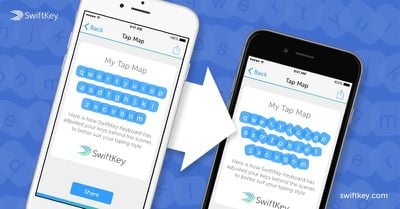
swiftkeytapmap

The Tap Map, similar to our heatmap on SwiftKey Keyboard for Android, shows how SwiftKey uses artificial intelligence to adjust the keys on your keyboard 'behind the scenes' to better fit your typing style. For example, if you typically hit the right half of the F key when you're aiming for G, the shape of G on your Tap Map will probably be larger and skewed to the left.

SwiftKey is hoping users will share their different Tap Maps on Twitter, and has promised to give prizes to the tidiest and sloppiest SwiftKey users.

Today's SwiftKey update includes usage statistics, letting users see data on how much they've typed, how far they've Flow-ed, and how many words have been predicted and corrected. It also includes information on how much a user's productivity has been improved through the SwiftKey keyboard.

Along with the new usage information, there are also three new language packs available in SwiftKey, including Arabic, Hebrew, and Farsi.

SwiftKey can be downloaded from the App Store for free. [Direct Link]

Top Rated Comments

146 months ago
What are some of the restrictions?

I use Swype. The only issue I have is that the keyboard tends to crash and I'm not a fan of the fact that getting to the Emoji keyboard requires holding down the world button and then fighting with the Apple keyboard to get it to switch to Emoji.

Is SwiftKey better? I tried it a while back and was not impressed either.

I've been using iOS since it was iPhone OS and the keyboard has got better and better. The lack of inline auto correction prompts is a deal breaker for me.

Example of what I mean:

MacRumors content image
Score: 4 Votes (Like | Disagree)
bushido Avatar
146 months ago
Gave up on SwiftKey last week actually. Absolutely LOVE it when it works. But so many times, especially when I have it as my default keyboard, it just doesn't even come up on my 6 plus. I try spotlight search and won't even get a keyboard half the time. Or Messages app locks up sometimes with it installed. Really inconvenient and I just got sick of it. If it worked with no bugs I'd re-install it and replace the default keyboard in an instant. It really is a good keyboard, but man do the bugs annoy me.

unfortunately that's a problem on apples part
Score: 3 Votes (Like | Disagree)
avanpelt Avatar
146 months ago
unfortunately that's a problem on apples part

Bingo.

I think that a vast majority of the problems people have with third-party keyboards are problems that are Apple's responsibility to fix.

Example: I was excited to try Apple Pay on the first day I got the iPhone 6. I downloaded the Wells Fargo "activator" app to finish the Apple Pay activation process with my card which required that I enter the last four digits of my cell phone number.

I tapped on the field to enter the last four digits, the SwiftKey keyboard came up, and I proceeded to enter the digits but they did not appear in the field. I tried and tried. Finally, I got on MR and saw that other people were having the same problem. Turns out the only keyboard that would allow you to enter the text was the default system keyboard. That seems to me that it is Apple's problem to fix because the stock keyboard is able to work in certain situations that third-party keyboards cannot.
Score: 2 Votes (Like | Disagree)
146 months ago
Gave up on SwiftKey last week actually. Absolutely LOVE it when it works. But so many times, especially when I have it as my default keyboard, it just doesn't even come up on my 6 plus. I try spotlight search and won't even get a keyboard half the time. Or Messages app locks up sometimes with it installed. Really inconvenient and I just got sick of it. If it worked with no bugs I'd re-install it and replace the default keyboard in an instant. It really is a good keyboard, but man do the bugs annoy me.
Score: 1 Votes (Like | Disagree)
edgr.sanchez Avatar
146 months ago
I tried Swype but it crashed to much. And since I type in both Spanish and English on a daily basis. It's annoying to have to hold the world button to switch to the Spanish keyboard and vice versa and the emoji keyboard too. And SwiftKey allows you to use 2 languages in the same keyboard.and emoji are included in the keyboard as well

Holy crap, just reinstalled SwiftKey. I'm in love.

I like that Emojis are included. I like the key mapping better as well. I instantly disabled Swype.
Score: 1 Votes (Like | Disagree)

Popular Stories

macOS 27 on MacBook Pro

Apple Says macOS 27 Won't Be Compatible With These Macs

Wednesday June 3, 2026 8:29 am PDT by
During WWDC 2025, Apple revealed that macOS 26 Tahoe would be the final major macOS version for Intel-based Macs. macOS 27 will be compatible with Apple silicon Macs only, meaning that you will need a Mac with an M-series chip or a MacBook Neo with an A18 Pro chip in order to install the software update. Apple will unveil macOS 27 during its WWDC 2026 keynote this Monday, June 8, and the...
MacBook Neo on Yellow Feature

MacBook Neo is So Popular That Apple Reportedly Doubled Production

Wednesday June 3, 2026 9:24 am PDT by
On an earnings call in late April, Apple's CEO Tim Cook said that customer response to the MacBook Neo was "off the charts," and the popularity of the laptop has reportedly led the company to significantly boost production. Apple supply chain analyst Ming-Chi Kuo this week said he believes that MacBook Neo shipments to Apple were doubled from an initial target of 5 million units to 10...
iphone 18 pro blue%402x

iPhone 18 Pro: Dark Cherry, Light Blue, and Dark Gray Chassis Leaked [Update]

Thursday June 4, 2026 5:18 am PDT by
Update: Since publication, new information has come to light suggesting the images have been AI-manipulated and are not in fact iPhone 18 Pro chassis parts. The original article follows. The color options Apple is reportedly planning for the upcoming iPhone 18 Pro and ‌iPhone 18 Pro‌ Max have appeared online today in the form of images of chassis parts of unknown authenticity....














