

Adobe Lightroom Updated With HDR and Panorama Merge, Facial Recognition and Filter Brushes - MacRumorsOpen MenuShow RoundupsShow Forums menuVisit ForumsOpen Sidebar
Skip to Content

Adobe Lightroom Updated With HDR and Panorama Merge, Facial Recognition and Filter Brushes

Adobe today announced a major update to Lightroom CC (and the launch of the standalone Lightroom 6), its professional photo editing software for Mac users. The new update brings significant performance improvements and several new features like HDR merge, Panorama merge, facial recognition, improved slideshows, a filter brush, and more.

One of the most impressive new organizational features in the updated version of Lightroom is facial recognition, which lets Lightroom users organize their photos by subject for the first time, in addition to organizing with tags, flags, and star ratings. Once a face in a single photo is named, the software is able to find more images that feature that person for quick tagging by face. A new "People" view lets users sort photos by person.
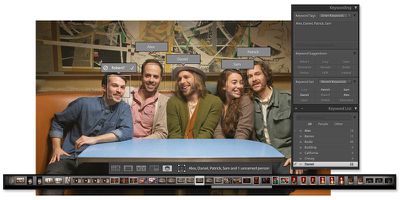
adobefacialrecognition
Panorama Merge, another new feature, lets photographers stitch together multiple images, including RAW and JPG files to create ultra high-quality panoramic shots. It has built in tools for automatically cropping non-matching edges and changing perspectives. With Lightroom's graphical performance improvements, even huge panorama files can be edited in real time with little lag.

adobepanoramamerge
With HDR Merge, it's possible to combine several different photos with different exposure settings into a single HDR image. Unlike other photo editing apps, Adobe's HDR Merge works directly with both JPG and RAW images. Because it works with RAW files, a high-quality HDR image can be created from as few as two photos. Other HDR options typically require more photos at different exposure levels to create a suitable image.
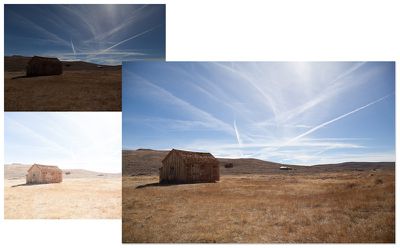
adobehdr
Lightroom's new filter brush, a popular request from Adobe customers, works with graduated and radial filter affects, letting a filter mask be reshaped with a brush tool so filter effects can be added and subtracted from specific parts of images for better precision. The last major feature update, which adds advanced slideshow tools, lets users put pan and zoom effects into their slideshows to add a motion effect. There's also a tool for syncing slideshows to multiple audio clips, and it's possible to add up to 10 songs to a slideshow.

Today's update to Lightroom CC may be of particular interest to Mac users who previously used the now-defunct Aperture photo editing software, as Apple no longer offers a professional-level photo editing app since discontinuing Aperture in favor of Photos for OS X. Lightroom has many professional-level features that are missing from the Photos for OS X app, and it also offers the same cross-platform syncing of all images with a Creative Cloud subscription. Adobe has promised to continue adding new features and more advanced tools to Lightroom in the future.

Adobe is also updating its Lightroom apps for the iPad and the iPhone, which connect to Lightroom CC and allow for photos and edits to be synced between all devices using Adobe's cloud service. The apps are gaining features like improved cropping tools, with the updated versions available for download today.

Lightroom CC is available through Adobe's Creative Cloud Photography plan, which bundles Photoshop and Lightroom together for $9.99 per month, or through Adobe's complete Creative Cloud plan, featuring all Adobe software for $49.99 per month.

Adobe is also selling the new Lightroom update on a standalone basis, branded as Lightroom 6 and priced at $149 (or $79 upgrade pricing). The standalone version of Lightroom does not include cloud integration with Adobe's mobile Lightroom apps and Lightroom on the web.

Lightroom for iPhone can be downloaded from the App Store for free. [Direct Link]

Lightroom for iPad can be downloaded from the App Store for free. [Direct Link]

Popular Stories

iPhone 18 Pro and Pro Max Feature

'Apple Upgrade' Program Reportedly Launching Next Week

Tuesday July 21, 2026 8:30 am PDT by
Apple and Klarna are partnering on a new "Apple Upgrade" leasing program set to launch in the U.S. on Tuesday, July 28, according to Bloomberg's Mark Gurman. The program will allow you to finance most iPhone, iPad, Mac, and Apple Watch models, with a 24-month term for iPhones and Apple Watches and a 36-month term for iPads and Macs. Customers will be able to pay off the device early during...
iPhone 18 Pro Deep Red Feature

iPhone 18 Pro Launching in Two Months With These 12 New Features

Friday July 17, 2026 10:39 am PDT by
It is now mid-July, and that means the iPhone 18 Pro and iPhone 18 Pro Max are now just two months away. The devices are expected to look similar to the iPhone 17 Pro and iPhone 17 Pro Max, but there will still be many year-over-year changes, with rumored features including a smaller Dynamic Island, 5G via satellite, and more. Apple is expected to unveil the iPhone 18 Pro, iPhone 18 Pro Max, ...
iPhone 18 Pro Deep Red Feature

iPhone 18 Pro Launching in Two Months With These 12 New Features

Tuesday July 21, 2026 6:22 am PDT by
It is now mid-July, and that means the iPhone 18 Pro and iPhone 18 Pro Max are now just two months away. The devices are expected to look similar to the iPhone 17 Pro and iPhone 17 Pro Max, but there will still be many year-over-year changes, with rumored features including a smaller Dynamic Island, 5G via satellite, and more. Apple is expected to unveil the iPhone 18 Pro, iPhone 18 Pro Max, ...

Top Rated Comments

Col4bin Avatar
147 months ago
Excited for the new updates to Lightroom, but NOT a fan of Adobe's creative cloud-based pay model where these applications must be rented—especially when extra/new features are bundled into these specific releases.
Score: 18 Votes (Like | Disagree)
jayducharme Avatar
147 months ago
I think I'll stick with Aperture.

Oh, wait....
Score: 14 Votes (Like | Disagree)
orbital~debris Avatar
147 months ago
So they still only offer subscription models? That's a shame, considering I'd actually pay for a one time fee. Not a fan of renting software, then again I guess that's a business model that should work in certain circumstances/environments.

Did you not read the full MacRumors article?
Hint: subscription and standalone versions are available.
Score: 10 Votes (Like | Disagree)
147 months ago
I'm on the CC subscription plan so looking forward to picking up the update. I still haven't fully bought into Lightroom yet though and I've been using it for over a year now. Functionally it is just fine and as easy to use as Aperture was. But visually, I was able to dial in on my desired look much quicker in Aperture. I loved how Aperture rendered Canon RAW files, and just haven't been able to replicate the exact look in Lightroom. Frustrating.

----------

They're still douchebags for not making it a free update to LR 5

I know right? Friggin software companies, trying to make money and stuff....
Score: 4 Votes (Like | Disagree)
gugy Avatar
147 months ago
I might consider it.
I am not too fond of the Photos app. I missed the old iPhoto for casual stuff and Aperture for more in depth editing.
Score: 4 Votes (Like | Disagree)
maflynn Avatar
147 months ago
I updated to Lightroom CC on my Surface, but the Mac version for my Macbook Pro, where my other license is installed, is still saying Lightroom 5. Adobe, on the ball as usual :rolleyes:

Sign out and back in on the creative cloud app (don't close/restart it). That worked for me.
Score: 3 Votes (Like | Disagree)















