

First Impressions of Apple Watch: Incredibly Comfortable, Unique and Easy Setup - MacRumorsOpen MenuShow RoundupsShow Forums menuVisit ForumsOpen Sidebar
Skip to Content

First Impressions of Apple Watch: Incredibly Comfortable, Unique and Easy Setup

While the first Apple Watch reviews published over two weeks ago, the devices are now making their way onto customers' wrists, allowing us to see broader first impressions of Apple's first new product since 2010's iPad.
image


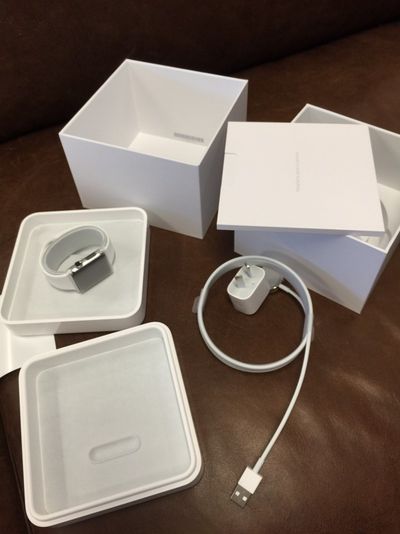
Several posters in our forums have pointed out an unboxing experience fairly unique to new Apple products as it appears that the traditional Apple stickers are not included with the packaging. Additionally, several posters have reported receiving emails notifying them that they can schedule an online Personal Setup where Apple will, through a video session, walk a user through setting up the Apple Watch and pairing it with their iPhone.

Another aspect of the Watch that users are noticing is how comfortable it is to wear. One user on Whirlpool pointed out that while he was originally going to use the sport band for exercise, he thinks its nice enough to wear regularly. One MacRumors reader told us that the Watch is indeed comfortable to wear with the build quality being "perfect", but that he found the sports band slightly awkward to put on at first.

I have a 42mm Apple Watch Sports in Space Grey. Watch is incredibly comfy. However the [black sports band] feels backwards to me, the holes and the pin make it slightly awkward to do up. I’m sure I’ll get used to this. Setup was simple and intuitive, asked me if I wanted to transfer all my current apple watch apps across during the process.


Other bands that have seen favorable impressions include the Milanese Loop, which also has a post dedicated to its unboxing in the MacRumors forums. Other early impressions include users finding certain less advertised features of the Apple Watch, such as the "Ping" feature that allows users to ping their iPhone from their Watch, to be very useful.

Finally, while most users are reporting easy setup and pairing processes, some are having difficulty pairing their iPhone and Apple Watch, with the Watch not displaying the needed pairing code (Update: Restarting appears to fix the problem). Others are noting that syncing a 1 GB music playlist is taking longer than desired.

For ongoing coverage of photos and first impressions, readers are welcome to follow our Apple Watch impressions threads in our Apple Watch forum.


Related Roundup: Apple Watch 11
Buyer's Guide: Apple Watch (Caution)

Popular Stories

apple watch series 11 pink

Apple Starts Selling Refurbished Apple Watch Series 11, Ultra 3, and SE 3

Friday June 5, 2026 2:14 pm PDT by
Apple is now selling refurbished versions of the Apple Watch Series 11, Apple Watch Ultra 3, and Apple Watch SE 3 at discounted prices. This is the first time the Series 11, Ultra 3, and SE 3 have been available through Apple's online refurbished store since the devices launched last September. Refurbished pricing on the 46mm GPS Apple Watch Series 11 starts at $369, down from $429, while ...
Apple Watch Series 9 Pink Aluminum Feature

watchOS 27 Drops Support for Apple Watch Series 8, Ultra 1, SE 2, and Older

Monday June 8, 2026 11:37 am PDT by
Apple today confirmed that watchOS 27 will not support the Apple Watch Series 8, Apple Watch Ultra (first generation), or Apple Watch SE (second generation), effectively drawing a line at devices equipped with the S9 or S10 chip. The only Apple Watch models compatible with watchOS 27 are the Apple Watch Series 9, Series 10, Series 11, Ultra 2, Ultra 3, and SE 3. The cuts are the biggest...
Apple Watch Series 9

Apple Watch Series 9 Mistakenly Left Off watchOS 27 Compatibility List

Monday June 8, 2026 4:17 pm PDT by
Apple today confirmed that the Apple Watch Series 9 is compatible with watchOS 27, after the device was mistakenly omitted from the software's official compatibility page. Apple updated its website immediately following its WWDC 2026 keynote, and the watchOS 27 page listed a shorter compatibility list than many users expected: the Apple Watch SE 3, Series 10, Series 11, Ultra 2, and Ultra 3. ...

Top Rated Comments

Ipadilac Avatar
146 months ago
No Stickers?? I always look forward to more stickers that I never stick on anything!
Score: 22 Votes (Like | Disagree)
OneMike Avatar
146 months ago
Still not really interested in owning one. I am interested in seeing how those who did order like it.
Score: 18 Votes (Like | Disagree)
heeloliver Avatar
146 months ago
Incredibly jealous right now.
Score: 17 Votes (Like | Disagree)
NoahK17 Avatar
146 months ago
My first impression is pissed, you MUST pair it with the iPhone in order to use it. Is the iTunes-to-activate-your-iPhone **** all over again. No buy for me ##
I'm sorry, why is that surprising to you? Apple has said from day you MUST have an iPhone 5 or newer in order to USE the Apple Watch.
Score: 16 Votes (Like | Disagree)
ksuyen Avatar
146 months ago
...and processing..., and processing.

The reviews seem to indicate that many apps are soooo sloooow that you might as well use your phone.

Please, other than much better fit and finish and a good Apple Pay implementation, how is this better then a decent Android Wear watch, and what is the real point of it?
For one thing, many Apps are soooo much faster the best Android Wear could offer. :D
Score: 14 Votes (Like | Disagree)
146 months ago
All these fools buying an overpriced digital watch, which is not even waterproof. Plus Apple removed a few of the health features (everyone seems to forget this - http://www.techtimes.com/articles/33784/20150220/apple-nixes-certain-health-features-watch-will-affect-sales.htm) - in effect its a cut down version at full price. Prefer my swiss made mechanical watch - fully automatic - no battery no charger, and sapphire crystal face and see-through back where you can see the mechanics working.

I have checked out these watches personally, and even 42mm is too small for my liking. The curved edges of the display have no functionality. Your thumb takes up 3/4's of the watch. I even managed to get the main screen locked to the left and nothing happened - it froze. It takes over a minute to kick over which proves its either a bloatware / bug issue or the processor is not powerful enough. Even the Apple employee said a lot of people are complaining about its size and its mainly an accessory device, and very limited function without an iPhone. So you have two devices with battery drain - the watch plus the iPhone - all using power at once to keep each other awake. We are going backwards.
This has to be comedy... Bad one. Otherwise you're months late on the comment.
Score: 12 Votes (Like | Disagree)















