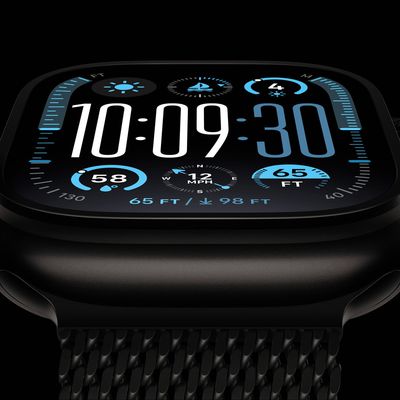
With any new Apple product launch, there are always several issues that pop up in the days following release, and the Apple Watch is no exception. Thus far we've seen sensor issues with customers who have dark wrist tattoos and problems with bands that don't lock. It appears there's another minor problem Apple Watch users are encountering -- malfunctioning digital crowns. The digital crown is located on the side of the watch and is used as the primary input method on the Apple Watch, aside from touch.
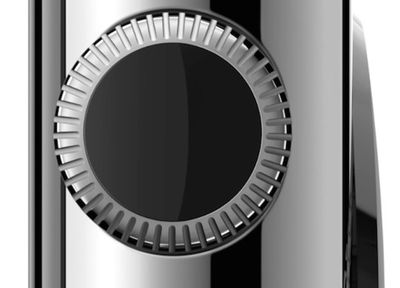
A number of users on both the MacRumors forums and Apple's own support communities are reporting issues with the digital crown of the Apple Watch becoming stuck or difficult to turn. Some users have said the stickiness causes the crown to feel stuck for a moment before loosening when turned, while others say the digital crown feels consistently difficult to turn.
I'm experiencing light stickiness every time I go to turn the crown, but it smoothens out shortly after. And this repeats itself after the crown isn't touched for a few seconds. It wasn't like this on day one. Mine doesn't take considerable pressure to turn though, you just feel that it's sticky at first as if there was a bit too much friction.
On Apple's support communities, some users are speculating that the issue is perhaps caused by sweat getting into the digital crown resulting in crystallized particles that block movement, but there are reports of problems from users who have not used their devices while exercising. Many of the Apple Watches affected are the Sport model, but stainless steel Apple Watch owners have also reported issues.
Several users have taken their Apple Watches in to be assessed by Apple employees and were told that the stickiness of the digital crown is not normal.
Well started experiencing same issue with my sport. Bad enough that double clicking was almost impossible. Took in today to Genius and three diff people came over and tested. All said was not normal. But I decided to send back now. Will be interesting test to see how much I miss it. Bigger concern is why and perhaps the sport vs ss and possibility of it keeps happening.
Ps. We compared to four diff demo units and all had same tactile feel except mine.
Some users have discovered that the problem is resolved by a quick rinse in water, a fix that Apple recommends in a support document. According to Apple, if the digital crown gets stuck or won't move, it could have dust or debris underneath, fixable by running the Apple Watch under fresh water from a faucet for 10 to 15 seconds.
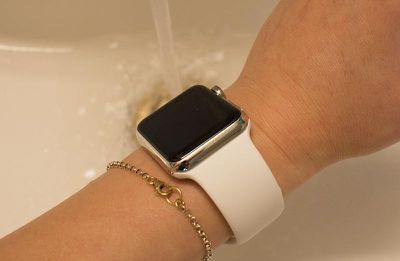
If the Digital Crown gets stuck or won’t move, it might be because of dirt or debris. If you find substances like dust or lotion around the Digital Crown, follow these steps to clean, and repeat as needed:
1. Turn off your Apple Watch and remove it from the charger.
2. If you have a leather band, remove it from your Apple Watch.
3. Hold the Digital Crown under lightly running, warm, fresh water from a faucet for 10 to 15 seconds. Soaps and other cleaning products shouldn't be used.
4. Continuously turn and press the Digital Crown as water runs over the small gap between the crown and the housing.
5. Dry your Apple Watch with a non-abrasive, lint-free cleaning cloth.
Some affected users have said that a water rinse does not solve the problem, or solves it only temporarily, while others have expressed dissatisfaction at potentially needing to rinse the Apple Watch after every workout. Customers who have gone to Apple Stores for a fix for their malfunctioning digital crowns have received either repairs or replacement devices, with Apple quoting week-long wait times for a fix.