The Quest for Quality: Five of the Most Useful Apple Watch Apps - MacRumorsOpen MenuShow RoundupsShow Forums menuVisit ForumsOpen Sidebar
Skip to Content

The Quest for Quality: Five of the Most Useful Apple Watch Apps

While Apple CEO Tim Cook recently confirmed that there are over 3,500 apps available for the Apple Watch, several reviewers and early adopters have complained that many fail to provide useful functionality on the wrist. Despite strict approval guidelines, the App Store for Apple Watch is cluttered with basic or poorly designed apps for the wrist-worn device, likely due in significant part to the apps having been developed before the Apple Watch was available.

To help users discover some high quality watch-based experiences, MacRumors reached out to its forum community and skimmed through the App Store to handpick five Apple Watch apps that we've found particularly useful. Some of the useful Apple Watch apps worth mentioning include Workflow, Philips Hue, Things, Calcbot and Clear.

Workflow

Workflow is an automation tool that enables you to drag and drop any combination of actions to create custom workflows for completing various tasks. You can, for example, use the app to get directions to nearby coffee shops within a preset radius directly on your Apple Watch. Workflows are created using a paired iPhone and automatically appear on the Apple Watch for one-tap use.
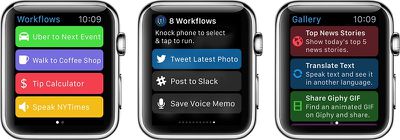
Workflow 3
Workflow features over 200 actions, including those for Contacts, Calendar, Maps, Music, Photos, Camera, Reminders, Safari, AirDrop, Twitter, Facebook, Dropbox, Evernote and iCloud Documents. The app, created by DeskConnect co-founders Ari Weinstein, Nick Frey and Conrad Kramer, is currently $2.99 on the App Store for iPhone and Apple Watch as part of a limited time 40% off sale.

Philips Hue

Philips Hue for Apple Watch displays up to 10 different lighting configurations for Hue lights that can be activated by pressing a circular button -- there's one button per screen, and you swipe between them. One minor inconvenience is that Hue has no Glance, so you have to actually open the app to turn on your lights, although it's a simple issue that could easily be addressed in a future update.
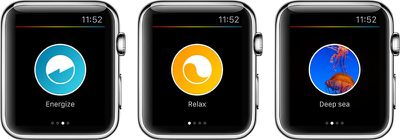
Philips Hue Apple Watch
You choose your desired scenes in the Hue for iPhone app in settings, where available scenes to choose from are listed under Widget & Apple Watch. Scenes you pick will be available on the Apple Watch and in Notification Center on iPhone if you have the widget turned on. The scenes will be the same in both places -- you can't pick different ones for the iOS widget and for the Apple Watch.

If you don't have a Hue Tap, quick selecting scenes on the Apple Watch is easily the fastest way to control your lights since the device is right on your wrist. With 10 scenes, there are a lot of options for controlling lighting all over the house. You can get more scenes by creating them on the iPhone or downloading them from the Meet Hue website.

Philips Hue for Apple Watch is free on the App Store.

Things

Things is one of several to-do apps available for the Apple Watch, displaying a list of day-to-day tasks and long-term goals on your wrist that can be assigned to categories, marked as completed or added to larger projects related to, for example, planning a vacation, preparing for a presentation or filing taxes.
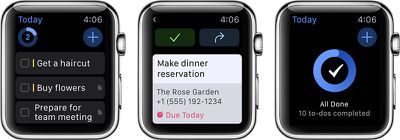
Things-Apple-Watch
To-dos can be added directly from the Apple Watch using Siri dictation, and categorized under Inbox or Today with a single tap. Things for Apple Watch can also provide notifications to remind you about scheduled to-dos for a specified date so that you don't forget, and all tasks automatically sync to a paired iPhone.

Things for Apple Watch is $9.99 on the App Store.

Calcbot

Calcbot by Tapbots makes up for the lack of a stock calculator app on the Apple Watch, enabling you to perform basic calculations and conversions, calculate tips and split bills right on your wrist. The regular calculator mode features a basic numeric keypad, and a firm press using Force Touch brings up a menu with add, subtract, multiply and divide options.

The conversion mode brings up a similar looking number pad with options to convert US dollars to euros, pounds to kilograms, miles to kilometers and Fahrenheit to Celsius using Force Touch. Calcbot Pro, $2.29, enables users to customize the four conversion options using the Calcbot app for iPhone, with over 500 units across 22 different categories to choose from.
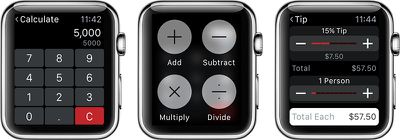
Calcbot-Apple-Watch
Perhaps the most useful functionality of Calcbot for Apple Watch is the tip calculator, which allows you to enter the total cost of your bill, calculate a 10% to 30% tip and divide the amount between up to 10 people if necessary. Apple Pay and Calcbot combined make the Apple Watch a more convenient option than fumbling with your iPhone and wallet when the check comes.

Calcbot for Apple Watch is free on the App Store.

Clear

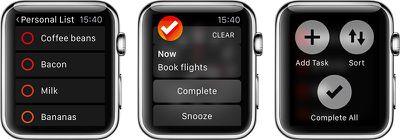
The Apple Watch's small screen size is ideal for displaying bite-sized information, making Clear a perfect match for the wrist-worn device. Clear for Apple Watch brings tasks, reminders and to-do lists to your wrist, featuring a Glance that shows you how many items are on your list and displays upcoming reminders. Adding new tasks can be done using Siri dictation.
Clear-Apple-Watch
Tapping on the Glance brings you to the full Clear app, where you can view all of your lists on the Apple Watch. If you create your own list, such as a grocery list or task list, you can check off items directly on the watch. If you press firmly on a list using Force Touch, you can sort the list, add new tasks or mark all tasks completed.

Clear for Apple Watch is $4.99 on the App Store.

These are by no means the only useful Apple Watch apps available so far, and we encourage readers to share some of their other favorites in the discussion thread associated with this post. It is clear, however, that many developers have struggled to find the right balance and user experience for the new platform.

With the Apple Watch now available and users and developers able to figure out the best way for apps on the wrist to fit into their daily lives, there will no doubt be improvements to the user experience and we'll continue to watch for interesting and novel apps making their way to the Apple Watch.


Related Roundup: Apple Watch 12
Buyer's Guide: Apple Watch (Buy Now)
Related Forum: Apple Watch

Popular Stories

apple watch series 3 design

Apple Offers Steps to Fix Daylight Saving Time Bug on Apple Watch

Sunday November 1, 2026 3:34 am PST by
Apple has published a support document describing what to do if your Apple Watch continues to show time that's off by one hour after daylight savings time changes. "This incorrect time appears only on the Always On display when your wrist is down," says Apple. "When you activate the display by tapping it or raising your wrist, the time changes to the correct hour." To fix the issue, Apple says ...
siri recap live rewind

watchOS 27.3 Brings Live Rewind and Siri Recap to Apple Watch

Tuesday November 3, 2026 10:35 am PST by
With the first beta of watchOS 27.3, Apple is introducing new Audio Intelligence features it previewed for the Apple Watch Series 12 and Ultra 4 earlier this year. Powered by the S11 chip, Audio Intelligence includes Live Rewind, Siri Recap, Sound Recognition, and Shazam Music Recognition. Sound Recognition and Shazam are already on the watch, but Live Rewind and Siri Recap are now available ...
apple watch series 3 design

Apple Watch Users in Europe Report Daylight Saving Glitch

Monday October 26, 2026 5:26 am PDT by
Some Apple Watch users running watchOS 27 are reporting a daylight saving glitch after clocks went back in the UK and Europe on Sunday. In a MacRumors forums thread, five users – several in the UK and central Europe – say their watch shows the correct time when activated, but the Always-On display keeps showing summer time, leaving it an hour fast. The problem has also been reported in...

Top Rated Comments

150 months ago
Revolutionary! LOL. I still don't quite get it. I have a Smartwatch (Asus Zenwatch) and at first - I was having fun with apps like these, then I slowly started pulling my phone out because the UX is simply better and I have to have it on me at all times anyway.

There's this weird schism between what we want to do on the watches and what we want to do with our phones. I don't think this is a case of Google Wear being inferior, I just haven't seen the killer app for these things yet.
Score: 29 Votes (Like | Disagree)
150 months ago
I feel like when ever someone talks about what the watch can do, they need to always (yes, ALWAYS) put it in the context of why it's better to do it on the watch instead of the phone. Both devices are mobile. Both devices use apps. One screen is small on your wrist, the other is about 4-6 times larger in your pocket. Your pocket is about 10 inches from your watch.

So instead of saying "with the Apple Watch, you can use a calculator" you should say "using a calculator app on the watch is better than the one on your phone because...".

Right. There are really very, very few reasons doing an "app" on the wrist is better than the phone.
Score: 20 Votes (Like | Disagree)
BruceEBonus Avatar
150 months ago
Top Tip: while AppleWatch is charging-you won't be able to use certain Apps. However don't despair. Simply buy a small notepad. You can write down stuff that the other apps will do like:
Remind you to have a haircut
When to eat your next meal
Scribe some basic mathematical calculations
When your next important meeting is
Friends birthday dates
When to exercise and where
Contact phone numbers
Note down passwords etc
The list goes on.
This alternative utility does not need batteries or linking- to an iPhone of course so this could be a real boon a proper money saver?

Apple Stores do not sell them. But most newsagents do. And not too expensive either. A great standby utility when you're iPhone or Watch is inaccessible.
Score: 19 Votes (Like | Disagree)
150 months ago
When a calculator is the most useful app, you know you have problems justifying a multi hundred dollar device.
Score: 15 Votes (Like | Disagree)
Joe Rossignol Avatar
150 months ago
I'm glad we're starting to see screenshots with the bezel. It is a little thing, but it's more attractive and easier to see the scale of the interface on the watch.

I added the bezels to the screenshot myself, glad you like them!
Score: 15 Votes (Like | Disagree)
sampaul Avatar
150 months ago
I still haven't got my Apple Watch. FML.:mad:

Score: 14 Votes (Like | Disagree)
Latest Stories
Siri AI Rumored to Become 'More Like an Agent' as Early as Next Year
5 hours ago
Apple Taking New Approach to Developing iOS 28 and macOS 28
7 hours ago
Early Apple Black Friday Deals on Apple Watch, MacBook Air, and More
1 day ago
'Backglow' Lets You Customize New MacBook Pro's Glowing Apple Logo
1 day ago
Top Stories: Apple Product Launches, iOS 27.3 Beta, and More
1 day ago
More Fun iPhone Duo Apps: 30 New Picks to Try
2 days ago
Hands-On With Apple's New OLED Touchscreen MacBook Pro
2 days ago
Apple Store With All-New Design Opening Soon in Southern California
2 days ago
Control the Glowing Apple Logo on Your New MacBook Pro
2 days ago
Apple Shares New 'Apple Card: Apply and Use in Minutes' Ad
2 days ago
Apple Says More Than 100,000 Apps Optimized for iPhone Duo, Here's What's Still Missing
2 days ago
Early Black Friday Deals Kickoff With Steep Discounts on Apple Watch Ultras and More
2 days ago
The MacRumors Show: iOS 27.3 Looks Like a Huge Update
2 days ago
Best Buy's Black Friday Event Begins With Sitewide Savings on Apple, TVs, More
2 days ago
Apple Releasing Yet Another Two New Products Next Week
2 days ago
MacBook Air Drops to Lowest Price in Months With Amazon's $250 Discount
2 days ago
Apple Rumored to Drop the iPhone's Action Button Next Year
2 days ago
Apple's Extended Return Policy Now in Effect for 2026 Holiday Season
2 days ago
Apple Music Classical Updated With New Icon and Refreshed Design
2 days ago
OLED iPad Mini, M6 iMac, and New MacBook Pros Available From Today
3 days ago
Apple Surveys iPhone Duo Buyers About Crease and Camera
3 days ago
Apple's First Touchscreen Mac is Now Arriving to Customers
3 days ago
Claude Gets Personal Finance Feature With Bank Account Linking
3 days ago
Apple Arcade Adds Crossy Road Rush and NBA 2K27
3 days ago
Apple's New HomeView Smart Home Hub: Here's How Much RAM It Has
3 days ago
iPad Mini vs. iPad Air Buyer's Guide: Now Just $50 Apart

3 days ago
First iOS 27.3 and macOS Golden Gate 27.3 Public Betas Now Available
3 days ago
Apple Announces a New Mac Sales Record
3 days ago
Paid $200 for Logic Pro? Apple Says You Won't Get This New Feature
3 days ago
Instagram's Edits Video Editor is Now Available on Mac
3 days ago







































