

Apple Watch Digital Crown Works as Remote Shutter for Camera Apps Using Music Glance - MacRumorsOpen MenuShow RoundupsShow Forums menuVisit ForumsOpen Sidebar
Skip to Content

Apple Watch Digital Crown Works as Remote Shutter for Camera Apps Using Music Glance

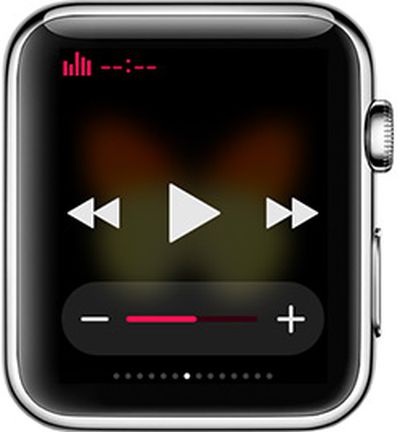
musicglanceSeveral apps that make use of the iPhone's camera have a feature that lets the volume button be used as a trigger to snap a photo, and in those apps, the Apple Watch's Music Glance lets the Apple Watch's Digital Crown serve as a remote camera trigger.

Discovered by a reddit user this morning, the hidden trick works in any app that lets the iPhone's volume buttons be used to take a photograph. Examples include Snapchat, Camera+, and Manual, all apps where the iPhone's volume button works in the same way as a press on the on-screen photo capturing button.

To use the Apple Watch as a remote trigger, open a compatible app like Snapchat, open up the Music Glance, and turn the Digital Crown. The action will cause the camera to take a photograph, much like pressing on the iPhone's volume button would do. It also works within the Music app itself.


This seems to work because in the Music app and the Glance, the Digital Crown serves as a replacement for the iPhone's volume controls, triggering the camera functionality. Headphones with volume controls work in much the same way. It's not clear if this was an intentional feature addition or if it's a bug that was overlooked, but it's a handy way to use the Apple Watch as a shutter remote for iPhone apps that support the functionality.

Though the Apple Watch can be used as a remote trigger for compatible apps through the Music Glance, the function is not as feature rich as Apple's remote control option for the built-in camera. With the default camera, the Apple Watch can turn the iPhone on and capture a photograph.


Related Roundup: Apple Watch 11
Buyer's Guide: Apple Watch (Caution)

Popular Stories

apple watch ultra 3 1

Apple Now Requires UNiDAYS Verification for Education Discounts in U.S. and Canada, Adds Apple Watch

Friday May 8, 2026 3:00 am PDT by
Starting today, Apple will require customers in the U.S., Canada, and Chile to verify their status as a student or educator to get educational discounts. Apple is adopting the UNiDAYS verification system that it uses in other countries, with a new process to accommodate homeschool families. Apple is also adding the Apple Watch Series 11, Apple Watch SE, and Apple Watch Ultra 3 to its...
Apple Watch Series 10 Jet Black Touch ID

Apple Watch Series 12 and watchOS 27: What to Expect Later This Year

Friday May 8, 2026 2:07 pm PDT by
While not too much has been reported about the next Apple Watch models, there are a few rumors about potential design changes and watchOS 27 features. Apple Watch Series 12 and Apple Watch Ultra 4 models are expected to be released in September, and we have outlined some of the key rumored hardware and software changes below. A new Apple Watch SE is not expected this year, as that model was...
Apple Watch Series 10 Jet Black Touch ID

Next Apple Watch Models Unlikely to Add Touch ID, Focus on Battery Life

Monday May 11, 2026 3:41 am PDT by
Apple is prioritizing larger batteries and more advanced health sensors over fingerprint authentication for the Apple Watch, according to a new claim from a prominent Chinese leaker. In a new Weibo post, Instant Digital pushed back on recent speculation about biometric recognition coming to Apple's wearable lineup, claiming instead that the company remains content to let users unlock their...

Top Rated Comments

144 months ago
Very neat. Let me try this on my Apple Watch...oh wait, it's still processing since 4/10. :(
Score: 7 Votes (Like | Disagree)
dotnet Avatar
144 months ago
Yeah, you can do that with the default Camera Remote app that comes pre-installed on the Watch.

Plus, the Camera Remote app supports using the side button (instead of the crown) as shutter release.
Score: 4 Votes (Like | Disagree)
larrylaffer Avatar
144 months ago
That's a bug.
Score: 4 Votes (Like | Disagree)
JaJaWa Avatar
144 months ago
Are there Apple camera apps that allow you to see the picture you're about to take (ie remote viewing) using the watch as a shutter?

Yeah, you can do that with the default Camera Remote app that comes pre-installed on the Watch.
Score: 3 Votes (Like | Disagree)
jclo Avatar
144 months ago
I know this has nothing to do with the article, but why is he wearing two watches? @Creator of the video, if you are here, I must know.

The watch on my right wrist is an activity tracking watch that I am going to be writing a review for. I'm testing it out. A watch on each wrists makes more sense than two watches on one wrist!
Score: 2 Votes (Like | Disagree)
144 months ago
That's a bug.

I wouldn't call it a bug. The apps are designed to take pictures with command for volume control. As the article points out, it works the same with the remote buttons on the EarPods and Bluetooth headsets. This is just a way to control music volume on the apple watch so it's working as expected.
Score: 2 Votes (Like | Disagree)













