

Force Touch on iPhone 6s to Make iPhone Interactions Faster With Focus on 'Shortcuts' - MacRumorsOpen MenuShow RoundupsShow Forums menuVisit ForumsOpen Sidebar
Skip to Content

Force Touch on iPhone 6s to Make iPhone Interactions Faster With Focus on 'Shortcuts'

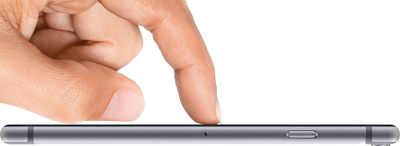
Rumors have all but confirmed the upcoming iPhone 6s and the iPhone 6s Plus will include Force Touch, allowing the device to distinguish between a light tap and a deeper press to enable a wide range of new gestures.

Force Touch has been built into the Apple Watch and the trackpads of the Retina MacBook and the newest Retina MacBook Pros, adding a whole new dimension to the way the devices are controlled. On the Apple Watch, Force Touch is used within apps to access different settings, and on the Mac, it can do things like previewing links in Safari, and accelerating rewind/fast forward speed in iMovie.
force-touch-iphone-6
Force Touch on the iPhone will work similarly to the way that it works on the existing devices that offer Force Touch, but there are some differences, according to information an inside source shared with 9to5Mac. Force Touch on the iPhone is said to be used primarily for "shortcut actions," letting users perform tasks within apps more quickly.

In Maps, for example, using Force Touch on a point of interest will cause turn-by-turn directions to start up immediately, while force pressing on a song in the Music app will bring up a menu to save it to a playlist. Force pressing on certain apps on the Home Screen could open directly to specific sections of the app.

Another feature in testing, according to one source, are shortcuts that appear after Force Touching an app icon on the Home screen. For example, if a user deep presses on the Phone app icon, he could choose to shortcut directly to the Voicemail tab. This could also apply to deep pressing the News app icon and being taken directly to either the Favorites or For You tabs.

Aside from Force Touch, the iPhone 6s and the iPhone 6s Plus will feature an A9 processor with 2GB of RAM, a revamped camera system with a 12-megapixel camera, improved Touch ID, and a chassis made of a new material with reinforcements at the weak points that previously caused some iPhones to bend. Rumors suggest the addition of Force Touch and the new reinforcements will cause the iPhone 6s and 6s Plus to be 0.2mm thicker, a change that will be hardly noticeable to most users.


Related Forum: iPhone

Popular Stories

Apple Card iPhone 16 Pro Feature

Apple Card Promo to Offer Free AirPods Pro 3

Friday May 15, 2026 8:59 am PDT by
Starting as early as next week, customers who sign up for an Apple Card at Apple's retail stores in the U.S. will receive $249 cash back when they purchase AirPods Pro 3, according to Bloomberg's Mark Gurman. The promotion has yet to be officially announced by Apple, so exact terms and conditions are not available at this time. AirPods Pro 3 are priced at $249 in the U.S., so customers who...
Apple WWDC25 iOS 26 CarPlay Light mode 250609

Six Popular iPhone Apps Now Available on CarPlay

Thursday May 14, 2026 9:10 am PDT by
Apple's CarPlay system for accessing iPhone apps on a vehicle's dashboard screen has received six popular apps in recent weeks: ChatGPT, Perplexity, Grok, Google Meet, WhatsApp, and the indie artist streaming platform Audiomack. Make sure you have the latest version of each app and they will automatically appear on CarPlay. ChatGPT Starting with iOS 26.4, CarPlay supports voice-based...
ipad mini 7 blue

OLED iPad Mini: Release Date, Pricing, and What to Expect

Thursday May 14, 2026 5:08 am PDT by
According to the latest rumors, Apple is close to launching its next-generation iPad mini. So what should we expect from the successor to the iPad mini 7 that Apple released over a year ago? Read on to find out. Processor and Performance Apple is working on a next-generation version of the iPad mini (codename J510/J511) that features the A19 Pro chip, according to information found in code...

Top Rated Comments

motulist Avatar
141 months ago
Force touch doesnt seem different than a long press.
Score: 42 Votes (Like | Disagree)
AngerDanger Avatar
141 months ago
And thanks to the protruding camera, Force Touch users can look forward to:


Attachment Image
Score: 40 Votes (Like | Disagree)
141 months ago
Looks like something new for Samsung to copy.
Score: 27 Votes (Like | Disagree)
macduke Avatar
141 months ago
On the Apple Watch, Force Touch can determine various levels of pressure. For instance, try slowly pushing down on the watch face. You can move it in and out based on how hard you press. I hope this capability is robust enough that Apple could unveil an API for it so that drawing apps can take advantage of the pressure sensitivity.

I hope that we are able to Force Touch things we can’t usually tap. The article mentions home screen icons, which is a neat idea. But imagine being able to Force Touch various status bar icons to quickly perform various actions—although admittedly the tap target sizes for those icons are really small so that may never happen. We could also FT notifications on our home screen to bring up a menu to do various things (more options than we have now). Or Force Touch on the clock on the home screen to see our calendar or next meeting.

As far as various potential home screen actions, I could see:

FT on Settings to quickly change a customizable set of things
FT on Calendar to quickly see your next meeting information
FT on Notes to quickly jot something down
FT on Camera to instantly take a picture or start recording a video
FT on Maps to start directions home
FT on Music to start your favorite playlist or station
FT on Reminders to quickly make a new reminder to your default list

I could go on, but I hope that they give us the ability to customize actions that can be taken when we FT different icons and third party apps as well.

As for things we could do inside of apps, it would be nice if we could FT any image anywhere in iOS and get options to share or have it default share or save it to our preferred service. Or FT a website URL or URL bar to save it to a reading list or to Pocket. I could also see FT on emails being useful if Apple would build in additional capabilities to use our inbox like a to-do list. FT could enable that without over-complicating the interface. It would be neat to FT a phone number to quickly set a reminder to call that number, add it to contacts, etc. The same could be done for other actionable information.

Another idea is that you could FT the keyboard to switch between modes for numeric, or third party keyboards, or emoji, etc. Or you could FT on Control Center to view another layer of controls. Or FT on a control center toggle to quickly switch it out with a list of other toggles that fly out in a circle around your finger. Or FT on any text input field and instantly start speaking to use dictation. Oh man there are so many fun things you could do!

I also hope that we get some kind of Taptic Engine feedback when typing—as long as it feels right—but I don’t know if that would drain the battery or wear out the parts faster.
Score: 25 Votes (Like | Disagree)
141 months ago
it is the begining for the big one iPhone 7. They need force touch for them to remove the home button. but they need same sapphire cover so this mean sapphire instead of gorila glass and this force touch. This is the only way that can be operated like a home button without one. because force touch is not a 100% software based so if your app is frozen you can force touch and come back to home screen like you do with your home button now.
So this force touch is forward thinking for the iP7. Like they did with ios7 and iphone 6, swipe left/right and with iphone 6 curved screen to be more fluent experience
Score: 16 Votes (Like | Disagree)
penajmz Avatar
141 months ago
If this is the only main thing on that iPhone I will be skipping. But 2GB ram and I'm in.
Score: 14 Votes (Like | Disagree)













