

VMware Launches Fusion 8 and Fusion 8 Pro With Windows 10, OS X El Capitan and Cortana Support - MacRumorsOpen MenuShow RoundupsShow Forums menuVisit ForumsOpen Sidebar
Skip to Content

VMware Launches Fusion 8 and Fusion 8 Pro With Windows 10, OS X El Capitan and Cortana Support

VMware today launched Fusion 8 and Fusion 8 Pro, the latest versions of its virtualization software for running Windows on a Mac without rebooting. Fusion 8 and Fusion 8 Pro include full support for Windows 10, OS X El Capitan and the latest Retina Macs, in addition to always-on access to Microsoft Cortana.
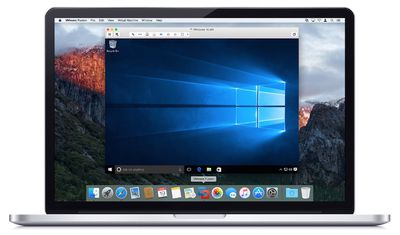
VMware Fusion 8
Fusion 8 and Fusion 8 Pro support DirectX 10 and OpenGL 3.3 for up to 65% faster graphics, alongside compatibility with USB 3.0 and multiple monitors with different DPIs. The virtual machine platform also delivers full 64-bit support with up to 16 vCPUs, 64GB RAM and an 8TB hard drive for a single virtual machine.

Fusion 8 and Fusion 8 Pro are optimized for the latest Macs, including the iMac with Retina 5K Display and 12-inch MacBook. DirectX 10 support enables Mac users to run Windows virtual machines with native resolution on a 5K display, with USB-C support and Force Touch pass-through also in tow for the latest MacBooks.

Fusion 8 Pro has additional advanced features and improvements, including the ability to connect to VMware vCloud Air, IPv6 support for both bridged networks and IPv6-to-IPv4 Network Address Translation (NAT), improved integration with VMware vSphere and support for several new Linux distributions and other operating systems.
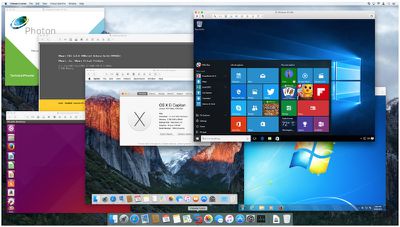
Fusion 8 Pro OS
Fusion 8 and Fusion 8 Pro are available today for $79.99 and $199.99 respectively through the VMware Online Store, while existing Fusion 6 or 7 customers can upgrade to Fusion 8 for $49.99 or Fusion 8 Pro for $119.99.

Parallels Desktop for Mac users also receive 40% off Fusion 8 and Fusion 8 Pro.

Related Forum: OS X El Capitan

Popular Stories

Apple Card iPhone 16 Pro Feature

Apple Card Promo to Offer Free AirPods Pro 3

Friday May 15, 2026 8:59 am PDT by
Starting as early as next week, customers who sign up for an Apple Card at Apple's retail stores in the U.S. will receive $249 cash back when they purchase AirPods Pro 3, according to Bloomberg's Mark Gurman. The promotion has yet to be officially announced by Apple, so exact terms and conditions are not available at this time. AirPods Pro 3 are priced at $249 in the U.S., so customers who...
Apple WWDC25 iOS 26 CarPlay Light mode 250609

Six Popular iPhone Apps Now Available on CarPlay

Thursday May 14, 2026 9:10 am PDT by
Apple's CarPlay system for accessing iPhone apps on a vehicle's dashboard screen has received six popular apps in recent weeks: ChatGPT, Perplexity, Grok, Google Meet, WhatsApp, and the indie artist streaming platform Audiomack. Make sure you have the latest version of each app and they will automatically appear on CarPlay. ChatGPT Starting with iOS 26.4, CarPlay supports voice-based...
ipad mini 7 blue

OLED iPad Mini: Release Date, Pricing, and What to Expect

Thursday May 14, 2026 5:08 am PDT by
According to the latest rumors, Apple is close to launching its next-generation iPad mini. So what should we expect from the successor to the iPad mini 7 that Apple released over a year ago? Read on to find out. Processor and Performance Apple is working on a next-generation version of the iPad mini (codename J510/J511) that features the A19 Pro chip, according to information found in code...

Top Rated Comments

140 months ago
If you install Windows 10, even if in Fusion or any VM, make sure you go i to Network part of the Control Panel and go to Advanced settings and tuen off sharing updates accross the Internet. If you don't do that little change then you could hit your Internet bandwidth limit that most ISPs have now.

Microsoft wants to make you Knternet connect part of a Torrent sharing botnet! You have to Opt-Out the Network panel settings.
I've opted out of Windows completely. I wish my company would do the same.
Score: 20 Votes (Like | Disagree)
140 months ago
Seems over priced given the cost of the Win 10 and OSX operating systems
I guess everything seems overpriced compared to 0$.
Score: 9 Votes (Like | Disagree)
satcomer Avatar
140 months ago
If you install Windows 10, even if in Fusion or any VM, make sure you go to Network part of the Control Panel and go to Advanced settings and turn off sharing updates accross the Internet. If you don't do that little change then you could hit your Internet bandwidth limit that most ISPs have now.

Microsoft wants to make you Internet connect part of a Torrent sharing botnet! You have to Opt-Out the Network panel settings.
Score: 7 Votes (Like | Disagree)
n-evo Avatar
140 months ago
I'm getting a bit annoyed with VMware and Parallels using the yearly OS X release cycle as an excuse to push very expensive updates witch are marginally better. But hey, it's mostly companies who buy these things with enough cash to burn. They're definitely making good use of that.
Score: 6 Votes (Like | Disagree)
AngerDanger Avatar
140 months ago
Fusion 8 and Fusion 8 Pro include full support for Windows 10, OS X El Capitan and the latest Retina Macs, in addition to always-on access to Microsoft Cortana
It's amazing that Apple has had Speakable Items for 22 years—and eventually allowed it to carry out actions after saying a keyword—but Windows is the closest thing to a hands-free assistant we can get for OS X.

For those interested in integrating voice commands with dictation, Apple does provide this feature, but you have to enable it yourself. ('https://support.apple.com/en-us/HT203085')

I'm just waiting to be able to say, "Spotlight, find images that have transparency, are under 200kb, and were made in the past 24 hours."
Score: 6 Votes (Like | Disagree)
140 months ago
What is better, Fusion 8 or Parallels 11?
You could always use Virtual Box. It's free and does a great job. I'm running Windows 10 on it now and it is cross platform (Windows, Mac, and Linux). But to answer your question, I've always had a better experience with Fusion.
Score: 6 Votes (Like | Disagree)














