

Popular automation app Workflow is being updated today with two highly useful, much-desired features: a Notification Center widget and a new syncing feature that lets workflows be synced across several devices.
For those of you who are not familiar with Workflow, it's an automation tool that lets users create a variety of workflows to accomplish tasks like creating GIFs from a series of photos, pulling images from a web page, translating an article, calculating a tip, and more. Users can create their own workflows or download them from the Workflow gallery and other third-party sites.
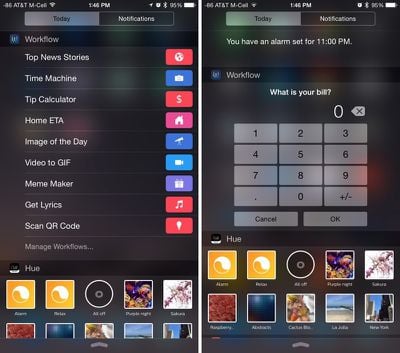
With the new Workflow Notification Center widget, workflows can be activated directly from the Today view, making it much quicker to access simple workflows that are frequently used. Not all workflows are suitable for use in the Notification Center depending on what they do, but there are dozens of pre-configured options that work well, and custom workflows are always available.
A few pre-made examples include workflows that provide directions to places like a nearby coffeeshop or home, automatically place calls, calculate tips, pull up images from websites, or play music. Some of the workflows will open the Workflow app when tapped, but others work directly within the Notification Center.
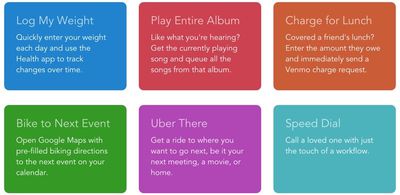
Along with a Notification Center widget, today's Workflow update introduces Workflow Sync, a service that allows Workflow users to backup their workflows and sync them between multiple devices, such as an iPad and an iPhone. Prior to the release of the syncing feature, Workflow needed to be set up separately on each iOS device.
There are also several new actions included in the update that can be used to create new types of workflows. New options include Share with Transmit, Log Workout, Log Health Sample, Find Health Samples, Get Details of Health Samples, Get Current IP Address, Get Network Details, Continue Workflow in App, Calculate Statistics, Show in BlindSquare, and Get My Workflows.
Other actions, like Edit Image, Make PDF, Tweet, and Take Photo have been improved. Edit Image can now output high-resolution images, making PDFs is more reliable, there's support for tweeting videos, and taking a photo no longer requires tapping the shutter. In all, 12 actions have been updated, with a full list available on the Workflow website.
Workflow is a universal app that can be downloaded from the App Store for $4.99. [Direct Link]
















Top Rated Comments
Don't know whether I'm going to stop using Launcher Pro to run workflows though. This takes up A LOT of space.