

USB Drives No Longer Required to Install Windows with Boot Camp in OS X El Capitan - MacRumorsOpen MenuShow RoundupsShow Forums menuVisit ForumsOpen Sidebar
Skip to Content

USB Drives No Longer Required to Install Windows with Boot Camp in OS X El Capitan

by

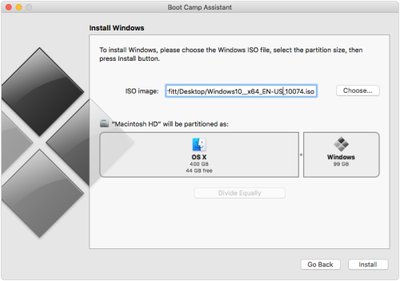
With OS X El Capitan available today to the public, some have begun discovering interesting tidbits and changes the new operating system has to offer. Twocanoes (via The Loop) has discovered that Boot Camp has gained the ability to install a Windows partition without a USB drive.
tumblr_inline_nv5uoowV4l1rw87o8_500

Image via Twocanoes

Boot Camp comes with a modified interface that places the ISO image selector and partitioning on a single screen, allowing a user to easily select an ISO image and partition their hard drive before installing Windows. Once Boot Camp Assistant completes its tasks, the computer restarts with the normal Windows installation processes.

The change comes from Apple reworking how many partitions Boot Camp Assistant creates, according to Twocanoes.

Boot Camp Assistant doesn’t just create a Boot Camp partition, but also creates an additional partition called “OSXRESERVED” that is FAT32 formatted.  It places this partition right after the recovery partition, and before the Boot Camp partition...

The "OSXRESERVED" partition includes all the installer files, Boot Camp drivers and EFI files required for to create and boot the Windows partition. Once Windows is installed and the user boots back into OS X, the "OSXRESERVED" partition is removed and the space reserved for that partition is added back to the OS X partition.

The only El Capitan-running Macs that support the new USB drive-less Windows installation are the 11- and 13-inch MacBook Air, the 13- and 15-inch MacBook Pro and the Mac Pro.


Related Forum: OS X El Capitan

Top Rated Comments

139 months ago
I would never put my Mac through the agonizing pain that is installing and running Windows.
Score: 14 Votes (Like | Disagree)
Pakaku Avatar
139 months ago
Why? Old Macs can't be partitioned?
I suppose with some clever partitioning, you could do the same thing manually through Disk Utility.

Bootcamp is nothing more than a glorified Disk Utility anyways.
Score: 12 Votes (Like | Disagree)
goobot Avatar
139 months ago
Seriously why would you install Windows on Mac?
Software or games not available on Mac.
Score: 12 Votes (Like | Disagree)
139 months ago
Seriously why would you install Windows on Mac?
Microsoft Project or Visio?
Vast majority of CAD software?
Majority of games?
Score: 7 Votes (Like | Disagree)
happyslayer Avatar
139 months ago
Weird that the new MacBook wasn't listed, especially since it's just a single port and it might be good to power the Mac while doing the install.
Score: 7 Votes (Like | Disagree)
Nermal Avatar
139 months ago
"... then press Install button". Shouldn't that be either "press Install" or "press the Install button"? It sounds strange to me as it stands.
Score: 6 Votes (Like | Disagree)

Popular Stories

Apple Card iPhone 16 Pro Feature

Apple Card Promo to Offer Free AirPods Pro 3

Friday May 15, 2026 8:59 am PDT by
Starting as early as next week, customers who sign up for an Apple Card at Apple's retail stores in the U.S. will receive $249 cash back when they purchase AirPods Pro 3, according to Bloomberg's Mark Gurman. The promotion has yet to be officially announced by Apple, so exact terms and conditions are not available at this time. AirPods Pro 3 are priced at $249 in the U.S., so customers who...
Apple WWDC25 iOS 26 CarPlay Light mode 250609

Six Popular iPhone Apps Now Available on CarPlay

Thursday May 14, 2026 9:10 am PDT by
Apple's CarPlay system for accessing iPhone apps on a vehicle's dashboard screen has received six popular apps in recent weeks: ChatGPT, Perplexity, Grok, Google Meet, WhatsApp, and the indie artist streaming platform Audiomack. Make sure you have the latest version of each app and they will automatically appear on CarPlay. ChatGPT Starting with iOS 26.4, CarPlay supports voice-based...
ipad mini 7 blue

OLED iPad Mini: Release Date, Pricing, and What to Expect

Thursday May 14, 2026 5:08 am PDT by
According to the latest rumors, Apple is close to launching its next-generation iPad mini. So what should we expect from the successor to the iPad mini 7 that Apple released over a year ago? Read on to find out. Processor and Performance Apple is working on a next-generation version of the iPad mini (codename J510/J511) that features the A19 Pro chip, according to information found in code...













