

Flexibits today updated its popular Fantastical 2 apps for the iPad, iPhone, and Apple Watch with support for a range of iOS 9 and iPhone 6s features. Fantastical 2 for iPad now includes split-screen multitasking support, letting it be used simultaneously with other apps with iOS 9's Slide Over and Split-View multitasking modes.
With Slide Over, users can pause one task to access their calendars to quickly schedule events or reminders, and with Split-View, Fantastical 2 can be used alongside another app. Slide Over works on the iPad Air and later and the iPad mini 2 and later, while Split-View is available on the iPad Air 2 and the iPad mini 4.
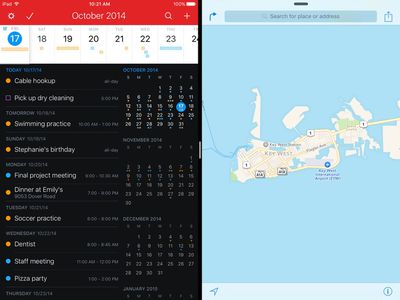
The iPad version of Fantastical 2 also includes new iOS 9 keyboard shortcuts when using an external Bluetooth keyboard that are accessible when holding down the command key.
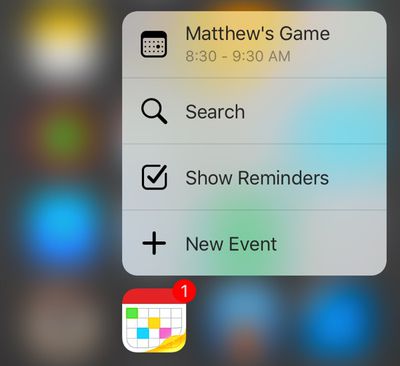
Fantastical 2 for the iPhone now includes support for 3D Touch on the iPhone 6s and the iPhone 6s Plus. A firm press on the Fantastical app icon on these devices will bring up a list of Quick Actions that lets users see upcoming events, add a new event, view reminders, and search through their calendars.
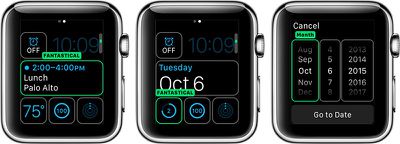
On the Apple Watch, the Fantastical 2 app is now native on devices running watchOS 2, improving loading speeds and app opening times. There are also now Fantastical complications that include a "go to date" option, which can be used on any watchOS 2 watch face that supports complications.
In addition to these major changes, there are several improvements and bug fixes that are common to both the iPhone and iPad apps. A full list of these minor enhancements are below:
- Additional iOS 9 fixes and improvements
- Improved design for week view
- Tap and hold on locations or URLs to choose an app to open them in (e.g. Google Maps or Apple Maps)
- Multiple invitation notifications are now shown separately instead of grouped into a single notification
- Improved highlight weekends for countries that have weekends on Friday and Saturday
- Fixed hang when adding new events with VoiceOver
- Fixed location and phone data detectors not appearing in event titles
Fantastical 2 for iPhone and Apple Watch is available from the App Store for $4.99. [Direct Link]
Fantastical 2 for iPad is available from the App Store for $9.99. [Direct Link]



















Top Rated Comments
Frankly, I would love an option to show next event starting time, just like Calendar complication.