

Lightroom for iOS Now Available to All Users, No Longer Requires Creative Cloud Subscription - MacRumorsOpen MenuShow RoundupsShow Forums menuVisit ForumsOpen Sidebar
Skip to Content

Lightroom for iOS Now Available to All Users, No Longer Requires Creative Cloud Subscription

by

Adobe updated its lineup of mobile apps earlier this week, and among those updates was a new version of Lightroom, the company's iOS-based photo editing app. As part of the recent update to Lightroom, Adobe quietly made the app available to all users, removing the need for a subscription to Creative Cloud.

Prior to this week, the free Lightroom app was dependent on the desktop version of Lightroom and it required users to have one of Adobe's Creative Cloud subscription plans. Signing up first on Lightroom used to activate a trial Creative Cloud account, giving iOS users only a limited amount of time to use the app. Now restriction free, Lightroom can be downloaded by all iOS users at no cost and used to manage and edit photos on iOS indefinitely.
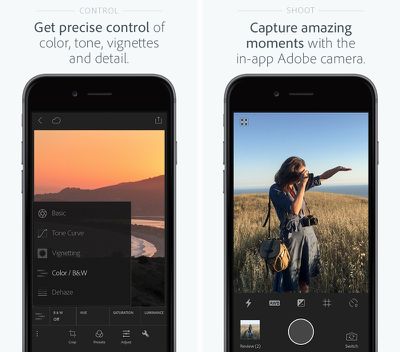
adobelightroom
The Next Web was the first to highlight the change to Lightroom, and the site spoke to Adobe's director of product management for digital imaging Tom Hogarty who said Lightroom has been a popular choice for mobile users. Adobe is likely hoping the change will draw potential subscribers to Adobe's other apps.

We're seeing alot of people come in first on Lightroom mobile, so now we're allowing people to use it locally on their local assets, their local photos and videos on their phone and tablet for as long as they like.

More and more people are adopting the phone as their primary camera, taking the DSLR out less and less, and we're seeing the same thing with the use of Lightroom. Some users are creative pros who are aiming for efficiency, but many others are just consumers who love photography.

Lightroom for mobile devices has many of the same capabilities that are available for the desktop and it's a powerful editing tool on iOS devices. It includes one-touch improvement tools and more advanced adjustments for fixing problems like insufficient lighting or unwanted objects.

The recent update to the app adds a new haze removal feature that's useful for removing haze in landscaping photos, and it includes a targeted adjustment to that allows colors in a specific area to be tuned. It also offers an in-app Adobe camera, integration with Photoshop Fix, and better organizational tools.

Adobe Photoshop Lightroom for iPhone is available for free from the App Store. [Direct Link]

Adobe Photoshop Lightroom for iPad is available for free from the App Store. [Direct Link]

Top Rated Comments

Glassed Silver Avatar
139 months ago
False. No need for ANY sign in or subscription fees like this article states.
You're right, another article I read didn't highlight this.

Still need to sign in and subscribe for sync though. So, pass. (for me, frankly)

Glassed Silver:mac
Score: 4 Votes (Like | Disagree)
139 months ago
Yes, it can handle RAW images just fine.
??? No, Lightroom for IOS does not even recognize RAW files.
Which actually makes it useless for me.

My ideal workflow would be: import RAWs from shooting into iPad, do some quick adjustments and rate them in Lightroom IOS, then later import the good ones onto my Macbook. Does not work, as Lightroom does not import the RAWs.
Score: 2 Votes (Like | Disagree)
nunes013 Avatar
139 months ago
Hmmmm I downloaded it and it prompted me to sign in. Once signing in with my Adobe ID it started a 30 day free trial of creative cloud. There was no option to bypass sign in...
Score: 2 Votes (Like | Disagree)
139 months ago
Beg to differ. U cannot use the app if you don't sign up or sign in. The app is unusable as that's as far as you get without signing in.

And yes I have the trial at the top of my page as well and I downloaded Lightroom the day of the announcements.
I didn't have to sign it. I just hit Get Started and I could import photos from my Camera Roll or any other album from my Phone. You need to sign in and have a CC account for syncing with Lightroom desktop. I Just deleted the app and redownloaded to test again and all you have to choose "Get Started" when you launch the app for the first time.
Score: 1 Votes (Like | Disagree)
AllergyDoc Avatar
139 months ago
I just downloaded it, tapped Get Started and started using it immediately. It's a nice app.

Attachment Image
Score: 1 Votes (Like | Disagree)
dearfriendx Avatar
139 months ago
The way I understood is that you still need to sign in, but you don't need the subscription for basic use.

Glassed Silver:mac
False. No need for ANY sign in or subscription fees like this article states.
Score: 1 Votes (Like | Disagree)

Popular Stories

Aston Martin CarPlay Ultra Screen

Apple Says CarPlay Ultra is Coming to These Vehicle Brands

Thursday May 21, 2026 11:53 am PDT by
Last year, Apple launched CarPlay Ultra, the long-awaited next-generation version of its CarPlay software system for vehicles. Nearly a year later, CarPlay Ultra is still limited to Aston Martin's latest luxury vehicles, but that should change fairly soon. In May 2025, Apple said many other vehicle brands planned to offer CarPlay Ultra, including Hyundai, Kia, and Genesis. CarPlay Ultra...
iphone 18 pro blue%402x

iPhone 18 Pro: Dark Cherry, Light Blue, and Dark Gray Chassis Leaked [Update]

Thursday June 4, 2026 5:18 am PDT by
Update: Since publication, new information has come to light suggesting the images have been AI-manipulated and are not in fact iPhone 18 Pro chassis parts. The original article follows. The color options Apple is reportedly planning for the upcoming iPhone 18 Pro and ‌iPhone 18 Pro‌ Max have appeared online today in the form of images of chassis parts of unknown authenticity....
iOS 27 All the New App Features

iOS 27: All the Rumored App Features

Wednesday June 3, 2026 3:48 pm PDT by
Siri is getting a major overhaul in iOS 27, but Apple also has some big updates planned for apps like Camera, Photos, and Wallet. There are multiple new AI features in the works, plus some non-AI upgrades. Camera Apple is moving Visual Intelligence from the Camera Control button to the Camera app in iOS 27, according to Bloomberg. There will be a Siri mode that will be available alongside...














