

iPad Pro Hands-on Makes the Case for Productivity Uses, Apple Pencil Is Excellent - MacRumorsOpen MenuShow RoundupsShow Forums menuVisit ForumsOpen Sidebar
Skip to Content

iPad Pro Hands-on Makes the Case for Productivity Uses, Apple Pencil Is Excellent

With the launch of the iPad Pro coming up shortly, technology and education expert Fraser Speirs got some hands-on time with the device at an invitation-only event in London yesterday. Speirs has been sharing his thoughts from his one-hour session with the iPad Pro and its accessories and answering questions on Twitter, offering an interesting perspective on the user experience.
iPad-Pro-Smart-Keyboard
Overall, Speirs was impressed by the iPad Pro, finding it most ideal for productivity tasks in noting the device "is expansive where the Air 2 is intimate. It definitely has a 'work' feel to it, although photos/media are fantastic." Multitasking in particular is "a whole different thing" on the iPad Pro with a true feeling of "two iPads stuck together," an experience that makes it "a great device for serious work and creativity."


Speirs is a bit less enthusiastic about other use cases, noting that "if you just use it to browse and Netflix" there may not be enough benefit from the iPad Pro to make it worth the increased size and weight compared to iPad Air 2. For reading, he feels "it's not a device to snuggle up with" but would be solid for reference work.

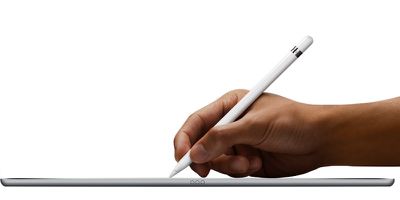
Turning to the Apple Pencil, Speirs calls it "extremely impressive" and "certainly the best iPad stylus I have used by a country mile." Palm rejection is described as "near-perfect" and the "best I have ever seen on iOS," making for a smooth experience with writing and drawing apps.
apple_pencil_white
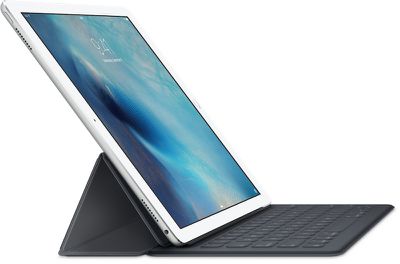
Speirs was less impressed with the Smart Keyboard, calling it "a bit fiddly" due to its size and complexity but a "decent enough" keyboard. As far as the keyboard feel, Speirs compares it most closely to Logitech's Keys-to-Go among accessories iPad users might already be familiar with.

For more of Speirs' thoughts on the iPad Pro and its accessories, check out his Twitter timeline, which is full of tidbits and other impressions.


Related Roundup: iPad Pro
Buyer's Guide: iPad Pro (Caution)

Popular Stories

iOS 27 Next to iPhone

Here's When iOS 27 Rolls Out Today in Every Time Zone [Update: It's Out]

Sunday September 13, 2026 3:00 am PDT by
Update 10:04 a.m.: iOS 27 is rolling out now, though it may take a bit for all users to see it, so keep checking! Apple is about to release iOS 27, which will finally deliver more advanced Siri AI capabilities as well as a variety of other refinements, improvements, and new features to iPhones. It's Apple's biggest software update of the year, and Apple announced at Wednesday's iPhone event...
iOS 27 Icon iPhone

iOS 27 Available Now With These 8 New Features

Monday September 14, 2026 9:00 am PDT by
Update — 10 a.m. Pacific Time: Apple has released iOS 27. During its iPhone 18 Pro and iPhone Duo event last week, Apple announced that iOS 27 will be released widely on Monday, September 14. iOS 27 should be available around 10 a.m. Pacific Time / 1 p.m. Eastern Time today via the Settings app, under General → Software Update. Below, we have highlighted eight new features and...
Apple iCloud Plus expansion hero

iCloud+ Now Includes Apple TV, Apple Arcade, and Curated Apple Music Stations in Over 100 Countries

Tuesday September 15, 2026 1:43 am PDT by
Apple today announced a new subscription initiative that turns paid iCloud+ subscriptions into a broader services bundle in more than 100 countries. In select countries, Apple says every paid iCloud+ plan, including the cheapest 50GB tier, now includes Apple TV and Apple Arcade "at no additional cost," while family sharing extends the storage, TV and Arcade access to up to five people....

Top Rated Comments

JXShine Avatar
142 months ago
Next year, apple will release the iPad Pro 2, featuring 3D touch, 20% lighter body. But that's not it! They will release iOS 10 to make your iPad Pro 1 30% slower!
Score: 43 Votes (Like | Disagree)
142 months ago
As an owner of a 12" Macbook, I still don't see the benefits of an iPad Pro other than the pencil. Anything else, like Office work or some Adobe photoshop, OS X is simply much better and the mouse interface is more useful than iOS and touch interfaces.
Score: 21 Votes (Like | Disagree)
142 months ago
WOW...there's a bunch of insight for you, I could have told you most of those things without the need to get a hands on experience!!
But you wouldn't have any credibility.
Score: 18 Votes (Like | Disagree)
bennyprofane Avatar
142 months ago
SP4 kill this hands down.
I recently bought the SP3. I was just so intrigued by the concept. I had been wishing for an iPad running OS X or at least giving us file system access and the possibility of external storage. I wanted to love the SP3 but there were too many reasons not to.
Windows is not good for touch (and having abandoned windows as my main system more than 10 years ago, I have to say I didn't like coming back at all, even though I still use it for some things on a VM but as a main system it's just so cluttered). The tiles were ugly so I was only in desktop mode and it's so fidly on touch that you have to use a mouse if you want to do more than start a movie or browse some websites. Battery lasted 5 hours tops, huge disappointment.
The screen was reflecting too much. Even when watching a movie, something which shouldn't use a lot of resources, the fan often started blowing.
For a laptop it was just too weak, for a tablet not that great. I guess there are some who have use for it but I much more prefer the combo of a Macbook Pro and an iPad. I sold the SP3 and am considering the iPad Pro. I haven't paid a lot of attention to the SP4 but from what I read, it still has most of the weaknesses I described and the Surface Book having only 3 hours of battery without the keyboard is the biggest joke (apart from that, it would make a cool hackintosh).

One thing the SP3 made me realize is that an iPad running OS X might not be that great. An open and (really) professional iOS is probably better. Perhaps we'll get there by iOS 20.
Score: 12 Votes (Like | Disagree)
142 months ago
When can you pre-order??????????????????????????????????????????????????
Score: 11 Votes (Like | Disagree)
142 months ago
Near perfect palm rejection? I'm a stickler for this, it needs to be perfect or else I'm always going to have issues while taking critical notes. Why near perfect and not perfect?

Anyone know if palm rejection is implemented by the app or if it's handled by iOS?
Score: 11 Votes (Like | Disagree)













