Apple Releases Lightning to SD Camera Reader With USB 3.0 Speeds on iPad Pro - MacRumorsOpen MenuShow RoundupsShow Forums menuVisit ForumsOpen Sidebar
Skip to Content

Apple Releases Lightning to SD Camera Reader With USB 3.0 Speeds on iPad Pro
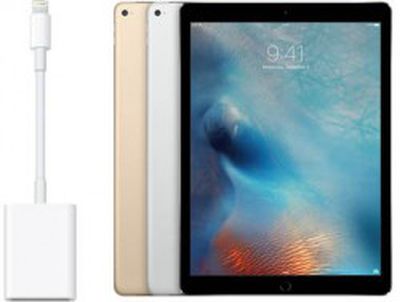
apple-sd-card-adapter-usb-3Apple has released a new Lightning to SD Card Camera Reader with support for up to USB 3.0 speeds on iPad Pro, and USB 2.0 speeds on all other iPad and iPhone models, as spotted by iDownloadBlog. The dongle retails for $29 on the Apple Online Store in the U.S. and is available to ship for delivery within approximately one week.

Last month, it was discovered that the iPad Pro's Lightning port supports USB 3.0 transfer speeds, allowing for data transfer speeds upwards of 60MB/s to a theoretical max of 625MB/s. All other iPads and iPhones can only transfer data at USB 2.0 speeds of around 25 to 35MB/s, since only the iPad Pro has the necessary hardware -- a Fresco Logic FL1100 4-port USB 3.0 Host Controller.

Apple has not updated its Lightning to USB Camera Adapter or other accessories to support the iPad Pro's USB 3.0 speeds, but multiple sources have previously confirmed that adapters are in the works. It remains unclear, however, if Apple plans on introducing new Lightning cables that will enable USB 3.0 speeds when transferring files from a computer to an iPad Pro.

Apple's new Lightning to SD Card Camera Reader is also available for £25 in the U.K. and $35 in Canada. Prices vary in other countries.

Related Roundup: iPad Pro
Buyer's Guide: iPad Pro (Neutral)

Popular Stories

apple price hike

Apple Just Increased Prices on MacBooks, iPads, and More

Thursday June 25, 2026 5:44 am PDT by
Apple today dramatically increased device prices across multiple product lines. Subscribe to the MacRumors YouTube channel for more videos. After temporarily taking it down earlier today, Apple's online store is back up with a series of product price increases. The changes are as follows: HomePod mini: $129, up from $99 (+$30) HomePod: $349, up from $299 (+$50) Apple TV: $199, up from...
iphone x flexible oled display

Apple Plans Wider Color Gamut for Future MacBook Pro, iMac, and iPad Pro

Monday June 29, 2026 6:35 am PDT by
Apple plans to adopt OLED panels capable of displaying a much wider range of colors, according to a new report from research firm TrendForce. The new panels would cover 95% of the BT.2020 color standard, which describes a far broader spectrum of colors than the DCI-P3 standard Apple's screens currently target. In practice, that means deeper, more accurate reds, greens, and blues. Reaching...
m5 ipad pro

Apple to Launch New iPad Pro in Spring 2027

Wednesday July 1, 2026 2:17 pm PDT by
Apple is planning to release new 11-inch and 13-inch iPad Pro models in spring 2027, reports Bloomberg. No major design changes are expected, with Apple focusing on internal upgrades. The iPad Pro models could use either M6 chips or M7 chips. Apple will introduce the M6 chip as soon as this year in an updated 14-inch MacBook Pro model, but it is aiming to release the M7 chip in the first...

Top Rated Comments

sputnikv Avatar
138 months ago
I would just say "Awesome", but one word responses aren't allowed.
Score: 11 Votes (Like | Disagree)
138 months ago
Useless to photographers until the iPad has a file system. I need to be able to move and organise RAW files between external drives and folders. Absolutely no support for this on iPad 'Pro'. One wonders.
Score: 8 Votes (Like | Disagree)
138 months ago
Useless to photographers until the iPad has a file system. I need to be able to move and organise RAW files between external drives and folders. Absolutely no support for this on iPad 'Pro'. One wonders.
iOS will probably never have what you think of as a 'file system' and even though I am an IT professional and power user, I hope Apple stick to their guns on that vision.

The file system is as outdated as the DOS interface and even though it took people a while to embrace the GUI interface all those years ago, it happened. Apple have implemented very clever, and more importantly 'secure' ways to share files between apps so you no longer need to have copies of copies of copies of files everywhere. You can simply use whichever tool is best for any given scenario.

It's not perfect yet by any means but if Apple were to 'give up' and just give us access to the raw filesystem it would be a great shame. Fortunately they have shown many times that they will stick to their guns (eg. floppy drives, optical drives, non-removable batteries) and generally the rest of the world catch up with their thinking eventually. I'm sure this will be the same situation.
Score: 7 Votes (Like | Disagree)
ericgtr12 Avatar
138 months ago
Great, now all they need is a file system.
Score: 6 Votes (Like | Disagree)
jclardy Avatar
138 months ago
So I'm gonna have to re-buy all my lightning cables because they are only capable of USB 2 speeds?
If you need USB 3 speeds, I almost never plug my phone in other than to charge. Maybe it would be nice for backups...but I just use iCloud. For the iPad Pro it would be nice to transfer files onto it, but you still have to go through iTunes so I tend to avoid that.

iOS will probably never have what you think of as a 'file system' and even though I am an IT professional and power user, I hope Apple stick to their guns on that vision.

The file system is as outdated as the DOS interface and even though it took people a while to embrace the GUI interface all those years ago, it happened. Apple have implemented very clever, and more importantly 'secure' ways to share files between apps so you no longer need to have copies of copies of copies of files everywhere. You can simply use whichever tool is best for any given scenario.

It's not perfect yet by any means but if Apple were to 'give up' and just give us access to the raw filesystem it would be a great shame. Fortunately they have shown many times that they will stick to their guns (eg. floppy drives, optical drives, non-removable batteries) and generally the rest of the world catch up with their thinking eventually. I'm sure this will be the same situation.
Are you using the same iOS 9 as I am? Because Apple's system of "Open In..." generates endless copies of files, with no way to properly manage them.

Take this incredibly rudimentary scenario. I use two apps to edit a file (Because one is good at one thing, and another is good at another.) We'll say we are modifying a PDF file.

- Use dropbox to "Open In..." app A
- Edit inside of app A, "Open In..." app B
- Edit inside of app B, "Open In..." Dropbox

How many copies of the file are there now? The answer is 3. Dropbox has the latest copy, App B has the latest copy as well (identical to the dropbox version, unless you edit it on another machine) and app A has an outdated copy missing changes from app B edits.

In what universe is this simpler than having App A and App B able to access the single copy of a file on dropbox?

And lets not get into the most obvious downfall of the iOS "file system", lack of external storage options.

I own an iPad Pro and I love using it, but it is years away from being able to replace a laptop for me, even for my hobby of photo/video editing. Primarily because of how difficult it is to move data to/from/within the OS.
Score: 5 Votes (Like | Disagree)
TJ82 Avatar
138 months ago
Ports as accessories.

Cha-Ching!

Back slaps all round.
Score: 5 Votes (Like | Disagree)