

Following in the footsteps of Juli, Joe, Mitchel, Marianne, and even MacRumors readers, I'm now adding my suggestions to the parade of holiday gift guides we've been publishing over the past week. Below you'll find a varied list of accessories that I, Eric Slivka, use on a daily basis. and hopefully there's something here for just about everyone with accessories for Macs, iOS devices, the Apple Watch, and the Apple TV all represented here.
- SteelSeries Nimbus Wireless Gaming Controller ($49.99)
SteelSeries has offered Apple-approved game controllers for some time now, but with the launch of the new Apple TV roughly six weeks ago, interest in such controllers is surging. Fortunately for Apple fans, the SteelSeries Nimbus is a solid option that notably relies on a Lightning port for charging, making it easy to use existing cables and even Apple's iPhone dock to recharge the controller.
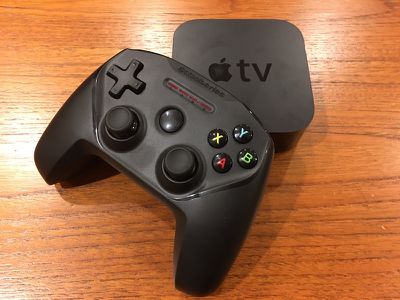
Apple has heavily featured the Nimbus alongside the Apple TV, and has equipped demo Apple TV units in its retail stores with the controller. The Nimbus is also included in a Disney Infinity 3.0 starter pack for Apple TV.
Gaming on the Apple TV is still in its early days, but the benefits of a controller over the included Siri Remote are already clear, enabling more precise and varied controls in a package that feels more natural in the hands when gaming. Beyond Apple TV, the Nimbus can also pair with iOS devices, enabling controller functionality for a number of games including Real Racing 3, Oceanhorn, and several titles in the LEGO series.
Make sure to check out our full review of the SteelSeries Nimbus for more details on the controller.
- Apple Watch Magnetic Charging Dock ($79.00)
I was skeptical of this one when it first leaked and even once it officially launched, but once I got it in my hands, I was hooked. Yes, it seems expensive, but keep in mind that it includes a 2-meter Lightning cable in the box, an accessory that Apple charges $29 for on its own.
Third-party Apple charging stands with the exception of the $130 combination Apple Watch and iPhone dock from Belkin do not include a charging cable of any sort, requiring users to supply their own Apple Watch charging cables at an additional cost unless they want to commit the sole cable that comes with the watch to that effort.
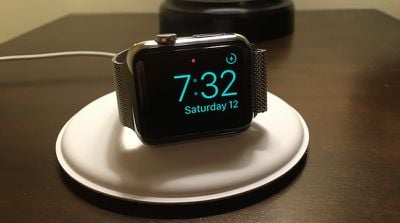
Unsurprisingly, Apple's dock has a premium feel, with a soft top and a microfiber bottom to prevent scratching. The center charging puck can lay flat or be swung up into a vertical position to charge the Apple Watch on its side, and the mechanism feels smooth and solid. The vertical orientation makes it great for Nightstand mode and for closed-loop bands. And while the disc shape takes up a bit more room than some other Apple Watch stands and docks, it's incredibly stable and with the charging puck folded flat the dock can be easily stored in a drawer or slipped into a bag.
The use of a Lightning cable for powering the dock is also a major advantage over third-party docks reliant on actual Apple Watch cables. I've got Lightning cables all over my house, so it's easy to move this Apple Watch dock anywhere in the house as needed and just plug a Lightning cable into it.
- Anker PowerPort 4 ($26.99)
Anker is an extremely popular accessory company due to its low prices, high-quality products, and good customer service, so their products are making several appearances in our gift guides. My choice is the PowerPort 4 USB wall charger, a compact charger that lets you charge up to four USB devices simultaneously from a single power outlet.
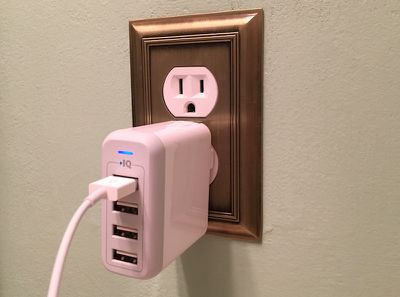
Introduced earlier this year, the PowerPort 4 includes a number of improvements over Anker's previous 4-port charger, including foldable prongs that make it great for travel and an increase to 40 watts from the previous 36-watt design. With 40 watts of charging power available, you can charge up to three iPads or two iPads and two iPhones simultaneously at high speed. A status light on the adapter tells you whether it's charging your connected devices at high speed (green) or normal speed (blue), making it easy to tell how much load you've got on the charger.
All of this comes in a package that's not a whole lot bigger and just a few bucks more than Apple's 12-watt iPad charger that only includes one USB port. With so many iOS devices, battery packs, and more sitting around my office and competing for outlet space with all of my other equipment, the PowerPort 4 is a must for keeping everything topped off.
- BB-8 App-Enabled Droid ($149.95)
Sphero's been involved with app-controlled toys for a few years now, but this holiday season sees the perfect tie-in to the upcoming Star Wars: The Force Awakens debut in the form of a BB-8 droid. This one's mostly going to appeal to kids (I've got two of my own who are in love with it) and it's definitely expensive, but it's a clever and fun toy for Star Wars fans if you're looking to splurge.
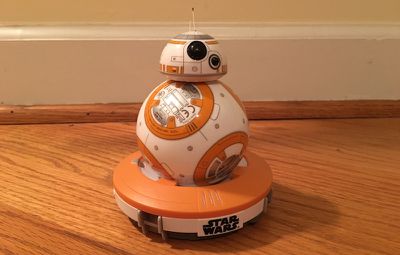
At its heart, BB-8 is very much like a standard Sphero, a gyroscope-equipped ball controlled via app from a paired iOS device. Unlike normal Sphero balls, however, BB-8 has an extra magnetically attached head to match the droid from the film. The magnets allow BB-8's head to stay upright (most of the time) even as its body is rolling around underneath.
Aside from simple steering controls on the app, BB-8 can also respond to voice controls and even go on "patrol mode" by itself to explore its environment, keeping track of obstacles and sounding alerts for "enemies" it encounters.
For more on BB-8, make sure to check out our full review.
- elago L3 Stand for Notebooks ($32.99)
I've been using elago's L3 Stand for a little over a year to elevate my Retina MacBook Pro a bit on my desk. It's a simple aluminum design that gives just right amount of elevation to the rear of the machine, improving air flow to help keep things cool. That's a plus when I'm driving one and sometimes two external monitors from it. My desk setup has my MacBook Pro sitting underneath a hutch, so I needed something that didn't add too much height, and the L3 Stand fits the bill perfectly.
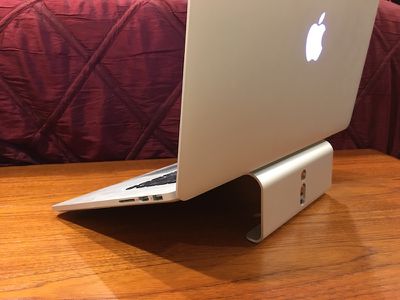
It's a fairly cheap investment as stands go, looks nice, has scratch-resistant silicone pads to protect the bottom and front edge of my MacBook Pro, and includes a pair of cable management holes in the rear. It's also available in silver, gray, and gold to match Apple's various notebook finishes.
For those who want to raise their machines a little higher and have some room to slide papers, a keyboard, or other desk items out of the way underneath, elago offers an alternative design with the L4 Stand.
- CalDigit Thunderbolt Station 2 ($196.99)
Yes, Thunderbolt 3 is right around the corner, but there are plenty of people who already have Thunderbolt 2 machines and might be looking for something to help make it easy to manage their peripherals. Thunderbolt docks have been notoriously slow to surface, but CalDigit's Thunderbolt Station 2 was one of the earlier ones out of the gate when it debuted early this year.
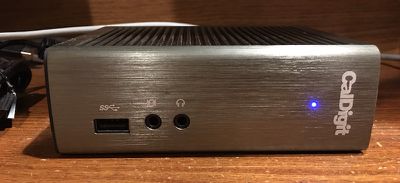
I've used a couple of different Thunderbolt docks, and CalDigit's has been the best fit for my needs. It's compact and sturdy, with good heft due to its ribbed metal enclosure that help dissipate heat. It can also be oriented either vertically or horizontally to fit various desk setups. The default orientation is vertical, with black cushioning covering the entire "bottom" of the device when standing up. If you wish to use the dock horizontally, CalDigit includes a pair of white rubber strips that easily slip onto the case's ridged casing for cushioning.
Most Thunderbolt docks come with a fairly standard set of ports of various types, and the Thunderbolt Station 2 covers those bases and then some, offering a pair of Thunderbolt 2 ports to allow for passthrough to daisy-chain additional Thunderbolt devices, an HDMI port, dual eSATA 6G ports for speedy data connections, and three USB 3.0 ports. As is also true of most docks, the majority of the Thunderbolt Station 2's ports are located on the back of the dock to keep cables out of the way, but the audio in/out ports and one USB port are located on the front for easy access. In addition to its easy accessibility, the front USB port also provides power even when the computer is turned off or disconnected, a convenient feature. The front of the dock looks clean with a brushed appearance, the three ports, a CalDigit logo, and a single blue light to show when the dock is connected to a computer. The light can be a bit bright if you have it on a desk in a bedroom for example, so those sensitive to light while sleeping may want to be mindful of the dock's placement.
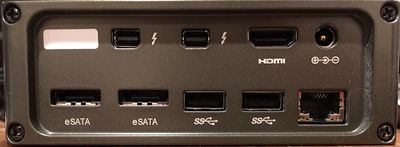
With many hard drive peripherals needing to be ejected before disconnection, CalDigit also provides a downloadable menu bar utility to make it easy to see connected devices and eject all of them at once prior to disconnecting the Thunderbolt dock from your machine.
The eSATA ports on the Thunderbolt Station 2 are a nice addition for power users, even if performance can be degraded under certain circumstances as they have to share the available bandwidth with other peripherals, but the ports will likely go unused by most consumers who have little need for the interface. Part of the compromise of including eSATA ports are the omission of extra USB ports or a Firewire port as seen on some competing docking stations, so that's something to keep in mind.
The Thunderbolt Station 2 carries a list price of $200, which is quite competitive in the docking station market, although Belkin and Kanex docks can sometimes be found at lower prices. Unlike some competitors, CalDigit's dock does not include a Thunderbolt cable, so if you don't already have one you'll need to pick one up separately. Fortunately, accessory vendors have slowly ramped up availability of Thunderbolt cables, so pricing has come down a bit on those over the past couple of years.
- Kenu Airframe+ Smartphone Car Mount ($29.75)
I reviewed this one nearly a year and a half ago before the larger iPhones even came out, and it's still my go-to solution for mounting my iPhone in the car. Available in black or white, the Airframe+ is a simple spring-loaded clamp that fits a variety of air vent sizes and styles, making it easy to put your phone wherever you need it. And its compact size means it's easy to slip it into a pocket or a bag.
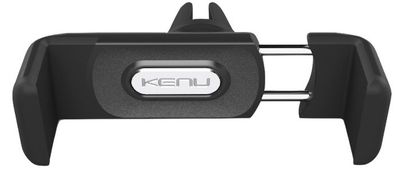
Kenu has also just released a new Dualtrip car charging solution with a pair of high-speed USB ports for charging multiple devices simultaneously. I haven't used the Dualtrip yet, as I have an existing dual-port car charger that works well, but it looks like a nice option that even fits inside an Airframe+ for storage and transport, and Kenu sells the two accessories together in an Airframe+ Car Kit bundle for a discounted price of $39.99.
Stay tuned as MacRumors staff members continue sharing their favorite products in the form of these gift guides over the next few days, and be sure to weigh in our Reader Picks guide to voice your own opinion on the best accessories out there.















































Top Rated Comments
This means you're actually only paying $40 for the dock, which is actually a good deal for an Apple accessory if you think you'd otherwise need a second cable for your Watch. Personally I need a dock for my apartment and another for my parent's home when I visit frequently enough as I don't like the inconvenience of disconnecting my cable/dock and transporting it with me. And since this dock appears to be portable it saves me the need to carry around a somewhat flimsy, loose cable if I do go traveling anywhere else.