

Microsoft Office Update Brings Drawing Tools for iPad, 3D Touch for iPhone 6s - MacRumorsOpen MenuShow RoundupsShow Forums menuVisit ForumsOpen Sidebar
Skip to Content

Microsoft Office Update Brings Drawing Tools for iPad, 3D Touch for iPhone 6s

by

Microsoft today updated its suite of Office apps designed for the iPad and the iPhone, adding features to take advantage of the iPad Pro's Apple Pencil and the 3D Touch function in the iPhone 6s and 6s Plus. Word, Excel, and PowerPoint have all been updated with the new tools.

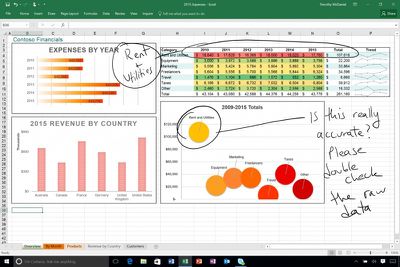
On iPads, there's a new Draw tab that can be found in each of the three apps. The drawing tools in this tab allow iPad owners to use a pen, finger, or Apple Pencil to write, draw, highlight, and annotate various Microsoft Office documents. Hand-drawn shapes can even be transformed into customized shapes. Draw is limited to the iPad and not available on the iPhone at this time.
microsoftdrawingtool
On the iPhone 6s and 6s Plus, Word, Excel, and PowerPoint have new 3D Quick Actions that are accessible on the iPhone's Home screen. The Quick Actions let users create new documents or quickly open recently created documents. For all iOS 9 users, Microsoft Office documents will now show up in Spotlight search, making it easy to locate files.

All three apps are also gaining a new cloud font feature, which provides on-demand access to fonts. PowerPoint includes one additional new feature not found in the other updates, a Morph update that allows Morph to be used to move several objects at once.

What's New
- Annotate with Ink: With the tools on the new Draw tab, use your pen, finger, or Apple Pencil to write, draw, and highlight. (iPad only)
- 3D Touch: Use 3D Touch from the home screen to quickly create or open a file. (iPhone 6s or 6s Plus only)
- Fonts from the cloud: Download fonts on demand, when you need them.
- Spotlight search: Quickly find recently opened documents in Spotlight. (iOS 9 required)

All of Microsoft's Office apps can be downloaded from the App Store for free. Documents can be created and edited at no cost on most iOS devices, but unlocking additional tools requires an Office 365 subscription priced at $6.99 per month. Using the Office apps on the iPad Pro requires a subscription.

- Microsoft Word [Direct Link]
- Microsoft Excel [Direct Link]
- Microsoft PowerPoint [Direct Link]


Top Rated Comments

136 months ago
A shiver went down my spine… for a few seconds I started liking a Microsoft product :) Seriously, can Apple's own iWork apps do that? I mean if Microsoft is ahead of the game - and Apple itself - on iPad Pro, what's the world come to?
Score: 3 Votes (Like | Disagree)
Franksan Avatar
136 months ago
Mad respect for Microsoft stepping up their game. Solid update. I love using the iOS Office suite!
Score: 2 Votes (Like | Disagree)
136 months ago
I take it you mean move/resize note containers?

It's possible to move text using cut/paste, but there doesn't appear to be a way to move/resize note containers on the iOS app.
Yes that's what I meant. Damn I wish they would fix that annoying bug already
Score: 1 Votes (Like | Disagree)
Krevnik Avatar
136 months ago
Will annotations drawn on a Word document on ipad be viewable on Word for Mac? Can you manipulate the drawings on a Mac?
Yes, and kinda. It's a shape, so you can use tools that work with shapes (resize, recolor, move, delete, group, etc), but you can't manipulate it in the sense of splitting it or erasing parts of it.
Score: 1 Votes (Like | Disagree)
sza Avatar
136 months ago
I never fit myself to devices. Use productivity apps like iWork/Office are neither ergonomic nor productive on small screens.
Score: 1 Votes (Like | Disagree)
69Mustang Avatar
136 months ago
A shiver went down my spine… for a few seconds I started liking a Microsoft product :) Seriously, can Apple's own iWork apps do that? I mean if Microsoft is ahead of the game - and Apple itself - on iPad Pro, what's the world come to?
Weird ain't it? Usually, I like the bad guy to be clearly defined. This new MS under Nadella is like some sort of anti-hero. Kills for a good reason, but likes it just a little too much.
Score: 1 Votes (Like | Disagree)

Popular Stories

iCloud iPhone 17 Pro

iPhone Users Who Pay for iCloud Storage Get Two New Perks on iOS 27

Thursday July 2, 2026 6:10 am PDT by
If you pay for certain iCloud+ storage plans beyond the 5GB that Apple offers for free, you will receive two more perks on iOS 27 at no additional cost. A summary of the two new iCloud+ perks on iOS 27:Increased daily usage limits for some new Apple Intelligence features, including image generation in the revamped Image Playground app. HomeKit Secure Video cameras receive generated video...
iPhone 4 on Black Feature

Apple Facing One of Its Worst Leaks Since the iPhone 4

Thursday July 2, 2026 9:53 am PDT by
Apple supplier Tata Electronics recently suffered a cyberattack that resulted in thousands of confidential files being published on the dark web, and this reportedly included some photos and documents related to the upcoming iPhone 18 Pro. We have elected not to share any of the leaked photos in this story due to the illegal nature in which they were obtained, but they can easily be found...
American Express Gold Apple Pay Feature

American Express Announces New Apple Pay Feature

Tuesday June 30, 2026 10:27 am PDT by
American Express today announced that you can now redeem Membership Rewards points when checking out with Apple Pay on the web and in apps on the iPhone and iPad. When checking out with Apple Pay on iOS 18 or iPadOS 18 or later, tap on your eligible American Express card (Platinum, Gold, Green, and others) and select the Membership Rewards points option. You can use points to cover all or...














