

Safari Crashing for Both iOS and Mac Users, Fixes Identified [Update: Fixed] - MacRumorsOpen MenuShow RoundupsShow Forums menuVisit ForumsOpen Sidebar
Skip to Content

Safari Crashing for Both iOS and Mac Users, Fixes Identified [Update: Fixed]

Safari users are today reporting an odd issue causing Apple's web browser app to crash on both Macs and iOS devices. Several Mac users are also not receiving autocomplete suggestions when entering text into Safari's address bar, with many pages including sites like Google failing to load completely. For many iPhone and iPad users, simply tapping on the URL bar causes Safari to crash.

URL searches, autocomplete, Top Sites and other Safari features rely on queries being sent to and returned by Apple's servers, suggesting this is where the problem lies. The issue also seems to depend on what data the browser most recently cached.

The current fix for iOS and Mac involves disabling Safari Suggestions, which stops the app from crashing to the home screen. On your iOS device, go into Settings, tap Safari, and toggle off the "Safari Suggestions" switch. On your Mac, the same setting is found in Safari -> Preferences -> Search.
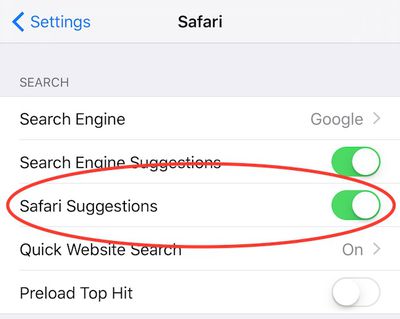
Safari bug
Alternatively, opening a Private Browsing window also appears to solve the issue.

The problem appears to be affecting users around the world and will likely be resolved when Apple corrects the service on their end.

Update: According to BuzzFeed, Apple has now fixed the issue that was causing the Safari browser to crash on iOS and Macs due to issues with Safari Suggestions.


Tags: iOS, Mac, Safari

Popular Stories

MacBook Pro Low Angle Wide Lens

macOS 27: Two More Changes Leaked Ahead of WWDC Next Month

Sunday May 10, 2026 9:45 am PDT by
macOS 27 will have a "slight redesign" compared to macOS Tahoe, according to the latest word from Bloomberg's Mark Gurman. In his Power On newsletter today, Gurman said the design changes will help to improve the readability of macOS Tahoe's Liquid Glass interface:If you've used Tahoe, you're likely familiar with some of the quirks — particularly the transparency effects and shadows that...
Apple Card iPhone 16 Pro Feature

Apple Card Promo to Offer Free AirPods Pro 3

Friday May 15, 2026 8:59 am PDT by
Starting as early as next week, customers who sign up for an Apple Card at Apple's retail stores in the U.S. will receive $249 cash back when they purchase AirPods Pro 3, according to Bloomberg's Mark Gurman. The promotion has yet to be officially announced by Apple, so exact terms and conditions are not available at this time. AirPods Pro 3 are priced at $249 in the U.S., so customers who...
Apple WWDC25 iOS 26 CarPlay Light mode 250609

Six Popular iPhone Apps Now Available on CarPlay

Thursday May 14, 2026 9:10 am PDT by
Apple's CarPlay system for accessing iPhone apps on a vehicle's dashboard screen has received six popular apps in recent weeks: ChatGPT, Perplexity, Grok, Google Meet, WhatsApp, and the indie artist streaming platform Audiomack. Make sure you have the latest version of each app and they will automatically appear on CarPlay. ChatGPT Starting with iOS 26.4, CarPlay supports voice-based...

Top Rated Comments

135 months ago
I wonder if this is actually a problem with Google search autocomplete because I'm not experiencing the problem and I use duckduckgo which has its own autocomplete. Obviously still a bug in Safari but perhaps triggered by Google.
Score: 10 Votes (Like | Disagree)
135 months ago
It just works...
Score: 7 Votes (Like | Disagree)
japanime Avatar
135 months ago
Safari feels snappier ... at crashing! :D
Score: 6 Votes (Like | Disagree)
135 months ago
I wonder if this is actually a problem with Google search autocomplete because I'm not experiencing the problem and I use duckduckgo which has its own autocomplete. Obviously still a bug in Safari but perhaps triggered by Google.
Using DuckDuckGo too, Safari works fine on all my devices
Score: 5 Votes (Like | Disagree)
kaostheory777 Avatar
135 months ago
Grrrr - i've spent the last 2 hours thinking my Safari was broken, deleting .plist files - reseting - fixing permissions etc. Oh well at least I stopped short of a full reinstall. Fingers crossed this is fixed by tomorrow. I don't like using Chrome :(
Score: 4 Votes (Like | Disagree)
135 months ago
MacRumors content image

......I thought my iMac got a virus or something. It's been not working for a few hours already. Search bar non responsive and typing did not even appear on search bar.

Attachment Image
Score: 4 Votes (Like | Disagree)













