

StarTech's Dual-Monitor Thunderbolt 2 Docking Station Features Two DisplayPorts - MacRumorsOpen MenuShow RoundupsShow Forums menuVisit ForumsOpen Sidebar
Skip to Content

StarTech's Dual-Monitor Thunderbolt 2 Docking Station Features Two DisplayPorts

by

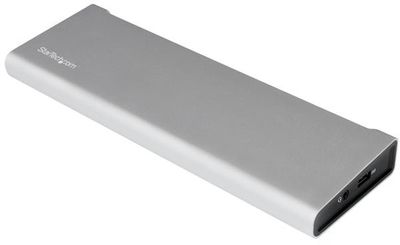
StarTech's latest Dual-Monitor Docking Station debuted in December, with a feature that sets it apart from other docking stations: dual DisplayPort 1.2 connections.
startechdock
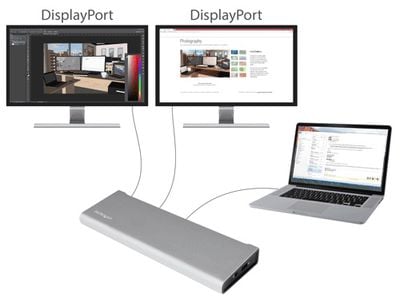
The Docking Station has a Falcon Ridge quad-channel Thunderbolt 2 controller for 20GB/s data transfer speeds. It can power two 2560 x 1600 displays through its DisplayPort connections, allowing for a dual-monitor setup that doesn't require a Thunderbolt-equipped display. It can also power a single 4K display (DisplayPort or Thunderbolt) or a DisplayPort display alongside a Thunderbolt display with a 4K resolution on the DisplayPort monitor.
startechdock2

This Thunderbolt 2 dock lets you connect two displays to your laptop using common DisplayPort monitors. Traditional Thunderbolt docks require that at least one of your monitors is a Thunderbolt display for dual video, which means you might need to spend extra time and money on the additional display. Because it offers two DisplayPort connections, the dock makes it easy to create a highly productive dual-video workstation, with no additional costs or inconveniences.

Along with two DisplayPorts, there are two Thunderbolt 2 connections, a Gigabit Ethernet port, and four USB 3.0 ports (one of which is Battery Charging Specification 1.2 compliant for charging devices when not connected to a laptop). It supports 5.1 digital optical audio output, line input, and includes a 3.5mm headphone jack, plus an eSATA port for connecting external storage devices. Up to 12 peripherals can be connected at one time and Thunderbolt daisy chaining is supported.

The Dual-Monitor Docking Station can be purchased from StarTech for $347.99, but it's also available from Newegg at the much lower price of $290.


Top Rated Comments

134 months ago
I don't consider myself a super cheapie or anything but the prices of these Thunderbolt docks is outrageous. Where's the ~$100 model with HDMI, gigabit ethernet, and a few extra USB 3.0? Not a huge power user with eighteen displays; don't care about Thunderbolt passthrough (MBP has 2xThunderbolt), but would still like an all-in-one solution with the other stuff for a reasonable price. Anything? Cheapest "dock" I can find is the StarTech dongle ('http://www.newegg.com/Product/Product.aspx?Item=9SIA24G2KG2051') with 1xUSB and 1xEthernet (no HDMI). Yes I know I can just use a separate cable for HDMI but that defeats the purpose of a single cable for the dock.
Score: 6 Votes (Like | Disagree)
HiVolt Avatar
134 months ago
These thunderbolt docks are way too much for what you get.

Why is it still so damn expensive? TB was released on 2011 Macs, wasn't it? 5 years isn't enough for the prices to come down?
Score: 2 Votes (Like | Disagree)
spaceballl Avatar
134 months ago
Man we have so many Thunderbolt 2 docking options... and now there are a whole batch of USB-C docking options for the 12" MacBook.

Best bet: Hold off for Thunderbolt 3 / USB-C, when the ports are the same, and get a new Mac then.
Score: 2 Votes (Like | Disagree)
133 months ago
I got one to test with at work and I'm unable to get the Dell 5k display to work at 5k with it. Still trying things but not sure it will be possible. Anybody else try this with a 5k monitor?
Score: 1 Votes (Like | Disagree)
Quu Avatar
134 months ago
I've wanted to pick one of these up but the docks just cost too much money. It's not that I'm adverse to spending the money for a quality product but these prices for such little functionality is silly.

I'd rather plug in two cables to power two external displays than spend $300 to plug one cable in. Thunderbolt IC's need to come way down in price.
Score: 1 Votes (Like | Disagree)

Popular Stories

macOS 27 on MacBook Pro

Apple Says macOS 27 Won't Be Compatible With These Macs

Wednesday June 3, 2026 8:29 am PDT by
During WWDC 2025, Apple revealed that macOS 26 Tahoe would be the final major macOS version for Intel-based Macs. macOS 27 will be compatible with Apple silicon Macs only, meaning that you will need a Mac with an M-series chip or a MacBook Neo with an A18 Pro chip in order to install the software update. Apple will unveil macOS 27 during its WWDC 2026 keynote this Monday, June 8, and the...
MacBook Neo on Yellow Feature

MacBook Neo is So Popular That Apple Reportedly Doubled Production

Wednesday June 3, 2026 9:24 am PDT by
On an earnings call in late April, Apple's CEO Tim Cook said that customer response to the MacBook Neo was "off the charts," and the popularity of the laptop has reportedly led the company to significantly boost production. Apple supply chain analyst Ming-Chi Kuo this week said he believes that MacBook Neo shipments to Apple were doubled from an initial target of 5 million units to 10...
iphone 18 pro blue%402x

iPhone 18 Pro: Dark Cherry, Light Blue, and Dark Gray Chassis Leaked [Update]

Thursday June 4, 2026 5:18 am PDT by
Update: Since publication, new information has come to light suggesting the images have been AI-manipulated and are not in fact iPhone 18 Pro chassis parts. The original article follows. The color options Apple is reportedly planning for the upcoming iPhone 18 Pro and ‌iPhone 18 Pro‌ Max have appeared online today in the form of images of chassis parts of unknown authenticity....















