

Apple Looks to Streamline Clarification of Awkward Autocorrect Messages in New Patent Application - MacRumorsOpen MenuShow RoundupsShow Forums menuVisit ForumsOpen Sidebar
Skip to Content

Apple Looks to Streamline Clarification of Awkward Autocorrect Messages in New Patent Application

by

The United States Patent and Trademark Office recently published a new patent application originally filed by Apple last July, detailing a system in which the receiver of an iMessage could be notified when pieces of the message are scrambled incoherently by the company's autocorrect system (via AppleInsider). The patent isn't a proactive solution to enhance the sometimes spotty nature of autocorrect, but simply a way to let the person on the other end of the text know what's happening, and give each user tools to better explain what they meant.

Apple describes a new user interface that would highlight any words or phrases in a message that have been siphoned through autocorrect. The system wouldn't be advanced enough to reveal the specifically intentioned words the sender meant, but at least give the receiver a heads up about which parts of the text were corrected.
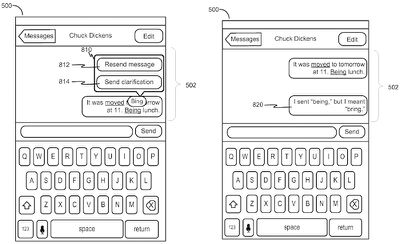
autocorrect patent 1

A design of the sender-side UI

Parts of the patent reveal iterations of the idea that can streamline the clarification process, as well. For example, a description of the sender-side user interface includes a prompt that pops up -- after a user taps on the autocorrected word -- with an option to "Send clarification" to the receiver. The canned message fills out the phrase, "I sent [wrong word], but I meant [correct word]." If they want a complete do-over, the user could also just opt to re-send the entire message.
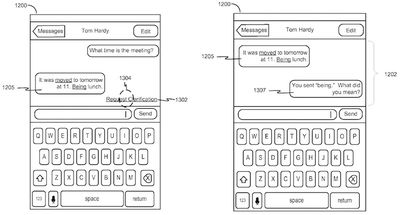
autocorrect patent 2

A design of the receiver-side UI

On the receiver-side user interface, if the sender isn't opting to fix the issue themselves, the other person can "Request clarification" by tapping on the highlighted autocorrect word or phrase. The automated message is similar to the previous sender-side phrase, asking "You sent [wrong word]. What did you mean?"

If implemented in a future version of iOS, the autocorrect highlight patent could be similar to the way iOS currently underscores vague references to dates and times when users send and receive text messages. Apple's new patent could be slightly more helpful for most users than that feature, however, especially given the speed with which iPhone users have grown accustomed to texting on the device, and how frustrating it can be to realize autocorrect interfered with your message.

Like most patents, it's still advised to be wary of how long it'll take Apple to implement the autocorrect notification system into iOS, if it ever will. Still, it's easy to see how useful and streamlined such a feature could be, without completely taking out much of the humorous -- and sometimes awkward -- mishaps for which autocorrect has become famous.


Tag: Patent

Top Rated Comments

136 months ago
Yey better autocorrect, it works most of the tomatoes.
Score: 22 Votes (Like | Disagree)
ArtOfWarfare Avatar
136 months ago
I feel that it would be vastly simpler to just fix autocorrect. I think if they fixed these two things, it would do away with 99% of false corrections by autocorrect:

#1: When I type a word that includes a capital in it, and it isn't the the first letter of the sentence, don't touch it. Ever. It's a name or trademark or something - it isn't ordinary English, leave it alone.

#2: When I type a valid English word, leave it alone. I don't care that it's statistically improbable that it's what I meant or whatever. AFAIK, I have never mistakenly typed one valid English word but meant another.

I remember making this suggestion when I was using my first iPhone, the 3GS, 7 years ago. I was so sure that Apple would swiftly fix it. Here we are, 7 years later with iOS 9, and autocorrect still sucks just as badly as it did then.
Score: 10 Votes (Like | Disagree)
RichTF Avatar
136 months ago
Sounds like a ducking awesome idea for iMessage!
Score: 7 Votes (Like | Disagree)
gaximus Avatar
136 months ago
Um, no. I don't have that problem. I don't press my finger in the same spot when I mean different letters, so I don't mix up top or too (because there's an o right before the letter that could be mixed up).

I definitely don't type letters in the wrong order and end up with no when I meant on or vice versa.

I could imagine there are some situations where autocorrect's current behavior is better than its behavior if you make the changes I proposed, but they seem exceedingly rare to me.
Wow I've never meet someone who never makes a mistake while typing. You must be an amazing typist or type so slow that its impossible to make a mistake. Some words I type so fast from muscle memory I'll mix up the characters, even in my own name.
Score: 6 Votes (Like | Disagree)
justperry Avatar
136 months ago
Autocorrect really sucks when you are bilingual, sometimes I deliberately type words in a different language but it autocorrects, it shouldn't do that when you have more than 1 keyboard language on your phone, or even on OS X.
Score: 6 Votes (Like | Disagree)
redscull Avatar
136 months ago
I feel that it would be vastly simpler to just fix autocorrect. I think if they fixed these two things, it would do away with 99% of false corrections by autocorrect:

#1: When I type a word that includes a capital in it, and it isn't the the first letter of the sentence, don't touch it. Ever. It's a name or trademark or something - it isn't ordinary English, leave it alone.

#2: When I type a valid English word, leave it alone. I don't care that it's statistically improbable that it's what I meant or whatever. AFAIK, I have never mistakenly typed one valid English word but meant another.
Seriously. Those are my same top two recommendations. They seem so ridiculously obvious to anyone and everyone 5 minutes into typing on an iPhone that I'll forever be flabbergasted that it's not how it works. There must be a hard-headed Senior VP somewhere who just flat put his foot down, insisting the functionality remain stupid, despite every underling and QA in Apple telling him it's broken.

My number three: If you replace a word I typed with a Capitalized word, and I backspace it because autocorrect was wrong, don't preserve the damn capitalization. It's so annoying trying to fix both the miscorrection and the miscapitalization. In fact, I don't think capitalized words should even be a valid replacement for my typo'd word unless I spelled it exactly correctly and merely lacked the capitalization. Or my typo was itself capitalized, explicitly indicating that I want it corrected to a capitalized word.
Score: 5 Votes (Like | Disagree)

Popular Stories

iOS 27 Next to iPhone

Here's When iOS 27 Rolls Out Today in Every Time Zone [Update: It's Out]

Sunday September 13, 2026 3:00 am PDT by
Update 10:04 a.m.: iOS 27 is rolling out now, though it may take a bit for all users to see it, so keep checking! Apple is about to release iOS 27, which will finally deliver more advanced Siri AI capabilities as well as a variety of other refinements, improvements, and new features to iPhones. It's Apple's biggest software update of the year, and Apple announced at Wednesday's iPhone event...
iOS 27 Icon iPhone

iOS 27 Available Now With These 8 New Features

Monday September 14, 2026 9:00 am PDT by
Update — 10 a.m. Pacific Time: Apple has released iOS 27. During its iPhone 18 Pro and iPhone Duo event last week, Apple announced that iOS 27 will be released widely on Monday, September 14. iOS 27 should be available around 10 a.m. Pacific Time / 1 p.m. Eastern Time today via the Settings app, under General → Software Update. Below, we have highlighted eight new features and...
Apple iCloud Plus expansion hero

iCloud+ Now Includes Apple TV, Apple Arcade, and Curated Apple Music Stations in Over 100 Countries

Tuesday September 15, 2026 1:43 am PDT by
Apple today announced a new subscription initiative that turns paid iCloud+ subscriptions into a broader services bundle in more than 100 countries. In select countries, Apple says every paid iCloud+ plan, including the cheapest 50GB tier, now includes Apple TV and Apple Arcade "at no additional cost," while family sharing extends the storage, TV and Arcade access to up to five people....













