

Giphy Launches New 'Giphy Keys' iOS Keyboard to Easily Share Animated GIFs - MacRumorsOpen MenuShow RoundupsShow Forums menuVisit ForumsOpen Sidebar
Skip to Content

Giphy Launches New 'Giphy Keys' iOS Keyboard to Easily Share Animated GIFs

by

Giphy today launched its own iOS keyboard, called Giphy Keys, that will let users search for and send GIFs without having to navigate to a separate keyboard application. Once users install Giphy Keys as a new keyboard in settings -- and allow it full access -- the app can be selected as a keyboard by tapping the globe icon whenever the keyboard is open on iOS.

The advantage of Giphy Keys is that anyone who constantly navigated through multiple keyboards to type messages and search for GIFs can now do both in one place. The top of the keyboard has a search functionality to find a GIF related to a specific topic, but Giphy also provides various categories related to moods or trends whenever you don't have a specific GIF in mind.
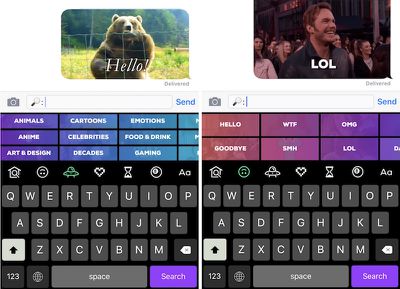
Giphy keys 2

GIPHY Keys is the easiest and fastest way to browse, search, and share GIFs in your text messages -- right from your keyboard! Not only do you have access to GIPHY's collection of millions of GIFs, you can play with our special GIPHY commands to make and discover so much more awesome content.

Similar to other GIF apps, once a user finds their desired GIF, all that needs to be done is a simple copy and paste into the message field and then hit the send button. Giphy Keys also introduces a new 8ball tab, where users can ask the app a question and receive an answer in GIF form. The section also gives weather forecasts for specific zip codes, and can animate words and phrases, all with GIFs.

For users who integrate GIFs into every corner of their iOS messaging experience -- from iMessage to Snapchat and other clients -- Giphy Keys should be a helpful addition to their daily perusal and sending of the popular animated format. Those interested can download Giphy Keys from the App Store for free [Direct Link].


Tag: Giphy

Top Rated Comments

132 months ago
This is no different than any other GIF app. They all have search and they all have normal keyboards too, I don't get it.

None of them have autocorrect, so you'll always have to switch back and forth between a GIF app and the keyboard app. So just use whichever GIF app you prefer. This one brings nothing new to the table.
Score: 2 Votes (Like | Disagree)
H3boy Avatar
132 months ago
I still like the Riffsy keyboard more
Score: 1 Votes (Like | Disagree)
Archmage Avatar
132 months ago
I wish I wouldn't have to paste, that the keyboard could insert the image just like a letter or word. (Same for bitmoji, etc).
Score: 1 Votes (Like | Disagree)
acearchie Avatar
132 months ago
A little clunky at the moment but I think this will be replacing my other keyboards.

Looking forward to trying it out further.
Score: 1 Votes (Like | Disagree)

Popular Stories

Aston Martin CarPlay Ultra Screen

Apple Says CarPlay Ultra is Coming to These Vehicle Brands

Thursday May 21, 2026 11:53 am PDT by
Last year, Apple launched CarPlay Ultra, the long-awaited next-generation version of its CarPlay software system for vehicles. Nearly a year later, CarPlay Ultra is still limited to Aston Martin's latest luxury vehicles, but that should change fairly soon. In May 2025, Apple said many other vehicle brands planned to offer CarPlay Ultra, including Hyundai, Kia, and Genesis. CarPlay Ultra...
iphone 18 pro blue%402x

iPhone 18 Pro: Dark Cherry, Light Blue, and Dark Gray Chassis Leaked [Update]

Thursday June 4, 2026 5:18 am PDT by
Update: Since publication, new information has come to light suggesting the images have been AI-manipulated and are not in fact iPhone 18 Pro chassis parts. The original article follows. The color options Apple is reportedly planning for the upcoming iPhone 18 Pro and ‌iPhone 18 Pro‌ Max have appeared online today in the form of images of chassis parts of unknown authenticity....
iOS 27 All the New App Features

iOS 27: All the Rumored App Features

Wednesday June 3, 2026 3:48 pm PDT by
Siri is getting a major overhaul in iOS 27, but Apple also has some big updates planned for apps like Camera, Photos, and Wallet. There are multiple new AI features in the works, plus some non-AI upgrades. Camera Apple is moving Visual Intelligence from the Camera Control button to the Camera app in iOS 27, according to Bloomberg. There will be a Siri mode that will be available alongside...














