'WhoApp' Provides Users With Detailed Unknown Caller Information for Free [Updated] - MacRumorsOpen MenuShow RoundupsShow Forums menuVisit ForumsOpen Sidebar
Skip to Content

'WhoApp' Provides Users With Detailed Unknown Caller Information for Free [Updated]

by

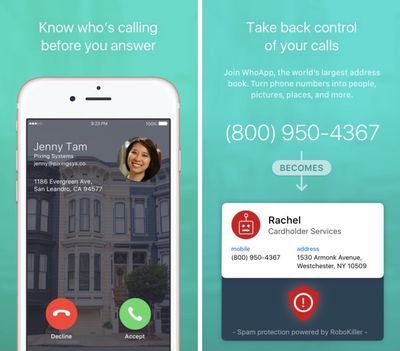
A new iOS app launching today, called WhoApp, plans to provide its users with detailed information about unknown callers soliciting their smartphones. Created by developer TelTech, WhoApp promises to recognize calls from telemarketers, wrong numbers, and potential scammers by returning information about the unknown dialer's name, picture, address, and even a Google Street View image of their location.

The app works through a two-step process: when users receive an undesirable call from a number not stored in their iPhone, they hit the decline button to send the call to WhoApp. Next, the app dials back the number to your phone with all of WhoApp's promised data points, allowing you to make a better decision about whether or not the call needs to be answered or ignored.

“For nearly a decade, we have focused on building innovative privacy and security apps that help people take control of their phones, and WhoApp will be another game-changer for iPhone users constantly wondering, ‘Should I take that call?’” said Meir Cohen, WhoApp’s CEO. “Turning caller ID into a name, face, and even a person’s front lawn was never before possible, and will change the way we use our iPhones.”

TelTech created a similar app before, called TrapCall [Direct Link], but WhoApp notably differs from the company's previous unknown caller ID creation in that it's free to download and requires no subsequent in-app purchases or paid subscription services.

WhoApp has a few other features as well, including its own phone dialing pad that lets users look up information on a phone number to find more information about someone before hitting the dial button. TelTech also says that the app "learns and grows with every call," getting smarter with age in determining between different types of calls, from scams and telemarketers, to someone potentially important not yet stored in your smartphone.
whoapp 1
Privacy and information gathering may be an issue for some users interested in WhoApp (the setup process requires access to an iPhone's address book, and it's heavily encouraged for users to connect to Facebook), but TelTech has launched a suite of call-related apps that have encouraged individual privacy. One of its previous creations, RoboKiller, won the FTC's anti-robocall competition last year, and another encourages identity protection by spoofing a user's real name and number on other smartphones to ensure anonymity.

WhoApp is currently available exclusively on the iOS App Store [Direct Link], but TelTech is additionally planning to launch the app on Android sometime this fall.

Update: WhoApp has been removed from the App Store, which the company claims is a temporary move to clean up the app and relaunch it in the coming weeks. Its removal is theorized by some to be at the hands of Apple due to privacy concerns, since the app accesses a user's address book to add entries into its massive "Contacts Database," bolstering its unknown caller identification features. According to one MacRumors tipster, "The app stole the address book info on my computer and sold it."


Tag: WhoApp

Top Rated Comments

137 months ago
This app is a privacy nightmare, they get all this information by uploading people's address books who sign up.
No kidding. Their privacy policy:

"When you give WhoApp permission to do so, WhoApp accesses your mobile phone’s address book and collects the names, phone numbers, addresses and certain other information about your contacts ("Contact Information"). WhoApp incorporates Contact Information into a database that it maintains of all its users’ contacts (“Contacts Database “). When your Contact Information is incorporated into the Contacts Database, it is no longer linked or linkable back to you. The Contacts Database is used by WhoApp and by apps that are offered by the company that offers WhoApp (or its affiliates) to fulfill customers’ requests for service and to improve each app’s services for its customers. PLEASE BE AWARE THAT IF YOUR PHONE’S ADDRESS BOOK CONTAINS AN ENTRY FOR YOU, THAT INFORMATION WILL BE DOWNLOADED TO THE CONTACTS DATABASE JUST LIKE ANY OTHER CONTACT INFORMATION."

No thanks - I don't want my friends/family (with address and pictures?) to be entered in here, and I hope they wouldn't either.

Edit: Is this even legal? Sharing personal information of others w/o consent? This is really scary/sketchy stuff. If each phone has an average of say, 50 contacts, and they get 100,000 users...
Score: 24 Votes (Like | Disagree)
_mdavenport Avatar
137 months ago
WhatsApp
WhoApp

Next up: WhereApp, WhenApp, WhyApp?
Score: 19 Votes (Like | Disagree)
macduke Avatar
137 months ago
Every time I get a suspect call, I just copy and paste the number into Google. About 9/10 times it finds the number immediately as a spammer, and I just tap block on the number and never get a call from them again.

What we really need is tougher regulation of phone numbers and the companies or entities behind them. There needs to be a system where a number can get flagged by users, and then a government agency investigates the business or entity. It's incredible to me that there are so many businesses and shady operations able to get an actual phone number that they can then use to spam and scam innocent people. Many times older people (I mean old enough that they get confused easily) are taken advantage of by these people. How can they get a phone number without some sort of deeper information provided to the phone company? To get a phone number, you should have to register a lot of verified personal info, and then be held responsible for what happens on that phone line. It shouldn't be so easy to get a phone number anonymously.
Score: 17 Votes (Like | Disagree)
LordQ Avatar
137 months ago
Apple should buy this!
Score: 15 Votes (Like | Disagree)
137 months ago
Apple: We want this as an add-on to incoming calls. We don't want to decline and click on an app. Been waiting for this for years now.
Score: 12 Votes (Like | Disagree)
JoEw Avatar
137 months ago
so the VM goes to WhoApp and not my phone?
This app is a privacy nightmare, they get all this information by uploading people's address books who sign up.
Score: 11 Votes (Like | Disagree)

Popular Stories

apple pro tell logo

Apple Launching Five New Products Today

Thursday November 5, 2026 12:59 am PST by
Apple is launching five new products on Friday, November 6, following pre-orders that opened last week, including its first touchscreen MacBook Pro models. The following new products will be available from today: iPad mini with OLED display and A20 Pro chip iMac with M6 chip 14-inch MacBook Pro with M6 chip 14-inch MacBook Pro with OLED touchscreen 16-inch MacBook Pro with OLED...
duo aquarium

More Fun iPhone Duo Apps: 30 New Picks to Try

Friday November 6, 2026 3:27 pm PST by
When the iPhone Duo launched, we shared a list of some of the fun apps developers created for the new form factor. Two weeks out, developers are continuing to come up with fresh ideas, so we thought we'd share some of our favorites. Games Marbles Unhinged ($2.99) - Marbles Unhinged is a marble maze designed for the Duo. When you fold it, the floor turns into a ramp. If you stand the top...
silver iphone 18 pro

Apple Rumored to Drop the iPhone's Action Button Next Year

Friday November 6, 2026 6:07 am PST by
Apple plans to merge the iPhone's Action button with the Camera Control starting next year, according to the leaker known as "Instant Digital." In a new post on Weibo, the leaker claimed that a single press of the combined button would open the camera, while a long press would trigger the function assigned to the Action button. They explicitly clarified that the dedicated Action button would ...

Latest Stories
Early Apple Black Friday Deals on Apple Watch, MacBook Air, and More
13 hours ago
'Backglow' Lets You Customize New MacBook Pro's Glowing Apple Logo
13 hours ago
Top Stories: Apple Product Launches, iOS 27.3 Beta, and More
20 hours ago
More Fun iPhone Duo Apps: 30 New Picks to Try
1 day ago
Hands-On With Apple's New OLED Touchscreen MacBook Pro
2 days ago
Apple Store With All-New Design Opening Soon in Southern California
2 days ago
Control the Glowing Apple Logo on Your New MacBook Pro
2 days ago
Apple Shares New 'Apple Card: Apply and Use in Minutes' Ad
2 days ago
Apple Says More Than 100,000 Apps Optimized for iPhone Duo, Here's What's Still Missing
2 days ago
Early Black Friday Deals Kickoff With Steep Discounts on Apple Watch Ultras and More
2 days ago
The MacRumors Show: iOS 27.3 Looks Like a Huge Update
2 days ago
Best Buy's Black Friday Event Begins With Sitewide Savings on Apple, TVs, More
2 days ago
Apple Releasing Yet Another Two New Products Next Week
2 days ago
MacBook Air Drops to Lowest Price in Months With Amazon's $250 Discount
2 days ago
Apple Rumored to Drop the iPhone's Action Button Next Year
2 days ago
Apple's Extended Return Policy Now in Effect for 2026 Holiday Season
2 days ago
Apple Music Classical Updated With New Icon and Refreshed Design
2 days ago
OLED iPad Mini, M6 iMac, and New MacBook Pros Available From Today
2 days ago
Apple Surveys iPhone Duo Buyers About Crease and Camera
2 days ago
Apple's First Touchscreen Mac is Now Arriving to Customers
2 days ago
Claude Gets Personal Finance Feature With Bank Account Linking
2 days ago
Apple Arcade Adds Crossy Road Rush and NBA 2K27
3 days ago
Apple's New HomeView Smart Home Hub: Here's How Much RAM It Has
3 days ago
iPad Mini vs. iPad Air Buyer's Guide: Now Just $50 Apart
3 days ago
First iOS 27.3 and macOS Golden Gate 27.3 Public Betas Now Available
3 days ago
Apple Announces a New Mac Sales Record
3 days ago
Paid $200 for Logic Pro? Apple Says You Won't Get This New Feature
3 days ago
Instagram's Edits Video Editor is Now Available on Mac
3 days ago
Prevent Siri and Search From Accessing Specific iPhone Apps
3 days ago
Best Early Black Friday Deals on iPhone 18 Pro and iPhone Duo
3 days ago








































