Apple Watch Gains 'SOS' Emergency Call Feature With WatchOS 3 - MacRumorsOpen MenuShow RoundupsShow Forums menuVisit ForumsOpen Sidebar
Skip to Content

Apple Watch Gains 'SOS' Emergency Call Feature With WatchOS 3

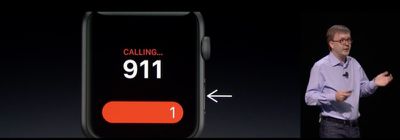
Today at it's WWDC keynote, Apple announced a brand new feature for watchOS 3 called SOS. The emergency call feature works similar to LifeAlert, allowing a user to easily call emergency services when they need it quickly and easily.
f1465838340
A user just has to press and hold the side button underneath the Digital Crown, and the emergency call will countdown from three. The Watch will then automatically call 911, or the equivalent for the country the user is in. The call will go through the paired iPhone, but it'll also be able to call directly from the Apple Watch if the Watch is on a Wi-Fi network.

SOS will also send your location to your emergency contacts, alerting them that you're in need of help. The Watch itself can also display a user's MedicalID, easily displaying a user's name, age, date-of-birth, medical conditions and other medical information.

Related Roundup: Apple Watch 11
Buyer's Guide: Apple Watch (Caution)

Popular Stories

youtube iphone apple watch health ad 2026

New Apple Ad Sells the iPhone and Apple Watch Health Pairing

Thursday April 23, 2026 11:18 am PDT by
Apple has published a new ad to appeal to customers in the market for an iPhone and Apple Watch pairing, highlighting the insights it can offer for your health. Titled simply "Health with iPhone + Apple Watch," the half-minute ad focuses on a woman waiting in line at a cafe who begins receiving unsolicited health and fitness advice from other people in the queue, as well as local residents,...
watchos 26 gradient light

This New Apple Watch Face Is Coming in watchOS 26.5

Friday April 24, 2026 5:51 am PDT by
iOS 26.5 and watchOS 26.5 will have a new Pride Luminance wallpaper and Apple Watch face when the updates are released in the coming weeks, according to Bloomberg's Mark Gurman. In a brief tweet, Gurman revealed that Pride Luminance will "Celebrate the vibrancy and individuality of the LGBTQ+ community and customize your watch face with colors from Pride flags." iOS 26.5 has been in...
modular ultra training load

watchOS 27 to Offer New Watch Faces, Including 'Modular Ultra' Variant

Monday May 4, 2026 5:58 am PDT by
For watchOS 27, Apple is testing new Apple Watch faces, and one of them is a simpler version of an existing Apple Watch Ultra watch face that could be coming to standard Series models. Writing in his latest Power On newsletter, Bloomberg's Mark Gurman reports that Apple is testing multiple new faces for watchOS 27, code-named "Orchid." One of them is said to be a "simplified take" on the...

Top Rated Comments

Johnny907 Avatar
130 months ago
And there had better be a way to disable this, or else I'm going to be wrist-dialing 911 everytime I do pushups. Having to go through my photos and delete a page full of watch face screen shots after every workout is annoying enough, but this could be extremely embarrassing plus potentially criminal in some areas.
Score: 5 Votes (Like | Disagree)
130 months ago
Could have saved my friend's dad's life... Amazing.
Score: 3 Votes (Like | Disagree)
AVEGA Avatar
130 months ago
This is a fantastic idea , I wonder how many idiots will cry and call this a junk app . I assume this is not exclusive to watch but iOS 10 update .

Watch this Jon Oliver Segment on 911 and this app will make so much more sense .
Score: 2 Votes (Like | Disagree)
130 months ago
I'm sorry for your loss.
Many thanks.
Score: 1 Votes (Like | Disagree)
tennisproha Avatar
130 months ago
Could have saved my friend's dad's life... Amazing.
I'm sorry for your loss.
[doublepost=1465928486][/doublepost]
This is really great. But how will I turn my watch off?
The macrumors post is incorrect. You hold down the side power button. It brings up 3 options: Power off, something else, and call SOS.
Score: 1 Votes (Like | Disagree)
Benjamin Frost Avatar
130 months ago
You don't think about needing assistance . . . until you do.

For me, it's living alone in a 1920's cottage with steep basement stairs . . . And having a campus studio in a building that's often deserted after hours or on holidays . . . and having a bad hip (now recoving from hip replacement surgery).

I welcome this app. The ability to communicate in an emergency is one of the reasons I got the Watch.
Hope your hip gets better and you're hopping around soon.
Score: 1 Votes (Like | Disagree)


















