Popular Writing App 'Scrivener' Now Available for iOS - MacRumorsOpen MenuShow RoundupsShow Forums menuVisit ForumsOpen Sidebar
Skip to Content

Popular Writing App 'Scrivener' Now Available for iOS

by

Popular writing environment Scrivener made its long-awaited debut on iOS this morning.

For those unfamiliar with the Mac application, Scrivener is a scalable long-form writing platform and author project management system featuring multiple editing and organization tools.

Note cards, character sketches, place descriptions, and research notes are just some of the options available to writers, with import options for media, web pages, PDFs, and more also forming part of the package.
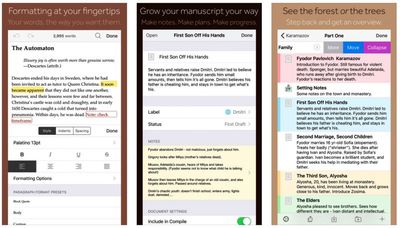
Scrivener for iOS
As a standalone writing environment, the new Scrivener iOS app functions in much the same way, offering rich text editing with support for comments, footnotes, keywords, and so on.

Many of the features from the desktop version have also made the port, such as the Binder, Outliner, Corkboard, and Inspector, although certain features that require more screen space — the Corkboard, for instance — are iPad-only.

The app syncs with Scrivener for macOS (Scrivener v2.8) and Scrivener for Windows using Dropbox, or users can copy projects between devices via iTunes. As mentioned however, the iOS app also works as a standalone tool, featuring multiple manuscript compilation and print formats as well as project export options, such as ebook, ePub, and PDF.

Scrivener 2.8 for Mac is a free update for all registered users of Scrivener 2, and along with iOS support, it also includes a number of bug fixes and minor tweaks.

Scrivener for iOS was first announced back in 2011, with an early launch goal originally estimated to be "some time in 2012." When that date slipped, lead developer Keith Blount kept fans updated on the troubled development of the app, with the iOS team running into coding issues and other setbacks over the years.

Scrivener for iOS costs $19.99 and is compatible with any device running iOS 9.0 or later. [Direct Link]


Top Rated Comments

Wildkraut Avatar
129 months ago
Doesn't look like an Evernote alternative.
This tool is not for normal notes taking, it is for serious "book,script,story,etc." writers.

The more professional alternative to Scrivener is Finaldraft.
Score: 6 Votes (Like | Disagree)
Daws001 Avatar
129 months ago
So happy this finally hit iOS.
Score: 2 Votes (Like | Disagree)
iLondoner Avatar
129 months ago
Fabulous app on the Mac, will definitely be buying on iOS, giving the ability to edit and compose on the road.
Score: 2 Votes (Like | Disagree)
Digital Skunk Avatar
128 months ago
Writing on iOS, at least for me, seems like it is too difficult given the smaller screen and keyboard. Granted I have an iPad Mini and could use the BT keyboard, but then, why wouldn't I use the MBP instead? But I can still see this as being useful for others.

When I wrote my book recently, I started off using StoryMill by Mariner Software, but then finished it off in Microsoft Word. I recall looking at Scrivener at one point a while ago and perhaps I should give it another look (the Mac version) for the second book I'm working on.
You should, but it all depends on how much research, notes, and other things you may have to bring along with you. I've found that writing non-fiction, short form (such as a story for a newspaper) doesn't work as well with the bulk of Scrivener. My wife is writing her dissertation in it, and so far I've written about 7 novels with it.

One of the biggest advantages I've had with writing with Scrivener for iOS on an iPad mini is the ability to just pull up a version of a novel or another novel fast and check documents notes and reference material, then hop back over to the one I'm working on. Even with the small screen and no keyboard I've been able to get work done, albeit with the a HUGE amount of typos due to iOS's lack of an international dictionary.
Score: 1 Votes (Like | Disagree)
maxsix Avatar
128 months ago
The missing iCloud sync support it's what keeps me from buying it yet.
It's a great app, too good to let the iCloud situation stop one from using it. Dropbox is more reliable anyway.
Score: 1 Votes (Like | Disagree)
Digital Skunk Avatar
129 months ago
this was the only app keeping me on the full fledged Mac. I can truly use an iPad Pro as my only machine while on the move now. And it so wonderful to see that the app functions well on an iPhone 6+ and iPad Mini as well.

Can't wait to try it out on a 12.9" iPad Pro.

I've been waiting YEARS for this.
Score: 1 Votes (Like | Disagree)

Popular Stories

iphone 18 pro blue%402x

iPhone 18 Pro: Dark Cherry, Light Blue, and Dark Gray Chassis Leaked [Update]

Thursday June 4, 2026 5:18 am PDT by
Update: Since publication, new information has come to light suggesting the images have been AI-manipulated and are not in fact iPhone 18 Pro chassis parts. The original article follows. The color options Apple is reportedly planning for the upcoming iPhone 18 Pro and ‌iPhone 18 Pro‌ Max have appeared online today in the form of images of chassis parts of unknown authenticity....
Aston Martin CarPlay Ultra Screen

Apple Says CarPlay Ultra is Coming to These Vehicle Brands

Thursday May 21, 2026 11:53 am PDT by
Last year, Apple launched CarPlay Ultra, the long-awaited next-generation version of its CarPlay software system for vehicles. Nearly a year later, CarPlay Ultra is still limited to Aston Martin's latest luxury vehicles, but that should change fairly soon. In May 2025, Apple said many other vehicle brands planned to offer CarPlay Ultra, including Hyundai, Kia, and Genesis. CarPlay Ultra...
iOS 27 All the New App Features

iOS 27: All the Rumored App Features

Wednesday June 3, 2026 3:48 pm PDT by
Siri is getting a major overhaul in iOS 27, but Apple also has some big updates planned for apps like Camera, Photos, and Wallet. There are multiple new AI features in the works, plus some non-AI upgrades. Camera Apple is moving Visual Intelligence from the Camera Control button to the Camera app in iOS 27, according to Bloomberg. There will be a Siri mode that will be available alongside...