

iOS 10 Beta 4 Tidbits: Redesigned Emoji and New Emoji Characters, Revamped Keyboard Sounds, and More - MacRumorsOpen MenuShow RoundupsShow Forums menuVisit ForumsOpen Sidebar
Skip to Content

iOS 10 Beta 4 Tidbits: Redesigned Emoji and New Emoji Characters, Revamped Keyboard Sounds, and More

Apple released iOS 10 beta 4 to developers today and as with any major beta update, it includes several small changes and tweaks as Apple aims to refine the operating system ahead of its public release this fall.

Today's update, available as an over-the-air download for those who installed the first three betas or the beta configuration profile, features new emoji, new keyboard sounds, Notification Center tweaks, and more.

We've rounded up all of the new features in beta four in the video below, so make sure to check it out to get a quick look at what's changed. We're also listing all of the changes in the post below.


Emoji - There are new emoji designed to promote gender equality. Many professions and activity emoji are now available in both male or female options. Emoji have a new texture and many emoji have seen slight design tweaks.
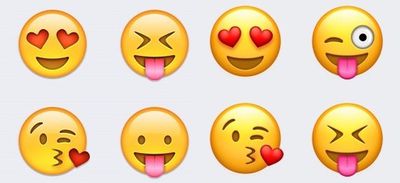
emoji2

New emoji textures. Old emoji on left, new emoji on right.

Control Center - There's an intro screen when opening Control Center for the first time that instructs people to swipe left to access the different Control Center cards.
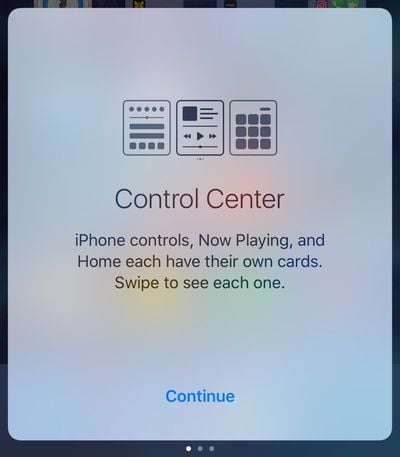
controlcenteropeningscreen
Haptic feedback - In iOS beta 3, Apple added haptic feedback when pressing the power button on the iPhone to lock it. In beta 4, this feature has been removed. There's no longer a haptic feedback buzz when locking an iPhone.

Accessibility - In the Accessibility section of the Settings app, the Color Filters option includes a set of colored pencils to show off the different color options instead of a color grid. This gives a better idea of how each setting is actually displayed on an iOS device.

Notification Center - The widgets screen, accessible by swiping to the right in the Notification Center, now displays the date. In previous versions of iOS 10, the date was not available.
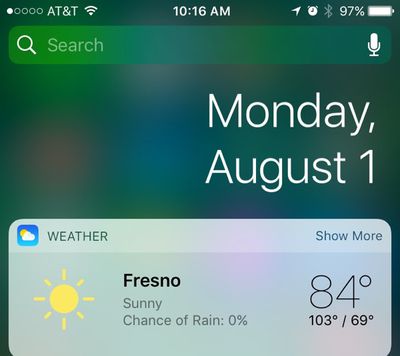
notificationcenterdate
Home - In the Control Center, the Home app icons have been tweaked again.
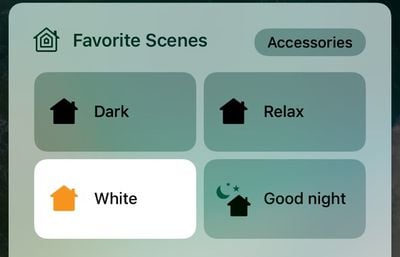
controlcenterhome
Keyboard sounds - Keyboard sounds have been slightly tweaked. Backspace now has a distinctive sounds unique from other key press sounds, and there's a new sound for space, return, shift, and number/emoji shift.

Wallpaper - Some older wallpaper options have been removed and the mountain wallpaper with stars from an earlier version of iOS has been re-added.


Related Forum: iOS 10

Popular Stories

Apple Card iPhone 16 Pro Feature

Apple Card Promo to Offer Free AirPods Pro 3

Friday May 15, 2026 8:59 am PDT by
Starting as early as next week, customers who sign up for an Apple Card at Apple's retail stores in the U.S. will receive $249 cash back when they purchase AirPods Pro 3, according to Bloomberg's Mark Gurman. The promotion has yet to be officially announced by Apple, so exact terms and conditions are not available at this time. AirPods Pro 3 are priced at $249 in the U.S., so customers who...
Apple WWDC25 iOS 26 CarPlay Light mode 250609

Six Popular iPhone Apps Now Available on CarPlay

Thursday May 14, 2026 9:10 am PDT by
Apple's CarPlay system for accessing iPhone apps on a vehicle's dashboard screen has received six popular apps in recent weeks: ChatGPT, Perplexity, Grok, Google Meet, WhatsApp, and the indie artist streaming platform Audiomack. Make sure you have the latest version of each app and they will automatically appear on CarPlay. ChatGPT Starting with iOS 26.4, CarPlay supports voice-based...
ipad mini 7 blue

OLED iPad Mini: Release Date, Pricing, and What to Expect

Thursday May 14, 2026 5:08 am PDT by
According to the latest rumors, Apple is close to launching its next-generation iPad mini. So what should we expect from the successor to the iPad mini 7 that Apple released over a year ago? Read on to find out. Processor and Performance Apple is working on a next-generation version of the iPad mini (codename J510/J511) that features the A19 Pro chip, according to information found in code...

Top Rated Comments

128 months ago
I am really sick of the focus that emojis get, yet applications like mail, calendar or file/attachment management, facetime are so lackluster.
Emojis and watch bands...welcome to the new Apple.
Score: 13 Votes (Like | Disagree)
MartinAppleGuy Avatar
128 months ago
Forgetting the biggest improvement of all; super fast animations.
Score: 11 Votes (Like | Disagree)
alecgold Avatar
128 months ago
Ill miss the feedback when locking. Found it really useful.
Score: 11 Votes (Like | Disagree)
128 months ago
It seems like nothing else at all happened aside from emojis being update. Nothing at all.
That's Apple today. They spend more time on fixing the gender equality of emojis than on the design and usability of their software. If they spent half as much time working on music app as they've spent on emojis, it wouldn't still be a steaming pile of poo.
Score: 10 Votes (Like | Disagree)
chrismail627 Avatar
128 months ago
I know it's been said before, but these 2 minute update videos are great. Nice job MacRumors.
Score: 10 Votes (Like | Disagree)
128 months ago
I am really sick of the focus that emojis get, yet applications like mail, calendar or file/attachment management, facetime are so lackluster.
Score: 10 Votes (Like | Disagree)













