

Logitech Releases CREATE Keyboard Case for 9.7-Inch iPad Pro - MacRumorsOpen MenuShow RoundupsShow Forums menuVisit ForumsOpen Sidebar
Skip to Content

Logitech Releases CREATE Keyboard Case for 9.7-Inch iPad Pro

by

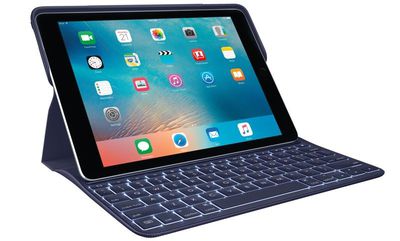
Logitech today announced that it is expanding its CREATE Keyboard Case with Smart Connector to the 9.7-inch iPad Pro, making the keyboard available for both of Apple's iPad Pro models.

As on the 12.9-inch iPad Pro, the CREATE case for the 9.7-inch iPad Pro connects to the three-dot Smart Connector on the tablet, allowing for both power and data transfer. Because it's powered via the iPad, the CREATE case does not need to charge and it does not need to connect to an iPad using Bluetooth.
logitechcreateblue
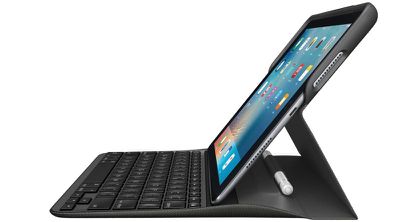
The CREATE Keyboard Case for the 9.7-inch iPad Pro features backlit keys, a protective case that protects the iPad when it isn't in use, iPad-specific function keys, and an integrated holder for the Apple Pencil. It is available in black and blue.

"CREATE is like the Swiss Army Knife of keyboard cases," said Michele Hermann, vice president of tablet accessories at Logitech. "It puts all the tools you need at your fingertips, and the keyboard charges through the Smart Connector so you can just set your iPad Pro into a typing position and go. It brings typing on the iPad Pro to a whole new level."

When the 12.9-inch iPad Pro launched, Logitech was the sole company to introduce a keyboard case that's able to use the Smart Connector on the tablet, and it continues to be the only company that offers a third-party Smart Connector keyboard solution.
logitechcreateblack
We went hands-on with the CREATE case for the 12.9-inch iPad Pro when it was released. We loved the backlit keys and the general key feel, but felt like it added too much bulk to Apple's thin and light ultra powerful tablet.

The CREATE keyboard case for the 9.7-inch iPad Pro can be purchased starting today from the Logitech website, the online Apple Store, and Apple retail stores. It is priced at $129.99.


Top Rated Comments

Keane16 Avatar
130 months ago
It's an ipad. With a lug about keyboard. Ipad concept is... you don't have a keyboard. That's the point. Do you see? Next!
Or for me - use it without one for 90% of the time, and for the 10% you have lots to type - attach it.

Amazing concept huh, adapts to your needs at the time. Do you see?
Score: 7 Votes (Like | Disagree)
130 months ago
Logitech stepping up their game, with a lighted keyboard! Will be purchasing. They continue to get better all the time.
Score: 4 Votes (Like | Disagree)
MrGimper Avatar
130 months ago
Lacks the flexibility of the ASK:

- Have to have a back case
- Have to have THEIR back case
- Can't rip the keyboard off when not needed and still have back protection from a case.
- Look like it would be a mare to fold back and use the tablet as a tablet.

But I'm sure others will love it and it fits their needs.
Score: 2 Votes (Like | Disagree)
130 months ago
Wouldn't want to type a dissertation on the SK but I'm actually quite impressed by it for light/medium usage balanced against it's relative little heft.

I just wish the Apple Smart Keyboard had shortcut keys, specifically play/pause. Yes yes, bringing up CC from the bottom or on the home screen from sleep is hardly an ordeal, but a single tap of a key is much more efficient. It's the lack of shortcut keys that compelled me to research alternatives like the Create, but I've not been too impressed with these alternatives. Too few use the Smart Connector, had hoped this would have improved nearly a year on.
Score: 2 Votes (Like | Disagree)
130 months ago
Looks pretty good.
Score: 2 Votes (Like | Disagree)
125 months ago
It's an ipad. With a lug about keyboard. Ipad concept is... you don't have a keyboard.
Agreed. The USP of the iPad is ultra-portability and handheld use. If I want a display with a keyboard connected I use something called a "laptop".

I say this out of experience - when I put my previous iPad in a keyboard case (it seemed like a good idea at the time) I found myself not using the iPad because, suddenly, you couldn't just grab it and use it...
Score: 1 Votes (Like | Disagree)

Popular Stories

iCloud iPhone 17 Pro

iPhone Users Who Pay for iCloud Storage Get Two New Perks on iOS 27

Thursday July 2, 2026 6:10 am PDT by
If you pay for certain iCloud+ storage plans beyond the 5GB that Apple offers for free, you will receive two more perks on iOS 27 at no additional cost. A summary of the two new iCloud+ perks on iOS 27:Increased daily usage limits for some new Apple Intelligence features, including image generation in the revamped Image Playground app. HomeKit Secure Video cameras receive generated video...
iPhone 4 on Black Feature

Apple Facing One of Its Worst Leaks Since the iPhone 4

Thursday July 2, 2026 9:53 am PDT by
Apple supplier Tata Electronics recently suffered a cyberattack that resulted in thousands of confidential files being published on the dark web, and this reportedly included some photos and documents related to the upcoming iPhone 18 Pro. We have elected not to share any of the leaked photos in this story due to the illegal nature in which they were obtained, but they can easily be found...
American Express Gold Apple Pay Feature

American Express Announces New Apple Pay Feature

Tuesday June 30, 2026 10:27 am PDT by
American Express today announced that you can now redeem Membership Rewards points when checking out with Apple Pay on the web and in apps on the iPhone and iPad. When checking out with Apple Pay on iOS 18 or iPadOS 18 or later, tap on your eligible American Express card (Platinum, Gold, Green, and others) and select the Membership Rewards points option. You can use points to cover all or...














