Writing App 'Ulysses' Gains WordPress Publishing Support and More - MacRumorsOpen MenuShow RoundupsShow Forums menuVisit ForumsOpen Sidebar
Skip to Content

Writing App 'Ulysses' Gains WordPress Publishing Support and More

by

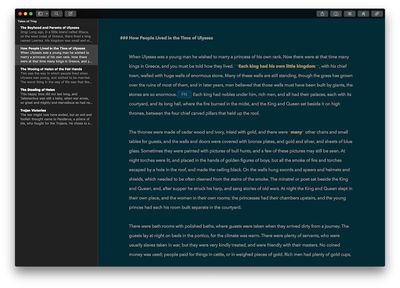
Popular writing app and Apple Design Award winner Ulysses gained WordPress publishing and Dropbox support today, in a simultaneous update to its iOS and Mac apps.

The changes that come with version 2.6 of the writing app mean that bloggers can publish their texts straight to a WordPress account, complete with tag, category, excerpt, and featured image support.
ulysses
Writers using the iOS or Mac app can also schedule the publishing time and preview their posts before they go live, all from within Ulysses. German developers The Soulmen say the app supports blogs hosted on WordPress.com as well as self-hosted installations, and also allows publishing to multiple accounts.

As with the Mac, iPad and iPhone users can now also sync their texts over Dropbox instead of via iCloud, with full support for adding Dropbox folders to Ulysses' hierarchical text library.

In addition, plain text and Markdown files stored in Dropbox folders behave just like native Ulysses sheets – supporting the app's sorting tools, filters, group goals, favorites, and so on – so users no longer need to import their files manually.

The 'Quick Open' feature on Ulysses for Mac has also made its way over to the iOS version, allowing users to perform entire library searches and open sheets without navigating through text hierarchies.

Meanwhile, Ulysses 2.6 brings Typewriter Mode to iOS, which promises the same focused writing experience to be found in the Mac app, allowing writers to highlight paragraphs and sentences, fix scrolling, mark the current line, and more.

Lastly, Ulysses 2.6 has been optimized for accessibility, to better cater for visually impaired writers working in macOS and iOS, with support for VoiceOver on both platforms.

Ulysses for Mac costs $44.99 and can be found on the Mac App Store. [Direct Link]

Ulysses for iOS is available as a universal app on the App Store, priced at $24.99. [Direct Link]


Tag: Ulysses

Top Rated Comments

134 months ago
just don't worry so much about having to use iCloud?
It's the sync service I use? I don't trust Dropbox, nor do I like how it sends deep roots into OS X for its syncing. Every dev should be supporting iCloud at this point if they're doing sync on Apple platforms. CloudKit is in my experience reliable.

I've messed around in Scrivener for a while but never really took to it. I find Ulysses to be a beautifully designed and very functional writing environment. Lots of great features that stay out of your way until you need them. And the design is very Mac-like. As for iCloud syncing, Ulysses offers sync either via Dropbox or iCloud. I tend to use Dropbox because I'm used to it and I like how transparent it is -- and if for whatever reason I decided to stop using Ulysses, my files would all be sitting there out in the open in .md format that I could edit with any other text editor out there.

Not sure if this answers your question, but also be aware that there's a demo of the OS X version on the Ulysses site, so you can poke around a bit before you commit.
Thanks, I'll have to give the demo a spin. To be honest, I've never been completely enamored with Scrivener. I find its "do whatever you want" philosophy too distracting for my brain when I want to get into the meat of writing a new chapter or a quick idea. I prefer something that gives me the tools to focus on specific writing tasks and presents them in elegant, intuitive ways. But, Scrivener is very powerful for some tasks and it's been the de facto tool for many, so I've continued to use it over the years.
Score: 2 Votes (Like | Disagree)
134 months ago
How are people liking Ulysses compared to Scrivener? I do my literary work in the latter, and I've been waiting forever for an iOS version of Scrivener, but now that it's here I see it's missing iCloud sync which I consider mandatory. So I've been thinking of jumping over to Ulysses, but it doesn't seem as full-featured for literary tasks.
I've messed around in Scrivener for a while but never really took to it. I find Ulysses to be a beautifully designed and very functional writing environment. Lots of great features that stay out of your way until you need them. And the design is very Mac-like. As for iCloud syncing, Ulysses offers sync either via Dropbox or iCloud. I tend to use Dropbox because I'm used to it and I like how transparent it is -- and if for whatever reason I decided to stop using Ulysses, my files would all be sitting there out in the open in .md format that I could edit with any other text editor out there.

Not sure if this answers your question, but also be aware that there's a demo of the OS X version on the Ulysses site, so you can poke around a bit before you commit.

EDIT: Since writing this, I've decided to buy the iOS version, which was a pretty frivolous purchase since I don't write much on my phone if I can avoid it -- but it's still nice to be able to access my library. The iOS app is gorgeous and very very full-featured. You can customize the theme to the same one you use on your Mac, and you can even upload custom fonts. Very impressive.
Score: 2 Votes (Like | Disagree)
alecgold Avatar
134 months ago
This is my iOS update week! Beta4, documents from Readdle (long overdue update!) and Ulysses got an update.

I don't use Ulysses that often, but for easy, destraction free and hassle free writing it is unbeaten imho. I might even start blogging! If I would actually have something meaningful to tell.
Score: 2 Votes (Like | Disagree)
Janichsan Avatar
134 months ago
While I like Ulysses's somewhat cleaner interface, the way it handles documents is a no-go for me: I want to be able to manage my documents myself and not be forced to cram everything in a closed-off proprietary database.
Score: 1 Votes (Like | Disagree)
134 months ago
I was going off the screenshots on the website. It's a very bad looking website, so that was probably skewing my opinion. I grabbed the demo and it looks a bit better than it did on the site. It's not bad, but for my taste, there's just way too much going on. Ulysses, to me, just feels like a lot of clutter is removed, and there's more polish. Obviously this is all highly subjective stuff. Not sure I agree with you about the "intuitive" part, but let's agree to disagree there.

It looks like Scrivener definitely holds a lot more stuff than Ulysses, which is meant really for text (though it does support attachments to some extent). The way I work, I'm way more likely to keep research materials and such in a folder in the Finder somewhere, synced/backed up through Dropbox, so I'm less likely to need all those extra features that Scrivener has.

Fortunately, both apps are available with free demos, which is something that makes me very glad there are alternatives to the App Store.
I agree it's subjective! I found Ulysses more cluttered! I could not get rid of some of the default folders which annoyed me!
I love having PDFs, pictures, websites and YouTube vids in scrivener. I can't remember if ULysses supports double-pane writing for writing and reference side by side? Or multiple documents open at the same time both on OS X and iOS? Couldn't live without that
Score: 1 Votes (Like | Disagree)
134 months ago
Care to elaborate why it's beter?
Also interested to hear why. The interface looks far more cluttered to me, but maybe it has some killer feature I'm not seeing?

Design is important to me in picking an environment in which to write, and Scrivener looks like it's from about 2004 at the latest.
I'm wondering from your comments if you have used the app. It received a UI update only a few months ago. The interface is well-designed, modern, and entirely customisable. I mean, the ENTIRE interface can be changed to suit how I like it. Every detail if I wish. Or it can be used out of the box. And the iOS app is just as good.

Scrivener has a much more straight forward organisational system. The main advantage of these apps is the organisational side of it, having all the writing in the one place. And Scivener does it better and more intuitively than Ulysses. That's really the whole issue.
Score: 1 Votes (Like | Disagree)

Popular Stories

apple pro tell logo

Apple Launching Five New Products Today

Thursday November 5, 2026 12:59 am PST by
Apple is launching five new products on Friday, November 6, following pre-orders that opened last week, including its first touchscreen MacBook Pro models. The following new products will be available from today: iPad mini with OLED display and A20 Pro chip iMac with M6 chip 14-inch MacBook Pro with M6 chip 14-inch MacBook Pro with OLED touchscreen 16-inch MacBook Pro with OLED...
duo aquarium

More Fun iPhone Duo Apps: 30 New Picks to Try

Friday November 6, 2026 3:27 pm PST by
When the iPhone Duo launched, we shared a list of some of the fun apps developers created for the new form factor. Two weeks out, developers are continuing to come up with fresh ideas, so we thought we'd share some of our favorites. Games Marbles Unhinged ($2.99) - Marbles Unhinged is a marble maze designed for the Duo. When you fold it, the floor turns into a ramp. If you stand the top...
silver iphone 18 pro

Apple Rumored to Drop the iPhone's Action Button Next Year

Friday November 6, 2026 6:07 am PST by
Apple plans to merge the iPhone's Action button with the Camera Control starting next year, according to the leaker known as "Instant Digital." In a new post on Weibo, the leaker claimed that a single press of the combined button would open the camera, while a long press would trigger the function assigned to the Action button. They explicitly clarified that the dedicated Action button would ...
Latest Stories
Early Apple Black Friday Deals on Apple Watch, MacBook Air, and More
13 hours ago
'Backglow' Lets You Customize New MacBook Pro's Glowing Apple Logo
13 hours ago
Top Stories: Apple Product Launches, iOS 27.3 Beta, and More
20 hours ago
More Fun iPhone Duo Apps: 30 New Picks to Try
1 day ago
Hands-On With Apple's New OLED Touchscreen MacBook Pro
2 days ago
Apple Store With All-New Design Opening Soon in Southern California
2 days ago
Control the Glowing Apple Logo on Your New MacBook Pro
2 days ago
Apple Shares New 'Apple Card: Apply and Use in Minutes' Ad
2 days ago
Apple Says More Than 100,000 Apps Optimized for iPhone Duo, Here's What's Still Missing
2 days ago
Early Black Friday Deals Kickoff With Steep Discounts on Apple Watch Ultras and More
2 days ago
The MacRumors Show: iOS 27.3 Looks Like a Huge Update
2 days ago
Best Buy's Black Friday Event Begins With Sitewide Savings on Apple, TVs, More
2 days ago
Apple Releasing Yet Another Two New Products Next Week
2 days ago
MacBook Air Drops to Lowest Price in Months With Amazon's $250 Discount
2 days ago
Apple Rumored to Drop the iPhone's Action Button Next Year
2 days ago
Apple's Extended Return Policy Now in Effect for 2026 Holiday Season
2 days ago
Apple Music Classical Updated With New Icon and Refreshed Design
2 days ago
OLED iPad Mini, M6 iMac, and New MacBook Pros Available From Today
2 days ago
Apple Surveys iPhone Duo Buyers About Crease and Camera
2 days ago
Apple's First Touchscreen Mac is Now Arriving to Customers
2 days ago
Claude Gets Personal Finance Feature With Bank Account Linking
2 days ago
Apple Arcade Adds Crossy Road Rush and NBA 2K27
3 days ago
Apple's New HomeView Smart Home Hub: Here's How Much RAM It Has
3 days ago
iPad Mini vs. iPad Air Buyer's Guide: Now Just $50 Apart
3 days ago
First iOS 27.3 and macOS Golden Gate 27.3 Public Betas Now Available
3 days ago
Apple Announces a New Mac Sales Record
3 days ago
Paid $200 for Logic Pro? Apple Says You Won't Get This New Feature
3 days ago
Instagram's Edits Video Editor is Now Available on Mac
3 days ago
Prevent Siri and Search From Accessing Specific iPhone Apps
3 days ago
Best Early Black Friday Deals on iPhone 18 Pro and iPhone Duo
3 days ago










































