MacRumors Giveaway: Win a Lightning MicroSD Card Reader and 64GB MicroSD Card from Lexar - MacRumorsOpen MenuShow RoundupsShow Forums menuVisit ForumsOpen Sidebar
Skip to Content

MacRumors Giveaway: Win a Lightning MicroSD Card Reader and 64GB MicroSD Card from Lexar

by

For this week's giveaway, we've teamed up with well-known storage and memory company Lexar to offer MacRumors readers a chance to win a bundle that includes Lexar's Lightning-based MicroSD Card Reader and a high-performance 64GB MicroSD card.

Lexar's MicroSD Lightning Reader is a tiny coin-sized dongle that makes it easy to transfer content from a microSD card to an iPhone or iPad, so it's an ideal companion to products like drones and GoPro-style action cameras. Many Android phones also feature microSD slots, so it's also a good way to transfer files between Android and iOS device, and it's also useful for transferring files directly between two iOS devices.


The Lightning MicroSD Reader is small enough that it can go anywhere, from a pocket to a small camera bag, but it looks like a high quality accessory that matches well with Apple's design aesthetic. It's so compact that it's potentially easy to lose, but it comes with a little strap so it can be attached to a set of keys or a loop on a backpack. The Lightning connector of the MicroSD Reader fits well into the Lightning port of an iPhone even with a case on, including Apple's own line of cases.

With a USB microSD reader (included with the 64GB card in the giveaway) you can also offload files from a computer and transfer them directly to the iPhone through the microSD reader, or use the reader to offload files from an iPhone to the microSD card for extra storage space.
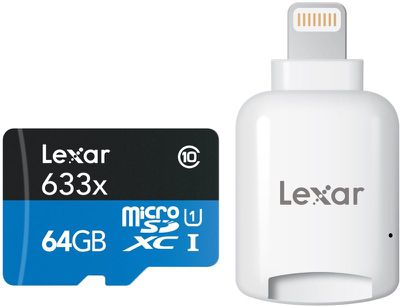
lexarcardandsdreader
The MicroSD Lightning Reader has to be used with the Lexar app, which is decent. If you put content like videos and photos on the microSD card, you can view them directly within the app and save them to the camera roll. You can also use the app to back up your iPhone's photos and contacts and transfer files to Dropbox.
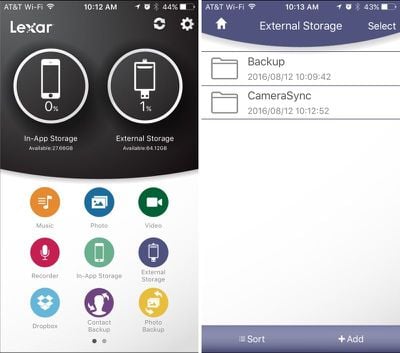
lexarapp
The Lexar MicroSD Lightning Reader can be purchased from Amazon for $19.99, but four MacRumors readers will win a Lightning Reader and a 64GB Lexar microSD card through our giveaway. To enter to win, use the Rafflecopter widget below and enter an email address. Email addresses will be used solely for contact purposes to reach the winner and send the prize.

You can earn additional entries by subscribing to our weekly newsletter, subscribing to our YouTube channel, following us on Twitter, or visiting the MacRumors Facebook page.

Due to the complexities of international laws regarding giveaways, only U.S. residents who are 18 years of age or older are eligible to enter. To offer feedback or get more information on the giveaway restrictions, please refer to our Site Feedback section, as that is where discussion of the rules will be redirected.

The contest will run from today (August 12) at 11:00 a.m. Pacific Time through 11:00 a.m. Pacific Time on August 19. The winners will be chosen randomly on August 19 and will be contacted by email. The winners have 48 hours to respond and provide a shipping address before new winners are chosen.


Top Rated Comments

LovingTeddy Avatar
128 months ago
Wait. Who need SD card. People are fine with 16GB storage. And really external storage for iOS is pointless, there is no file system to mange all the file. You will rely on lame app to access your file.
[doublepost=1471037287][/doublepost]
By putting everything in a cloud storage you can service that gives you whatever filesystem you want. Dropbox has it. icloud sort of has it. I am sure you can get it with others.

The point of this device is to get information from one device to another - I am sure this device does a fine job. All I am saying is that it is possible to do that today without any physical device - and that would be my preference.
[doublepost=1471031291][/doublepost]
I have a DSLR that I can create a wifi connection to from my iphone and download photos. It is not fast, but it works. I have a pair of 64gig memory cards for the DSLR, so I have never really needed to do it, but it's nice knowing that I have that option. I would think that with time the camera companies will improve this because it would be very nice not to worry about running out of memory on vacation somewhere.
I dislike cloud storage and perfer local. And I am cheap, I refuse to pay extra dollar for bigger storage. What should I do?

If anything. Not able to manage my file and store my content local via expandable storage is my biggest gripe about iOS.
Score: 3 Votes (Like | Disagree)
128 months ago
Although I'm not an US citizen and can't participate, it's a nice offer from Macrumors. It shows they're valuing their visitors.

Thanks Macrumors for making this nice gesture :)

I wish Apple had built in an card reader in their iPad in the first place because next week I'll be on holidays and probably don't have wifi. I'll be using my iPad for storaging photos. Didn't know there was such a device around.
Again, thanks Macrumors :)
Score: 2 Votes (Like | Disagree)
128 months ago
This thing is awesome and I hope I win it!

I use GoPros everyday and I am getting a Phantom 4 soon. Sure I can use wifi to preview footage but it's not full quality and it takes just shy of forever.
This would be awesome to check shots in the field and wouldn't take up anymore room.

Personally, I think this is awesome.

My bigger cameras also have wifi but they also have nice big screens to review on.

Fingers crossed on this one.
Score: 2 Votes (Like | Disagree)
128 months ago
One of the major complaints I hear is lack of access to the file system on iOS. This bypasses or solves that. Right?
Apple makes a lighting to SD card reader. I have it and it works wonderfully. And you don't need an app to use it.
Score: 2 Votes (Like | Disagree)
128 months ago
I have a inexpensive HD Muvi action camera and think this device would be great to do some editing in the field with video that camera captures on my iPad that I can then share with others.
Score: 2 Votes (Like | Disagree)
CarlJ Avatar
128 months ago
I use the cloud for all this. There are so many services out there. Dropbox and icloud are only two of them. Carrying another dongle that I will probably lose or break before I ever use it is not for me thanks.
I use the cloud for such things too, but then I haven't used a non-iPhone camera in years. I can imagine this might be quite useful for someone who takes their DSLR on a trip, but not their laptop - upload some pictures off the camera to an iPad, use the bigger screen to select the best and tweak a bit, then upload the results to somewhere online.
Score: 2 Votes (Like | Disagree)

Popular Stories

plugable macrumors giveaway

MacRumors Giveaway: Win a MacBook Neo and Accessory Kit From Plugable

Friday May 8, 2026 9:58 am PDT by
For this week's giveaway, we've teamed up with Plugable to offer MacRumors readers a chance to win a MacBook Neo and a Plugable MacBook Neo accessory kit that includes the UD–6950PDH USB-C Docking Station, USBC–9IN1E USB-C Hub, and the PS–30C1 30W power adapter. Plugable makes a wide range of accessories for Apple devices, and it is perhaps best known for its hubs and docks. There are...
lululook charging station design

MacRumors Giveaway: Win an Apple Watch Ultra 3 and 25W 3-in-1 Charging Station From Lululook

Friday May 15, 2026 9:51 am PDT by
For this week's giveaway, we've teamed up with Lululook to offer MacRumors readers a chance to win an Apple Watch Ultra 3 and a Qi2.2 25W 3-in-1 Charging Station to go along with it. Lululook makes all kinds of accessories for Apple devices, and it has several Apple Watch charging options with different capabilities and price points. The $68 3-in-1 Charging Station is one of Lululook's...
video proc giveaway

MacRumors Giveaway: Win an iPhone 17 and a Lifetime Copy of VideoProc Converter AI

Friday May 22, 2026 10:02 am PDT by
For this week's giveaway, we've teamed up with Digiarty VideoProc to offer MacRumors readers a chance to win an iPhone 17 and a copy of the VideoProc Converter AI software to use with it. VideoProc Converter AI is software for editing and managing videos, images, audio, DVDs, and more. It includes a suite of AI features for easy photo and video editing, along with tools for converting,...