macOS Sierra Addresses Dropbox Security Concerns by Explicitly Asking for Accessibility User Permission - MacRumorsOpen MenuShow RoundupsShow Forums menuVisit ForumsOpen Sidebar
Skip to Content

macOS Sierra Addresses Dropbox Security Concerns by Explicitly Asking for Accessibility User Permission

by

Following Dropbox-related security concerns that surfaced earlier this month, developer Phil Stokes has confirmed that macOS Sierra now explicitly requires apps to ask for user permission to access Accessibility (via Daring Fireball). Users can give access to an app, or click "not now" to deny the request.
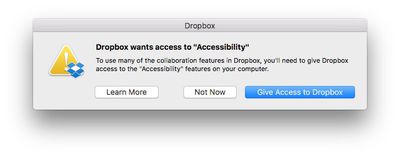
dropbox-accessibility-permission
Concerns were raised after it was demonstrated that Dropbox appears in System Preferences > Security & Privacy under Accessibility, despite the fact that users were never prompted to grant access to the features. More details can be found in our previous coverage and in a Dropbox support document.

Let’s assume for the sake of argument that Dropbox never does any evil on your computer. It remains the fact that the Dropbox process has that ability. And that means, if Dropbox itself has a bug in it, it’s possible an attacker could take control of your computer by hijacking flaws in Dropbox’s code. Of course, that’s entirely theoretical, but all security risks are until someone exploits them. The essence of good computer security and indeed the very reason why OSX has these kinds of safeguards in place to begin with is that apps should not have permissions greater than those that they need to do their job.

At the time, Dropbox said it was working with Apple to reduce its dependence on elevated access in macOS Sierra, and would respect when people disable the app's Accessibility permissions, but now a much-needed safeguard exists regardless.

In a new blog post, Dropbox still recommends that Mac users running macOS Sierra update their Accessibility permissions, if needed, to ensure smooth syncing and access to certain features of the cloud storage service.

Advanced Dropbox collaboration features, such as the badge, require Accessibility permissions. You’ll be prompted to grant these permissions when you install the Dropbox desktop app on macOS Sierra. To do so, follow the instructions on screen. The same will apply for older versions of OS X in the coming weeks. For more information on Dropbox Mac permissions, visit our help center.

macOS Sierra was publicly released today as a free update on the Mac App Store.

Related Forum: macOS Sierra

Top Rated Comments

dragje Avatar
132 months ago
Drop-who?

However in all seriousness, I abandoned Dropbox ages ago and migrated to Google Drive and have never looked back.

Dropbox are "ok" no doubt but lack so many features and compared to Google are seriously slow. My file transfers since switching to Google Drive have more than tripled!
I'll never move my documents to Google Drive which enables the company to look inside within each document for commercial exploitation usage. For the same very reason I rarely using Google as a search engine, simply because I truly hate the so called targeting adds, as if I'm considdered to be a f*beep*ing monkey that would be interested in camera's for weeks just because I was searching for one at one given day. Google makes sure that all the adds on websites, in one way or the other, has something to do with camera's.

I'll regret the day that I might not care about this any longer, that I'm willingly stop using my brains and surrender myself entirely to commercial exploitation and accept that I've become a slave for a company by providing them personal information about myself and by agreeing that "to think yourself" is something one should not do. For the same reason I don't make use of facebook, delete apps that requires a facebook and/or a Google account and doesn't enable me to login besides these options.

I grew up in the world where the internet became big. And I'm really became fascinated with the phenomenon called the internet. And I should because it delivers also so much good. But I've never been able to understand why people willingly give away all of their private information, especially knowing that there is no such thing as: 'I've nothing to hide'
Score: 7 Votes (Like | Disagree)
simonmet Avatar
132 months ago
I came here to say the same thing. No matter which box you click: "Not Now", "Learn More", or obviously the third one, it puts itself in Accessibility.

My response was to remove Dropbox from my computer.
This is an OS X behaviour and unrelated to Dropbox. OS X is putting it there and this I believe is nothing new. The problem before was that Dropbox seemingly exploited loopholes or weakness in OS X to enable those privileges without asking.

It also replicates behaviour in iOS. If you deny an app permission to send you notifications or have access to your location the app still appears in the relevent settings so you can subsequently enable the permissions later if you so choose without having to delete and reinstall the app.

So it's entirely appropriate and normal that OS X puts it there.

Score: 5 Votes (Like | Disagree)
132 months ago
I chose "Not Now" and Dropbox still jumped into Accessibility—though unchecked. My question is, how does it get in there?
I came here to say the same thing. No matter which box you click: "Not Now", "Learn More", or obviously the third one, it puts itself in Accessibility.

My response was to remove Dropbox from my computer.
Score: 2 Votes (Like | Disagree)
Pakaku Avatar
132 months ago
I chose "Not Now" and Dropbox still jumped into Accessibility—though unchecked. My question is, how does it get in there?
Sounds like the OS itself just keeps a history of whatever has attempted to ask for permission, and anything the user denied permission for is just left there unticked.
Score: 2 Votes (Like | Disagree)
132 months ago
Well done Apple.

Score: 2 Votes (Like | Disagree)
smacrumon Avatar
132 months ago
Drop-who?

However in all seriousness, I abandoned Dropbox ages ago and migrated to Google Drive and have never looked back.

Dropbox are "ok" no doubt but lack so many features and compared to Google are seriously slow. My file transfers since switching to Google Drive have more than tripled!
And I guess you're happy for Google to peruse your files on a daily basis.
[doublepost=1474429813][/doublepost]This is really interesting. Who would have thought MacOS could be circumvented like this? I certainly didn't. Yep post those permission warnings just like iOS vigilantly does.
Score: 1 Votes (Like | Disagree)

Popular Stories

apple pro tell logo

Apple Launching Five New Products Today

Thursday November 5, 2026 12:59 am PST by
Apple is launching five new products on Friday, November 6, following pre-orders that opened last week, including its first touchscreen MacBook Pro models. The following new products will be available from today: iPad mini with OLED display and A20 Pro chip iMac with M6 chip 14-inch MacBook Pro with M6 chip 14-inch MacBook Pro with OLED touchscreen 16-inch MacBook Pro with OLED...
duo aquarium

More Fun iPhone Duo Apps: 30 New Picks to Try

Friday November 6, 2026 3:27 pm PST by
When the iPhone Duo launched, we shared a list of some of the fun apps developers created for the new form factor. Two weeks out, developers are continuing to come up with fresh ideas, so we thought we'd share some of our favorites. Games Marbles Unhinged ($2.99) - Marbles Unhinged is a marble maze designed for the Duo. When you fold it, the floor turns into a ramp. If you stand the top...
silver iphone 18 pro

Apple Rumored to Drop the iPhone's Action Button Next Year

Friday November 6, 2026 6:07 am PST by
Apple plans to merge the iPhone's Action button with the Camera Control starting next year, according to the leaker known as "Instant Digital." In a new post on Weibo, the leaker claimed that a single press of the combined button would open the camera, while a long press would trigger the function assigned to the Action button. They explicitly clarified that the dedicated Action button would ...
Latest Stories
Early Apple Black Friday Deals on Apple Watch, MacBook Air, and More
13 hours ago
'Backglow' Lets You Customize New MacBook Pro's Glowing Apple Logo
13 hours ago
Top Stories: Apple Product Launches, iOS 27.3 Beta, and More
20 hours ago
More Fun iPhone Duo Apps: 30 New Picks to Try
1 day ago
Hands-On With Apple's New OLED Touchscreen MacBook Pro
2 days ago
Apple Store With All-New Design Opening Soon in Southern California
2 days ago
Control the Glowing Apple Logo on Your New MacBook Pro
2 days ago
Apple Shares New 'Apple Card: Apply and Use in Minutes' Ad
2 days ago
Apple Says More Than 100,000 Apps Optimized for iPhone Duo, Here's What's Still Missing
2 days ago
Early Black Friday Deals Kickoff With Steep Discounts on Apple Watch Ultras and More
2 days ago
The MacRumors Show: iOS 27.3 Looks Like a Huge Update
2 days ago
Best Buy's Black Friday Event Begins With Sitewide Savings on Apple, TVs, More
2 days ago
Apple Releasing Yet Another Two New Products Next Week
2 days ago
MacBook Air Drops to Lowest Price in Months With Amazon's $250 Discount
2 days ago
Apple Rumored to Drop the iPhone's Action Button Next Year
2 days ago
Apple's Extended Return Policy Now in Effect for 2026 Holiday Season
2 days ago
Apple Music Classical Updated With New Icon and Refreshed Design
2 days ago
OLED iPad Mini, M6 iMac, and New MacBook Pros Available From Today
2 days ago
Apple Surveys iPhone Duo Buyers About Crease and Camera
2 days ago
Apple's First Touchscreen Mac is Now Arriving to Customers
2 days ago
Claude Gets Personal Finance Feature With Bank Account Linking
2 days ago
Apple Arcade Adds Crossy Road Rush and NBA 2K27
3 days ago
Apple's New HomeView Smart Home Hub: Here's How Much RAM It Has
3 days ago
iPad Mini vs. iPad Air Buyer's Guide: Now Just $50 Apart
3 days ago
First iOS 27.3 and macOS Golden Gate 27.3 Public Betas Now Available
3 days ago
Apple Announces a New Mac Sales Record
3 days ago
Paid $200 for Logic Pro? Apple Says You Won't Get This New Feature
3 days ago
Instagram's Edits Video Editor is Now Available on Mac
3 days ago
Prevent Siri and Search From Accessing Specific iPhone Apps
3 days ago
Best Early Black Friday Deals on iPhone 18 Pro and iPhone Duo
3 days ago








































