

macOS Sierra: iCloud Drive Syncs Desktop Files and Documents Across Devices - MacRumorsOpen MenuShow RoundupsShow Forums menuVisit ForumsOpen Sidebar
Skip to Content

macOS Sierra: iCloud Drive Syncs Desktop Files and Documents Across Devices

by

With macOS Sierra, Apple is aiming to make it easier to access all of your content across multiple devices, expanding iCloud Drive to encompass the desktop and documents folder of every Mac.

This feature puts all of the files stored either on the desktop or in the documents folder in iCloud, making them available on iOS devices, Macs, and iCloud.com for easy access to your most recent files wherever you are.
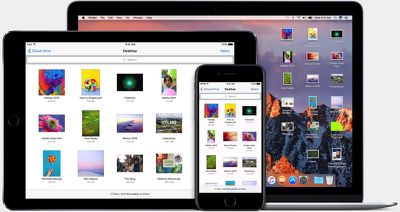
iclouddrivemacosierra
Turning on the new iCloud feature is done when setting up macOS Sierra. When you install the new operating system, Apple will ask if you want to enable iCloud storage for the desktop and documents folder and will let you know how much iCloud storage space it will take up.

If you have a lot of files on your desktop or in the documents folder, it can take up a significant amount of space, so you might need to do some file cleanup before enabling it.

If you want to enable the feature later or turn it off at some point, you can do so by going to System Preferences --> iCloud --> iCloud Drive --> Options ---> and checking or unchecking "Desktop & Documents Folders" in the list of apps allowed to upload data to iCloud Drive.
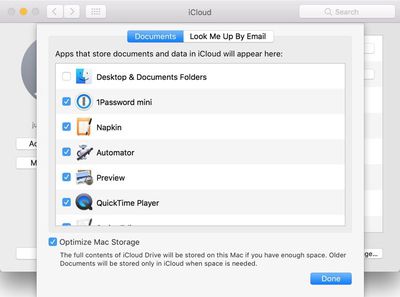
icloudoptions
On Macs and iOS devices, the contents of the desktop and documents folder can be accessed through the iCloud Drive app. On iCloud.com, the files can be accessed through the iCloud Drive folder that's available once you're signed in. If you have a Windows machine, your Mac files will be able to be downloaded through the iCloud for Windows app.
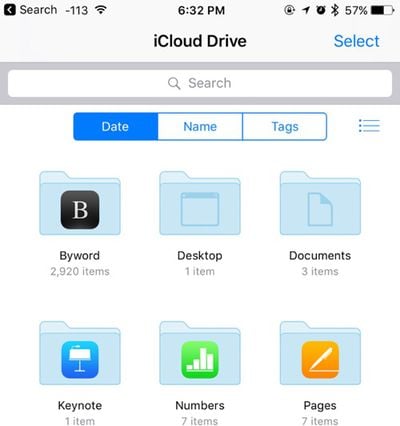
iclouddrive
The new iCloud storage options in Sierra bring Macs more in line with iOS devices, which use iCloud Drive for all file storage purposes. macOS Sierra is available for free starting today.


Related Forum: macOS Sierra

Top Rated Comments

zorinlynx Avatar
128 months ago
I strongly suggest NOT using the optimize storage feature! Not only will this remove the files from your Mac, but it'll keep the files from being backed up with Time Machine.

You will literally be trusting iCloud *completely* to store your important files. Definitely NOT a good idea!

Keep Optimize Storage off. Back up your data. It's only a matter of time before someone gets bitten by this.
Score: 14 Votes (Like | Disagree)
CamiMR Avatar
128 months ago
How about an option to sync Desktop only, and not Documents, does that exist?
Score: 4 Votes (Like | Disagree)
128 months ago
i find it incredibly pushy on apple's part to have Optimization turned on by default (see original post screen shot bottom).
installing macOS Sierra has this on by default.
Score: 3 Votes (Like | Disagree)
128 months ago
Need more macOS articles
Score: 3 Votes (Like | Disagree)
rGiskard Avatar
128 months ago
Sigh. I wish Apple would just create a way to copy files directly to my iPad. Say I have a directory of PDFs, txts, and epubs, and I want to read them on my iPad. I will be on my iPad away from wifi. So I want them ALL on my iPad. Not off on a server in a desert somewhere, but on my iPad, you know, that thing Apple sold me that is supposedly owned by me?

This is a trivial thing to do on my Nexus 7. Why must it require so much extra effort on my iPad? Just stop holding my hand and include a Finder in iOS already!
Score: 2 Votes (Like | Disagree)
Traverse Avatar
128 months ago
I strongly suggest NOT using the optimize storage feature! Not only will this remove the files from your Mac, but it'll keep the files from being backed up with Time Machine.

You will literally be trusting iCloud *completely* to store your important files. Definitely NOT a good idea!

Keep Optimize Storage off. Back up your data. It's only a matter of time before someone gets bitten by this.
I wouldn't even trust Dropbox with this kind of feature, let alone Apple with their less than stellar record. The idea behind this is great, but not realistic. The casual user with only 128GB of storage may benefit, but someone like me who likes to have at least 2 local copies and a cloud copy will not be satisfied with it.

I don't even like that it's baked into the OS. I just hope they never enable it by default without somehow informing the user. I like iCloud and Dropbox confined to syncing some app data and specific files that i manually place in their folder.
[doublepost=1474416973][/doublepost]
Untrue. Files are downloaded, then backed up, then optimized.
After they're optimized, they're not affect by your local time machine backups because they're not on your computer, they're in iCloud. Your computer only has a few kb placeholder.
Score: 2 Votes (Like | Disagree)

Popular Stories

iCloud iPhone 17 Pro

iPhone Users Who Pay for iCloud Storage Get Two New Perks on iOS 27

Thursday July 2, 2026 6:10 am PDT by
If you pay for certain iCloud+ storage plans beyond the 5GB that Apple offers for free, you will receive two more perks on iOS 27 at no additional cost. A summary of the two new iCloud+ perks on iOS 27:Increased daily usage limits for some new Apple Intelligence features, including image generation in the revamped Image Playground app. HomeKit Secure Video cameras receive generated video...
iPhone 4 on Black Feature

Apple Facing One of Its Worst Leaks Since the iPhone 4

Thursday July 2, 2026 9:53 am PDT by
Apple supplier Tata Electronics recently suffered a cyberattack that resulted in thousands of confidential files being published on the dark web, and this reportedly included some photos and documents related to the upcoming iPhone 18 Pro. We have elected not to share any of the leaked photos in this story due to the illegal nature in which they were obtained, but they can easily be found...
Apple Event Logo

Apple Just Released a New Product

Thursday July 2, 2026 8:04 am PDT by
Apple's first product release of summer 2026 occurred this week, but do not get too excited, as it is merely the Beats Solo Buds in a new color. Beats Solo Buds are now offered in orange through Best Buy in the U.S., with availability set to expand to 7-Eleven stores in Japan on July 4. Apple already offered orange Solo Buds in India for free with the purchase of an iPhone 15 or iPhone 15 ...














