

macOS Sierra and iOS 10: Universal Clipboard for Cross Device Copy/Paste - MacRumorsOpen MenuShow RoundupsShow Forums menuVisit ForumsOpen Sidebar
Skip to Content

macOS Sierra and iOS 10: Universal Clipboard for Cross Device Copy/Paste

by

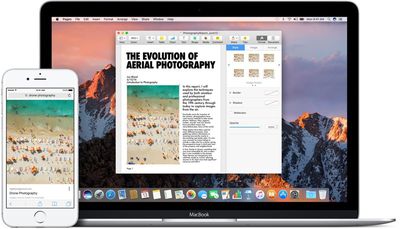
New in macOS Sierra and iOS 10 is a Universal Clipboard feature that makes it much easier to transfer links, text, photos, and more between different devices. With Universal Clipboard, you can copy something on your Mac and paste it on your iPhone, or vice versa.

It's already been possible to open up web pages across multiple devices, but now that functionality has been extended further. With macOS Sierra and iOS 10, when you copy a link on one device, it's uploaded to iCloud and available on all other devices where you're signed in with your Apple ID. You can do things like look up a recipe on your Mac, copy the text, and paste it on your iPhone, or copy a photo from an iPhone to an iPad.

Using the feature is as simple as copying something on one device, switching over to another device, and hitting "Paste." It can sometime takes a second or two for the copy to register, but it works seamlessly. There are no visual indicators for Universal Clipboard -- it's all behind the scenes.
macossierrauniversalclipboard
Apple has implemented an expiration for Universal Clipboard, so you only have a few minutes to paste something to another device once it's been copied. After that expiration time, which appears to be about two minutes, cross-device paste stops working and will need to be reactivated with another copy.

There are limitations on what can be copied where. Text can be copied almost anywhere on a Mac or iOS device, but images are somewhat more limited and will need to be copied into an app, like Pages, so it isn't a solid alternative to AirDrop for photo file transfers.

Universal Clipboard is a Continuity feature, so to get it to work, you will need to be signed into the same Apple ID across all devices. Bluetooth will also need to be turned on for the feature to work, and Bluetooth LE is required. The following Macs work with Universal Clipboard:

- MacBook (Early 2015 or newer)
- MacBook Pro (2012 or newer)
- MacBook Air (2012 or newer)
- Mac mini (2012 or newer)
- iMac (2012 or newer)
- Mac Pro (Late 2013)

Continuity features are sometimes unreliable, and there have been reports about spotty performance with Universal Clipboard during the beta testing period. Sometimes it helps to sign in and out of iCloud to restore functionality, and you'll need to make sure Handoff is activated on your iOS device (Settings --> General --> Handoff).

Aside from a Bluetooth connection and the same Apple ID, there are no other requirements. Wi-Fi is not necessary, as Universal Clipboard will work with cellular data.

Previously introduced Continuity features allow users to do things like make and answer phone calls on their Macs, get SMS messages on the Mac, and transfer tasks from one device to another with Handoff. Other new Continuity features in macOS Sierra include Apple Pay on the web and Auto Unlock with Apple Watch.

macOS Sierra is available as of today and can be downloaded from the Mac App Store.

Related Forum: macOS Sierra

Top Rated Comments

freediverx Avatar
130 months ago
Doesn't work at all for me, and I've grown increasingly unwilling to toggle iCloud off and on every time related features don't work as advertised.
Score: 6 Votes (Like | Disagree)
130 months ago
It's already been possible to open up web pages across multiple devices, but now that functionality has been extended further. With macOS Sierra and iOS 10, when you copy a link on one device, it's uploaded to iCloud [...]
As someone who sometimes uses copy/paste for sensitive information (e.g. to copy passwords from a password manager), this makes me very uneasy if true. Does anyone know if this is documented somewhere? I had assumed that the universal clipboard works similarly as Airdrop, which does not upload anything to iCloud (but rather uses a combination of Bluetooth and peer-to-peer Wifi to transfer the data locally). Unfortunately the iOS Security Guide has not yet been updated to cover the universal clipboard.
Score: 4 Votes (Like | Disagree)
130 months ago
Bluetooth? I though it worked via iCloud. O well, I'm not turning on Bluetooth.
I'm glad it doesn't use iCloud... I don't want everything I copy to be sent over the internet immediately.
Score: 2 Votes (Like | Disagree)
LiE_ Avatar
130 months ago
Doesn't work for me. 5k iMac on ethernet and 6+ on wifi. When I connect the iMac to wifi, I can paste a placeholder image from Evernote (?). restarted each device.
Uses bluetooth.
Score: 1 Votes (Like | Disagree)
LiE_ Avatar
130 months ago
For me it works copying on Mac and pasting on iPhone but not the other way round.

2015 rMBP
iPhone 7+
Score: 1 Votes (Like | Disagree)
130 months ago
As someone who sometimes uses copy/paste for sensitive information (e.g. to copy passwords from a password manager), this makes me very uneasy if true. Does anyone know if this is documented somewhere? I had assumed that the universal clipboard works similarly as Airdrop, which does not upload anything to iCloud (but rather uses a combination of Bluetooth and peer-to-peer Wifi to transfer the data locally). Unfortunately the iOS Security Guide has not yet been updated to cover the universal clipboard.
it seems to work the same as hand-off. no internet connection is needed. only that there is proximity for a BT connection and that the devices are on the same network (wifi or ethernet). this works even if the network the devices are connected to does not have access to the internet.
Score: 1 Votes (Like | Disagree)

Popular Stories

iOS 27 Next to iPhone

Here's When iOS 27 Rolls Out Today in Every Time Zone [Update: It's Out]

Sunday September 13, 2026 3:00 am PDT by
Update 10:04 a.m.: iOS 27 is rolling out now, though it may take a bit for all users to see it, so keep checking! Apple is about to release iOS 27, which will finally deliver more advanced Siri AI capabilities as well as a variety of other refinements, improvements, and new features to iPhones. It's Apple's biggest software update of the year, and Apple announced at Wednesday's iPhone event...
iOS 27 Icon iPhone

iOS 27 Available Now With These 8 New Features

Monday September 14, 2026 9:00 am PDT by
Update — 10 a.m. Pacific Time: Apple has released iOS 27. During its iPhone 18 Pro and iPhone Duo event last week, Apple announced that iOS 27 will be released widely on Monday, September 14. iOS 27 should be available around 10 a.m. Pacific Time / 1 p.m. Eastern Time today via the Settings app, under General → Software Update. Below, we have highlighted eight new features and...
Apple iCloud Plus expansion hero

iCloud+ Now Includes Apple TV, Apple Arcade, and Curated Apple Music Stations in Over 100 Countries

Tuesday September 15, 2026 1:43 am PDT by
Apple today announced a new subscription initiative that turns paid iCloud+ subscriptions into a broader services bundle in more than 100 countries. In select countries, Apple says every paid iCloud+ plan, including the cheapest 50GB tier, now includes Apple TV and Apple Arcade "at no additional cost," while family sharing extends the storage, TV and Arcade access to up to five people....















