

Apple's iOS 10.1 Beta Includes Promised Portrait Mode for iPhone 7 Plus Users - MacRumorsOpen MenuShow RoundupsShow Forums menuVisit ForumsOpen Sidebar
Skip to Content

Apple's iOS 10.1 Beta Includes Promised Portrait Mode for iPhone 7 Plus Users

Today's new iOS 10.1 beta, available now to developers, includes a new "Portrait" camera mode for iPhone 7 Plus users, which was shown off at the iPhone's debut event but wasn't quite ready for release.

Portrait mode is designed to mimic the kind of shallow depth of field images that can be taken with a high-end DSLR, with a front subject that stands out over a blurred background.
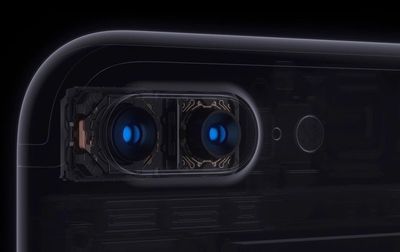
iphone7pluscamera
To achieve this look, Apple's built-in image signal processor scans a scene, using machine learning techniques to recognize the people in the image. From there, it creates a depth map of the image from both of the two cameras included in the device, keeping the people in focus while applying an artful blur or "bokeh" to the background.

According to TechCrunch, Apple's Portrait option was built on technology acquired from camera company LinX. Portrait mode is using the 56mm lens to capture the image while the wide-angle lens gathers perspective data to build the depth map and divide the image into layers.
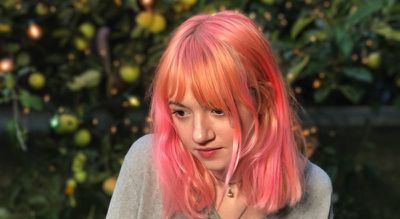
appleportraitexample

Once it has this 9-layer slice, it can then pick and choose which layers are sharp and which get a gaussian (randomish) blur effect applied to them.

Once the telephoto lens detects the subject, using autofocus and other stuff we'll talk about in a second, the image processor inside the iPhone 7 will then apply blur in greater and greater amounts to the layers that are further away from that subject.

It's in beta, so there are some quirks Apple will need to work out. Apple has said that Portrait won't be used all the time, and it does appear to require good lightning and the right focusing distance between objects to function properly. It will take some experimentation to get good shots with Portrait.

Portrait mode is a new feature in the camera app that can be found alongside other video and photo taking options like "Video" and "Panorama." It even includes a Live Preview effect that lets you see what the image will look like before you take it, something that's unique to the iPhone.


Popular Stories

iCloud iPhone 17 Pro

iPhone Users Who Pay for iCloud Storage Get Two New Perks on iOS 27

Thursday July 2, 2026 6:10 am PDT by
If you pay for certain iCloud+ storage plans beyond the 5GB that Apple offers for free, you will receive two more perks on iOS 27 at no additional cost. A summary of the two new iCloud+ perks on iOS 27:Increased daily usage limits for some new Apple Intelligence features, including image generation in the revamped Image Playground app. HomeKit Secure Video cameras receive generated video...
iPhone 4 on Black Feature

Apple Facing One of Its Worst Leaks Since the iPhone 4

Thursday July 2, 2026 9:53 am PDT by
Apple supplier Tata Electronics recently suffered a cyberattack that resulted in thousands of confidential files being published on the dark web, and this reportedly included some photos and documents related to the upcoming iPhone 18 Pro. We have elected not to share any of the leaked photos in this story due to the illegal nature in which they were obtained, but they can easily be found...
American Express Gold Apple Pay Feature

American Express Announces New Apple Pay Feature

Tuesday June 30, 2026 10:27 am PDT by
American Express today announced that you can now redeem Membership Rewards points when checking out with Apple Pay on the web and in apps on the iPhone and iPad. When checking out with Apple Pay on iOS 18 or iPadOS 18 or later, tap on your eligible American Express card (Platinum, Gold, Green, and others) and select the Membership Rewards points option. You can use points to cover all or...

Top Rated Comments

ArtOfWarfare Avatar
128 months ago
Very neat, but I already felt like the mode switcher was getting crowded on my 6+ with:

[LIST=1]
* Time-Lapse
* Slo-Mo
* Video
* Photo
* Square
* Pano


I think Apple should figure out another UI for swapping between all these modes. Maybe bring back the straight forward toggle between photo and video from iOS 3, and then make Time-Lapse and Slo-Mo be sub-modes for Video, and have Square, Pano, and Portrait be sub-modes for Photo?
Score: 20 Votes (Like | Disagree)
128 months ago
Not bad at all

Attachment Image
Score: 19 Votes (Like | Disagree)
filmantopia Avatar
128 months ago
But will it hiss? :D
At least it won't explode.
Score: 16 Votes (Like | Disagree)
f_merc Avatar
128 months ago
rather have dark mode
Score: 15 Votes (Like | Disagree)
128 months ago
Not bad!

MacRumors content image ('https://www.flickr.com/photos/phixional_ninja/29213385193/in/dateposted-public/lightbox/')

Score: 14 Votes (Like | Disagree)
Michael Scrip Avatar
128 months ago
Gaussian blur? What in the world apple use lens blur ffs. How else will they get the bokeh like effect. Maybe someone misreported? Lens blur makes bright objects in the background turn into those beautiful bokeh balls while gaussian is just a regular blur kind of like those used to censor on television. Maybe apple has their own in house filter that'll do something like lens blur? Because gaussian will not make it look "bokeh" at all …
Were you actually expecting to get optical bokeh from lenses and sensors the size of your pinky nail? :)

This was always gonna be a digital effect applied in post.

The iPhone may do a billion calculations when you press the shutter... but this is still a special effect.

I was honestly hoping that you could use image data from both cameras combined to make one good picture... not this faux-blurred-Photoshop effect.
Score: 13 Votes (Like | Disagree)














