Apple Watch Series 2: A Swimmer's Perspective - MacRumorsOpen MenuShow RoundupsShow Forums menuVisit ForumsOpen Sidebar
Skip to Content

Apple Watch Series 2: A Swimmer's Perspective

As a lifelong swimmer, I found the addition of 50-meter water resistance and swim workout tracking in the Apple Watch Series 2 to be a welcome improvement that made the new watch a must-have upgrade for me. While the original Apple Watch was not rated for swimming, many users had no issues regularly using it in the water, although its lack of built-in swim tracking features limited its usefulness.
apple_watch_swim_wrist
With Apple Watch Series 2, Apple has not only upgraded the water resistance with new gaskets and seals to make it suitable for swimming, but added new Pool Swim and Open Water Swim workouts to help track your progress. As part of the Apple Watch Series 2 introduction earlier this month, Apple highlighted how it worked with swimmers in the company's fitness labs to develop the software to accurately track swim workouts, from using the accelerometer in the watch to measure arm movements to tracking energy expenditures during workouts.

So how well does the new Apple Watch work when you take it for some swims in a pool? Let's take a look.

Getting Started

Swim tracking is managed in the same Workout app as other types of exercise, with both pool and open water swim workout options to choose from and a variety of different goals available for each workout.

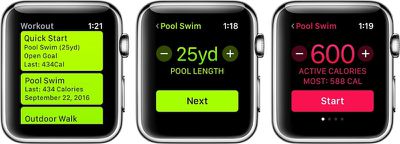
When you launch a pool swim workout from the Apple Watch, the first screen lets you input the length of the pool you're going to be swimming in. The default value in the U.S. is 25 yards, which is the most common pool length, but you can adjust this manually down to the exact yard as needed. A force press on the screen lets you change between yards and meters.
apple_watch_swim_workout
The next screen is where you set your goal for the workout. As with other types of workouts, you can swipe left and right on the watch to choose between calories burned, time or distance, or simply set an open goal. If you've previously completed swim workouts, the watch displays your best performances for each of the metrics, giving you a reference for setting new goals.

In the Pool

Once you've selected your pool length and workout goal, you're ready to go. Hit the Start button and the watch will give you a three-second countdown and you're off.

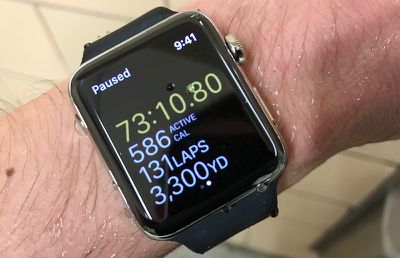
During your swim workout, the Apple Watch can display up to four different metrics. By default, these include workout duration, active calories burned, laps completed, and distance. Using the Apple Watch app on your iPhone, however, you can customize the display to rearrange the order of the different metrics or replace some of them with other options including average pace, total calories burned, and heart rate. Alternatively, you can set your Apple Watch to display only a single metric at a time and use the Digital Crown to change metrics during the workout.

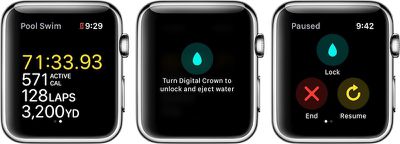
One unique aspect to swim workouts is that once the workout begins, the Apple Watch screen automatically locks to prevent accidental taps that can occur as water interferes with the touch sensing. If you want to pause your workout at any point, simply press the Digital Crown and the side button simultaneously. Pressing them again resumes the workout tracking.
apple_watch_swim_in_progress
As detailed during its introduction earlier this month, the Apple Watch Series 2 has a clever feature to help clear water from its speaker, using vibrations of the speaker itself to expel water from the speaker cavity when your workout is complete. Once your workout is paused and you're finished, turning the Digital Crown expels the water from the speaker and unlocks the screen, which then allows you to swipe right and end the workout, resume the workout, or re-lock the display.

How Well Does It Work?

So how well does the swim workout tracking work? The answer is very well if your goal is to simply swim back and forth to rack up yardage. The watch accurately senses individual strokes and both open turns and flip turns at the ends of the pool to calculate the distance you've traveled, elapsed time, and calories burned, and I found the active calories burned metric calculated by the watch to be close to figures estimated by other sources for various types of swimming activity.

Apple notes that the heart rate sensor may not function properly during swimming activities as water may interfere with the measurements, but that calories burned continue to be estimated using the watch's accelerometer. In my experience, however, the heart rate sensor continued to function very well in the water, accurately capturing my heart rate throughout my workouts.

Where the Apple Watch's swim tracking starts to fall short is for people looking to do more varied swim workouts based around swim sets and focused exercises like stroke drills and kicking. The Apple Watch's tracking is linked to its ability to sense arm motion, which means if you're doing a kick set, it won't pick it up at all. Or if you're doing specialized drills to work on your technique, such as one-arm strokes, if may not track accurately if you don't have a regular stroke rhythm.

The Apple Watch's pace calculation also becomes less useful if you're doing interval-based sets, as it's simply going to tell you the interval you were going on instead of your actual swimming pace unless you manually pause the workout as you finish each repeat and resume before starting the next one. That quickly becomes tedious, especially as I found myself having to visually check the watch's screen each time to make sure it was pausing and resuming correctly, as pressing the crown and side button didn't always register properly.

It would be great if the watch could sense when I've stopped at the wall to rest and automatically pause my workout and then resume once I push off the wall on my next swim. It obviously starts to get tricky differentiating random arm movements while resting from the start of a new swim with only an accelerometer to go on, but I feel like there could be some improvements made here.

I'd also love a way to edit workouts after the fact to include untracked activities such as kick sets and drills, even if it's just adding in the yardage. For now, I'm using a third-party app like MyFitnessPal to create a second workout to estimate my calories burned for the portions of my workouts the Apple Watch can't track.

Finishing Up Your Workout

At the end of your workout, the Apple Watch app displays a summary of your session, including the time of day the activity took place, dominant stroke used, distance, workout time, pool length, laps completed, average pace, average heart rate, and both active and total calories burned, as well as the weather at your location.
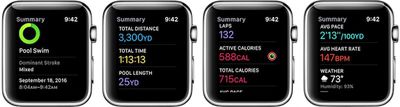
apple_watch_swim_summary
All of that data gets synced over to the Activity app on your iPhone, where it's visible in the Workouts tab. A bonus view on the iPhone lets you break down the average pace number and see your pace for each 100-yard segment of the workout. And of course the exercise and calorie data also automatically syncs over to the Health app on the iPhone, as well as third-party apps hooked into HealthKit, to help track your overall health status.
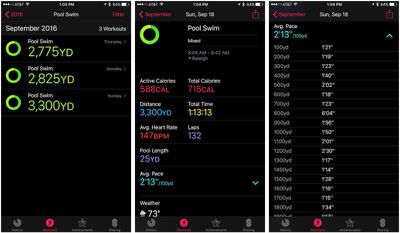
iphone_activity_swim_summary

Open Water Swimming

Aside from pool swims, the Apple Watch Series 2 can also track open water swims in the Workout app. I'm not as much of a fan of open water swimming and so I haven't had a chance to test that function out, but it operates in a similar fashion to pool workouts, allowing you to set a goal for time, distance, or calories, or leave an open goal.

As with pool swims, you can customize the metrics shown on the Apple Watch's display during a workout using the Apple Watch app on your iPhone. The default metrics are duration, active calories, burned, average pace, and distance, but these can be rearranged or swapped out for total calories burned and heart rate metrics from your iPhone.

Once you hit "Start" it will track your swimming progress, and as long as you are using a freestyle stroke it will use GPS to plot your location and speed while the accelerometer tracks your calories burned. Once your open water swim is completed, you can view a map of your route within the Workout entry in the Activity app on your phone.

Wrap-up

Plenty of serious and not-so-serious swimmers and triathletes already wear fitness watches to track their workouts, but this is my first foray into wrist-worn swim tracking. I like the tracking the Apple Watch can provide in pool swims to help keep tabs on my yardage, heart rate, and calories burned, and it's something I'll likely continue playing with. It's great for tracking long workouts with a minimum of stopping.

If you're doing sets of short swims or varied sets involving drills or kicking, it can be frustrating to have that activity go untracked or to have to manage pausing and unpausing the tracking to separate swimming from resting intervals. Frequent focusing on the watch to ensure it's tracking accurately and at the right times can also divert your attention from the actual swimming, although that will likely improve over time as I gain familiarity with using the watch in the pool.

For those reasons, the Apple Watch Series 2 may not yet become an everyday swim tracker for me, although I'll keep experimenting with it to figure out the best way to incorporate it into my workouts to provide the best data with minimum disruption to my workout focus.

Where the new Apple Watch could be a major benefit, however, is for open water swimmers. The lengthy freestyle swims are ideal for tracking with the Apple Watch, and the watch's GPS should make it a great tool for tracking those lake and ocean swims where it's difficult to estimate how far you've swum. It's certainly not the first GPS swim tracking watch, but for open water swimmers it's a great addition to an Apple Watch they can wear throughout the day to provide a host of other functions.


Related Roundup: Apple Watch 12
Buyer's Guide: Apple Watch (Buy Now)
Related Forum: Apple Watch

Popular Stories

apple watch series 3 design

Apple Offers Steps to Fix Daylight Saving Time Bug on Apple Watch

Sunday November 1, 2026 3:34 am PST by
Apple has published a support document describing what to do if your Apple Watch continues to show time that's off by one hour after daylight savings time changes. "This incorrect time appears only on the Always On display when your wrist is down," says Apple. "When you activate the display by tapping it or raising your wrist, the time changes to the correct hour." To fix the issue, Apple says ...
siri recap live rewind

watchOS 27.3 Brings Live Rewind and Siri Recap to Apple Watch

Tuesday November 3, 2026 10:35 am PST by
With the first beta of watchOS 27.3, Apple is introducing new Audio Intelligence features it previewed for the Apple Watch Series 12 and Ultra 4 earlier this year. Powered by the S11 chip, Audio Intelligence includes Live Rewind, Siri Recap, Sound Recognition, and Shazam Music Recognition. Sound Recognition and Shazam are already on the watch, but Live Rewind and Siri Recap are now available ...
southern straps 3 1

MacRumors Giveaway: Win an Apple Watch Series 12 and a Nylon Band From Southern Straps

Friday October 9, 2026 10:20 am PDT by
For this week's giveaway, we've teamed up with Southern Straps to offer MacRumors readers a chance to win an Apple Watch Series 12 and a nylon band from Southern Straps to go along with it. Southern Straps is a California-based company that has been making high-quality bands for the Apple Watch since the device first launched in 2015, and the company's selection of bands offer a an...

Top Rated Comments

Chupa Chupa Avatar
132 months ago
I think your perspective as a swimmer is similar to how many runners feel about AW as a running watch. If you are serious about the sport it's best to get a dedicated watch made for it. The AW tries hard to be a Jack-Of-All-Trades and truly is a master of none when it comes to sports tracking. It's a good activity tracker and huge convenience with notifications, ApplePay, signing in your Mac now. That is where it shines.

I'm hoping future iterations of the Nike branded AW becomes more of a unique, dedicated sports tracking watch than the marketing gimmick it is with the upcoming release. Apple needs to start designing sports watchs as sports watches rather than just slapping a name and unique band on the same watch that is in the other AW lines.
Score: 14 Votes (Like | Disagree)
WildCowboy Avatar
132 months ago
Even with a rating of "waterproof," I wouldn't take my Apple watch into the ocean (saltwater). Does anyone known if Apple has commented how ocean-proof the new watch is?
Apple officially says it's okay to use in the ocean.

https://support.apple.com/en-us/HT205000

Apple Watch Series 2 may be used for shallow water activities like swimming in a pool or ocean.
One of our readers also emailed Jeff Williams to specifically ask about using the Nike version while surfing. Here's the reply he got:

Nike only comes in Aluminum. If you rinse with fresh water after surfing, you should be great. We actually conduct out salt water corrosion testing without rinsing, and the watch performs well. That said, given you surf daily, I'd recommend rinsing.
Score: 8 Votes (Like | Disagree)
69Mustang Avatar
132 months ago
Nice informative article. We need more posts like this. Kudos.

Even with a rating of "waterproof," I wouldn't take my Apple watch into the ocean (saltwater). Does anyone known if Apple has commented how ocean-proof the new watch is?
Not picking on you, but I wish this "waterproof" misunderstanding would go away. The watch isn't waterproof and afaik there is no, nor has there ever been, such a thing as ocean-proof.

The Apple Watch has a water resistance (WR) rating, not a waterproof rating. It will never have a waterproof rating, especially in the US where it's prohibited from advertising a watch as waterproof.

Apparently, the warranty is not clear about it, it only says you shouldn't misuse it and it's marketed to be used in a pool.
Frankly, I'd still be way happier with a waterproof certification.
You'll never get one. Here's a good explanation in layman's terms. It's from CNet so watch out for the abhorrent autoplay video pop up. Water resistance v Waterproof ('https://www.cnet.com/how-to/water-dust-resistance-ratings-in-gadgets-explained/')

/rant over. apologies.
Score: 6 Votes (Like | Disagree)
cult hero Avatar
132 months ago
I wonder how long can last sport bands trough heavy swimming sessions
Only kinda-sorta related but I have a pair of sport bands—one of them I picked up a week ago. I do a lot of running and weightlifting in mine and I can say that close to a year of doing so has taken away the "soft" feel of the original. The new one feels much nicer when I put it on.

It's probably a combination of drying out and getting a little more rigid. The band is still fine and by no means uncomfortable, but there is a pretty noticeable difference in the sport bands over time.

As someone who does a variety of workouts, often in an impromptu manner, I really like the watch (and especially after the latest OS update). The jack-of-all-trades is extremely useful. And there's the added bonus of my phone being silent most of the time.
Score: 5 Votes (Like | Disagree)
BuddyTronic Avatar
132 months ago
You can call it "Mary" if you want, but that doesn't mean it meets the accepted definition of waterproof.

Keep in mind that the depth ratings are shorthand for withstanding a specific pressure - and once you start thrashing it around through the water - by swimming, say - you're actually causing significantly more pressure to be exerted upon it. If you take a "50 meter watch" to 50 meters deep (or even 49) and start swimming around with it, I think you may become rather sad at the outcome.
I now understand - thanks for taking the time to explain a bit more. "resistant" is the way to get out of warranty issues.

Nevertheless I will abuse the hell out of my Apple Watch S2 and see what happens. First one did pretty good. I'm definitely going to shower with it after swims and definitely going to have shampoo around it. It will all be fine, and if I break it, I'll buy another and be "careful" I guess. This stuff becomes junk after a year anyway, and the money I blow on it is a tax deduction for my work as a developer, and good for my health - I need all the motivations I can get to keep the beer belly away. Money can be replaced, but the time it takes to baby my iPhone is a real waste of time. So many guys I see have iPhone 5's in "mint" condition with no scratches - whoop-dee-doo. Mine is covered with scratches and worth 50 bucks less usually so I never understood why people want to keep the precious iPhone so pristine - same for the watch, and same for anything that doesn't have a beating heart inside :) Just my way of looking at it.
Score: 3 Votes (Like | Disagree)
69Mustang Avatar
132 months ago
Apple Watch S2 certification is very confusing! up to 50 m.. what about dust resistance? does it even have dust resistance? because obsiously is not mentioned

So Macrumors.. how about you stop praising Apple Watch S2! because when it comes to water and dust resistance the iPhone 7 destroys the Apple Watch S2!!!
The confusion comes from two different types of certifications. Water resistance on watch v IP rating on phone. Water resistance on the watch is and ISO rating. Specifically, ISO 2281-2010 per Apple's description:

"Apple Watch Series 2 has a water resistance rating of 50 meters under ISO standard 22810:2010. This means that it may be used for shallow-water activities like swimming in a pool or ocean. However, Apple Watch Series 2 should not be used for scuba diving, waterskiing, or other activities involving high-velocity water or submersion below shallow depth."

The iPhone 7's IP67 rating says that it stops the ingress of water from a depth of 1m for up to 30 minutes. So it's definitely not more water resistant. Dust resistant? I can't say. The AW has never listed it's level of dust resistance. The original and Series 1 watch only state IPX7 which gives an indication of water resistance but no dust resistance.


Score: 3 Votes (Like | Disagree)
Latest Stories
Early Apple Black Friday Deals on Apple Watch, MacBook Air, and More
13 hours ago
'Backglow' Lets You Customize New MacBook Pro's Glowing Apple Logo
13 hours ago
Top Stories: Apple Product Launches, iOS 27.3 Beta, and More
20 hours ago
More Fun iPhone Duo Apps: 30 New Picks to Try
1 day ago
Hands-On With Apple's New OLED Touchscreen MacBook Pro
2 days ago
Apple Store With All-New Design Opening Soon in Southern California
2 days ago
Control the Glowing Apple Logo on Your New MacBook Pro
2 days ago
Apple Shares New 'Apple Card: Apply and Use in Minutes' Ad
2 days ago
Apple Says More Than 100,000 Apps Optimized for iPhone Duo, Here's What's Still Missing
2 days ago
Early Black Friday Deals Kickoff With Steep Discounts on Apple Watch Ultras and More
2 days ago
The MacRumors Show: iOS 27.3 Looks Like a Huge Update
2 days ago
Best Buy's Black Friday Event Begins With Sitewide Savings on Apple, TVs, More
2 days ago
Apple Releasing Yet Another Two New Products Next Week
2 days ago
MacBook Air Drops to Lowest Price in Months With Amazon's $250 Discount
2 days ago
Apple Rumored to Drop the iPhone's Action Button Next Year
2 days ago
Apple's Extended Return Policy Now in Effect for 2026 Holiday Season
2 days ago
Apple Music Classical Updated With New Icon and Refreshed Design
2 days ago
OLED iPad Mini, M6 iMac, and New MacBook Pros Available From Today
2 days ago
Apple Surveys iPhone Duo Buyers About Crease and Camera
2 days ago
Apple's First Touchscreen Mac is Now Arriving to Customers
2 days ago
Claude Gets Personal Finance Feature With Bank Account Linking
2 days ago
Apple Arcade Adds Crossy Road Rush and NBA 2K27
3 days ago
Apple's New HomeView Smart Home Hub: Here's How Much RAM It Has
3 days ago
iPad Mini vs. iPad Air Buyer's Guide: Now Just $50 Apart
3 days ago
First iOS 27.3 and macOS Golden Gate 27.3 Public Betas Now Available
3 days ago
Apple Announces a New Mac Sales Record
3 days ago
Paid $200 for Logic Pro? Apple Says You Won't Get This New Feature
3 days ago
Instagram's Edits Video Editor is Now Available on Mac
3 days ago
Prevent Siri and Search From Accessing Specific iPhone Apps
3 days ago
Best Early Black Friday Deals on iPhone 18 Pro and iPhone Duo
3 days ago