

Some Mac owners are reporting problems with external monitors and the use of scaled resolutions since installing macOS Sierra earlier this week.
Several MacRumors readers using 4K displays have described the disappearance of scaled HiDPI resolutions beyond 1920x1080 since updating from OS X El Capitan, leaving their options reduced to 1080p or a non-scaled native resolution of 3840x2160. Monitors with native 1440p resolutions also seem to have had HiDPI scaling options removed.
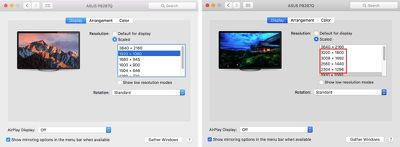
Owners of larger displays often use Apple's scaled HiDPI resolutions offered in Display preferences to enjoy increased desktop space without reducing the legibility of text. MacRumors forum member Sheza warned:
If you're like me and you have a 1440p monitor that you like to run in 1080p HiDPI mode using a custom plist or SwitchResX, DO NOT UPGRADE TO SIERRA.
Likewise if you have a 4K display and you like a bit more space while maintaining that sweet retina look and so you run it in 1440p HiDPI, DO NOT UPGRADE TO SIERRA.
Apple seems to have inexplicably removed this ability. You're now forced to destroy your eyesight by running... at native resolution.
Some readers have reported unsuccessfully trying alternative monitor cable connections – switching over from DisplayPort to HDMI and vice versa. Others have tried using third-party resolution utilities like SwitchResX, with mixed results.
A separate report posted on StackExchange, viewed 1,259 times, details the same issue:
I just upgraded to macOS Sierra. In El Capitan, I could have my 4k monitor (Dell P2715Q) scale so it was the equivalent of a 2560x1440 monitor, but in Sierra it only lets me do 2k/4k resolutions now.
MacRumors can also confirm that the issue appears to be software-related, since the scaled resolutions reappear when affected Macs are rolled back to OS X El Capitan. The issue does not seem to be limited to a particular monitor brand and the latest Public Beta (10.12.1) of Sierra released on Thursday does not reinstate the missing resolutions.
It's unclear if the change is intentional or whether Apple will re-introduce the scaling options in a forthcoming update. Sierra Beta users are advised to submit feedback to Apple using the Feedback Assistant app located in /Applications/Utilities.




















Top Rated Comments
"Sierra has been super stable and mostly bug-free, even as a beta for many weeks."
Couple of dolts on Macrumors:
"Sierra breaks EVERYTHING as usual! Apple is doomed!"
sudo defaults write /Library/Preferences/com.apple.windowserver.plist DisplayResolutionEnabled -bool true
[doublepost=1474646008][/doublepost]And an editorial suggestion; given that not all of us are experiencing this, maybe the article should say "Some Users..." and not just "Users"
[doublepost=1474633341][/doublepost]I should add, actually, as I just remembered: the first time I plugged this machine (Macbook Pro 13" early 2015) into this monitor was during the public beta phase, and at that time I found the same thing: I could only select up to "looks like 1080p" in HiDPI modes.
But I'm now on the final release version and it's working just fine. I kinda assumed maybe it was a limitation that they tried in testing but removed for release having got negative feedback about it. But that's just an assumption, I know nothing
I'm not aware of having *done* anything specific to fix it myself, I'm afraid.