Craig Federighi Says Touch Bar on New MacBook Pro Has 'So Much Potential' For Developers - MacRumorsOpen MenuShow RoundupsShow Forums menuVisit ForumsOpen Sidebar
Skip to Content

Craig Federighi Says Touch Bar on New MacBook Pro Has 'So Much Potential' For Developers

YouTube tech reviewer Marques Brownlee has shared an exclusive interview with Apple senior vice president of software engineering Craig Federighi. The pair chatted about the new MacBook Pro and its customizable Touch Bar, which Federighi said is "going to be great" and has "so much potential" for developers.
touch_bar_hero
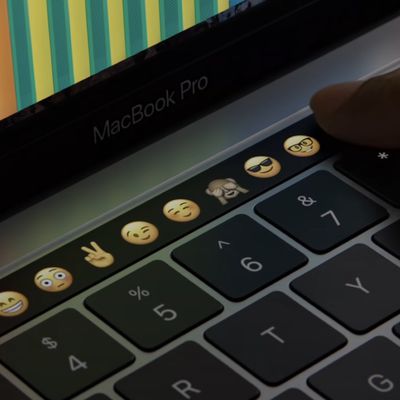
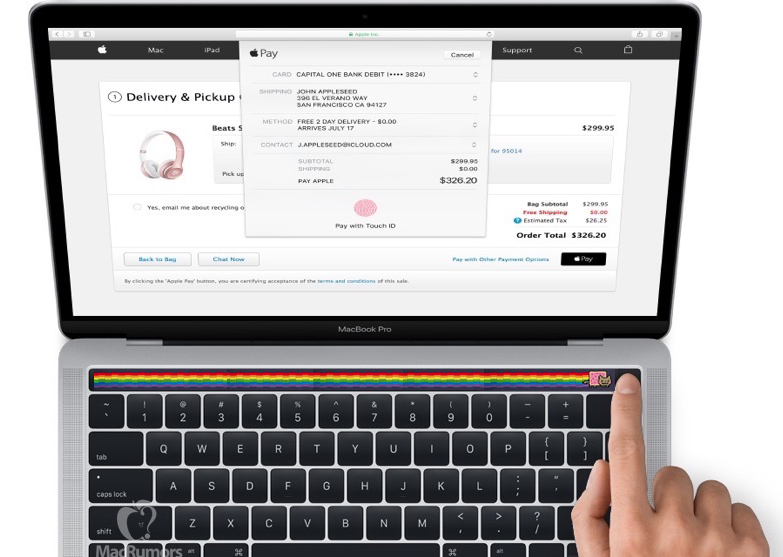
Touch Bar is a Multi-Touch strip of glass that replaces the standard row of function keys on the new MacBook Pros, providing users with system-level and app-specific controls that contextually change. For example, when a user types text in a document, the Touch Bar might include controls for adjusting the font face and size.

MacBook Pro users can interact with the Touch Bar using gestures. Tapping activates a control, such as a button, or selects an item, such as an emoji. Touching and holding initiates a secondary action on a control, such as a button. Panning moves an element, such as a slider of photos or emojis, from side-to-side.


The questions and answers below were edited slightly for clarity and brevity.

"Why now? Why 2016 for us to arrive at the Touch Bar?"

A lot of it came together in terms of the technology being just right to really pull this off in this kind of form factor — such as Touch ID and the quality of the display. We wanted it to feel just completely native to the keyboard and completely real — and be so responsive. We were able to take so much that we've learned in the hardware for iOS devices — and even so much of the security model of iOS, like for Touch ID — and incorporate some of our custom silicon to make it happen. A lot of things had to come together to make this possible. It’s exciting to finally have it out.

"Similar to Touch ID in the iPhone, Touch Bar will get better with time, right? What are you most looking forward to seeing, maybe in a year from now, when we have these and developers get their hands on it? What kind of stuff should we expect to see?"

What's been really awesome is that we've brought some developers in over the past month — and we just showed a small subset of the ones that had come in and already started doing work — and they have a lot of great ideas. Look at djay Pro. It's so exciting when we develop a product and we have a vision of what we can do with it with our apps. We know inherently this is a device with so much potential because it's just a versatile Multi-Touch display. When you get it in the hands of these developers and it's like, "we didn't think of that, but that's just awesome."

I’m really excited about what we've seen so far. I think, of course, a lot of people will do buttons and sliders, but I think there will be this next wave where people say, "hey, this is like custom hardware." You can create the control that supports the best mechanic for whatever it is you want to do in your app, whether that's a game doing something really novel or music, which is so awesome for those kind of real-time capabilities. It's going to be great, but I'm really excited about how fast it's already happening. I think day one, you get one of these, and it's going to be great.

touch_bar_labeled
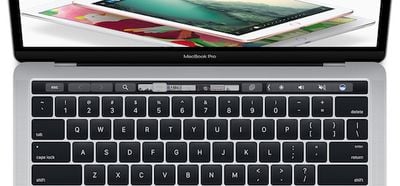
Apple's newly published design guidelines refer to the Touch Bar as an extension of the keyboard and trackpad, not the display. Apple does not want developers to include display alerts, messages, scrolling content, or static content in their Touch Bar extensions, but rather controls that resemble the appearance of the physical keyboard keys in terms of size and color.

Although technically it’s a screen, the Touch Bar functions as an input device, not a secondary display. The user may glance at the Touch Bar to locate or use a control, but their primary focus is the main screen. The Touch Bar shouldn’t display alerts, messages, scrolling content, static content, or anything else that commands the user’s attention or distracts from their work on the main screen.

The guidelines also tell developers not to include functions solely in the Touch Bar to ensure backwards compatibility with older Macs. There must always be a way to perform tasks using the keyboard or trackpad. Apple also tells developers not to use Touch Bar for well-known keyboard shortcuts such as find, select all, deselect, copy, cut, paste, undo, redo, new, save, close, print, and quit.
Popular Stories

iPhone 18 Pro Burgundy Feature

MKBHD Switches Back to iPhone 18 Pro After Testing iPhone Duo

Tuesday November 3, 2026 5:10 am PST by
YouTuber Marques Brownlee has switched back to the iPhone 18 Pro after spending more than two weeks with the iPhone Duo. On the latest episode of the "Waveform" podcast, Brownlee said he missed the Pro's cameras and Face ID. He added that he would miss opening the iPhone Duo, using it in portrait, and reading on the larger screen. Despite strong initial demand for Apple's first foldable...
HomeView Music

MKBHD is 'Not Convinced' About Apple's New HomeView, Here's Why

Thursday October 15, 2026 5:44 am PDT by
Apple this week introduced an all-new HomeView smart home hub, but popular tech reviewer Marques Brownlee is "not convinced" about it. In his HomeView impressions video on his YouTube channel MKBHD, Brownlee said "I cannot figure any group that this is actually ideal for." HomeView has a lot of overlap with other Apple devices, including the iPhone, iPad, Apple Watch, and HomePod....


touch bar close up

Apple's MacBook Pro Touch Bar Was Announced 10 Years Ago Today

Tuesday October 27, 2026 3:45 am PDT by
Apple introduced the Touch Bar 10 years ago today. At its "Hello again" event on October 27, 2016, Apple pitched the OLED Multi-Touch strip as "revolutionary." It replaced the MacBook Pro's function keys and divided users from the start, arriving in the same controversial redesign as the butterfly keyboard and removal of HDMI, SD card, and MagSafe ports. The Touch Bar died slowly. A physical...

Top Rated Comments

dixido Avatar
131 months ago
The possibilities are endless...
MacRumors content image
Score: 44 Votes (Like | Disagree)
131 months ago
Wonder if it's too little too late.
I haven't seen this much negative feedback on a Mac portable since the original MacBook Air.
Score: 41 Votes (Like | Disagree)
131 months ago
I haven't tried it myself and although it looks nice, I think its an ergonomic disaster. You go from the trackpad (blindly) to the touch bar (you have to look), use it... look at the screen if it's okay and over and over again... Can't believe Apple comes up with such an ergonomic disaster like this. They really don't get it and are out of ideas. Did this really took 4 years to develop :eek:.

Same for photo's. I don't get the double functions with the trackpad. Multitouch on the trackpad is ergonomic logical in my opinion (you can keep your eyes on the screen and naturally perform certain tasks on the trackpad).

I understand the pricing. Numbers of Apple's iPads are down for years, by upping the price for the notebooks, they hope to sell more iPads. With this pace of innovation they'll sell less from both.
Score: 34 Votes (Like | Disagree)
131 months ago
Apple starts reminding me Microsoft and Sony of 00's sitting in its throne neglecting all the innovation that's been happening in the industry and simply adding minimal functional innovation to their product lineup. I love my 2016 MacBook as it is a great computer overall but I wish Apple would be brave enough to start thinking outside of the box. What about higher integration between iOS and MacOS? What about augmented reality potentials? I am sorry Federighi, this touchbar looks interesting but you can see straight away it is a gimmick, it is not ergonomic to work with, there will be a point the user will just grab a mouse and do all those tasks quicker. Dont try to fool us with "developers" talk now, this is not iOS, this is macOS, the same OS whose App Store is pretty much dead. I really enjoy Apple products, but somehow I start feeling they are becoming overhyped this day and I cant simply justify spending 2k pounds like this for an additional touchbar and a few improvements. I want Apple to start focusing on their products again and not only sales pitch and marketing.
Score: 28 Votes (Like | Disagree)
131 months ago
Poor Craig. It feels like him and Phil are the last of the SJ bred senior execs who actually want to innovate and push the boundaries. But they're held back by Timmy's penny pinching ******** and Jony's idiotic quest for an invisibly thin Apple device.

The way Craig says in his first answer, that they've been working on this for years.. to me it sounds like "FFS, Timmy finally let us get this out."
Score: 26 Votes (Like | Disagree)
131 months ago
Gimmick AT BEST. A little too late. Um...Fujitsu laptops had fingerprint unlock technology before 2010 and many Windows laptops already have 4K screens with multi-touch gestures. As always, enjoy your overpriced MacBook Pros. I wish I could put MacOS on a Dell XPS laptop. Much better design.

-1
You're really going to compare 2nd Gen Touch ID to pre-2010 Fujitsu laptop biometrics?

....
Score: 23 Votes (Like | Disagree)
Latest Stories
Siri AI Rumored to Become 'More Like an Agent' as Early as Next Year
4 hours ago
Apple Taking New Approach to Developing iOS 28 and macOS 28
6 hours ago
Early Apple Black Friday Deals on Apple Watch, MacBook Air, and More
1 day ago
'Backglow' Lets You Customize New MacBook Pro's Glowing Apple Logo
1 day ago
Top Stories: Apple Product Launches, iOS 27.3 Beta, and More
1 day ago
More Fun iPhone Duo Apps: 30 New Picks to Try
2 days ago
Hands-On With Apple's New OLED Touchscreen MacBook Pro
2 days ago
Apple Store With All-New Design Opening Soon in Southern California
2 days ago
Control the Glowing Apple Logo on Your New MacBook Pro
2 days ago
Apple Shares New 'Apple Card: Apply and Use in Minutes' Ad
2 days ago
Apple Says More Than 100,000 Apps Optimized for iPhone Duo, Here's What's Still Missing
2 days ago
Early Black Friday Deals Kickoff With Steep Discounts on Apple Watch Ultras and More
2 days ago
The MacRumors Show: iOS 27.3 Looks Like a Huge Update
2 days ago
Best Buy's Black Friday Event Begins With Sitewide Savings on Apple, TVs, More
2 days ago
Apple Releasing Yet Another Two New Products Next Week
2 days ago
MacBook Air Drops to Lowest Price in Months With Amazon's $250 Discount
2 days ago
Apple Rumored to Drop the iPhone's Action Button Next Year
2 days ago
Apple's Extended Return Policy Now in Effect for 2026 Holiday Season
2 days ago
Apple Music Classical Updated With New Icon and Refreshed Design
2 days ago
OLED iPad Mini, M6 iMac, and New MacBook Pros Available From Today
2 days ago
Apple Surveys iPhone Duo Buyers About Crease and Camera
3 days ago
Apple's First Touchscreen Mac is Now Arriving to Customers
3 days ago
Claude Gets Personal Finance Feature With Bank Account Linking
3 days ago
Apple Arcade Adds Crossy Road Rush and NBA 2K27
3 days ago
Apple's New HomeView Smart Home Hub: Here's How Much RAM It Has
3 days ago
iPad Mini vs. iPad Air Buyer's Guide: Now Just $50 Apart
3 days ago
First iOS 27.3 and macOS Golden Gate 27.3 Public Betas Now Available
3 days ago
Apple Announces a New Mac Sales Record
3 days ago
Paid $200 for Logic Pro? Apple Says You Won't Get This New Feature
3 days ago
Instagram's Edits Video Editor is Now Available on Mac
3 days ago