

Twitter Introduces QR Codes for Sharing and Following Accounts - MacRumorsOpen MenuShow RoundupsShow Forums menuVisit ForumsOpen Sidebar
Skip to Content

Twitter Introduces QR Codes for Sharing and Following Accounts

by

Twitter today introduced Snapchat-style QR codes, which are designed to make it easier to find and follow friends on the social network. Each Twitter QR code is unique to an individual Twitter user, so when scanned, it'll bring up the person's account.

To access your Twitter QR code, you'll need the official Twitter app for iOS. In the app, go to your profile, tap on the gear icon, and select the "QR Code" option to generate your own personal QR code or scan someone else's code.
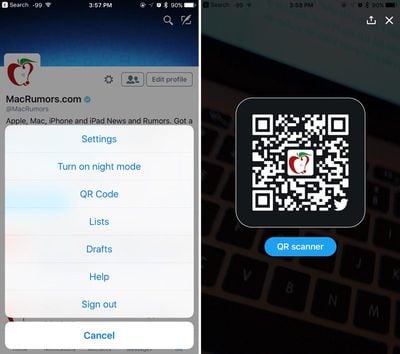
twitterqrcode
Scanning a QR code is as simple as using the iPhone's camera to either scan from a secondary screen or an image you've saved to the camera roll. You can follow MacRumors on Twitter by scanning the below code with your iPhone and the Twitter app.

macrumorsqrcode
QR codes were first made popular by Snapchat as a quick way to find your friends without having to search for them, but they may not be as popular on Twitter because the QR code settings are buried so deeply within the app.

Twitter's QR codes are currently rolling out to users and may not be immediately available for everyone.

Twitter for iOS can be downloaded from the App Store for free. [Direct Link]

Tag: Twitter

Top Rated Comments

Slix Avatar
128 months ago
Because sending an @ handle or a link is too difficult these days. *eye roll*
Score: 4 Votes (Like | Disagree)
vjl323 Avatar
128 months ago
Because sending an @ handle or a link is too difficult these days. *eye roll*
There's one very good use of QR codes that do make this useful - "IRL" use. Eg: Follow Us on (insert social media name and URL here). Having a sign with a Facebook/Instagram/Pinterest/Twitter/etc links - people with smart phones will look at it, and maybe they will stop to type the URL out. But if they see a QR code, they can simply snap a shot of it and later use the social media app to load that QR code in and 'friend' or 'follow' the business.

Yes, they could take a pic of the URL, but then you have the whole "look at the URL, type part of it in a browser, visit the photo again to make sure i didn't make typos, etc" and that's a bit of a pain when you're trying to do something quickly.

For online - yeah, QR codes are harder, but if you've got a business and have cards or signs up, that's a very quick way to send people your profile info w/o having to make them type a URL.

Bonus points for making the QR codes slightly different if using it to send a customer to one's own website - you can have the URL embedded in the QR code lead to a different URL (which redirects to the home page) and analyze the logs later to see which QR codes people are scanning when in a store/business (each sign with the QR code would be tracked, so if a customer scans it on the front door sign, you'd know vs the sign in a different part of the building - same with printing it on a biz card - this way you can track an "offline referer" of sorts - so you know the person used a biz card, or a front door sign to discover your website).
Score: 3 Votes (Like | Disagree)
macduke Avatar
128 months ago
We did some research when I was studying marketing in college in early 2012 (I minored in that and photography in addition to my design degree) and not many people actually use QR codes. We found the same thing when I got a job at another university on the marketing and communications team. Students weren't engaging with them IRL and our survey showed only a fraction knew how to use them. I also think they're ugly, have poor UX, and as there is no native support for them on iOS, I recommended that we stop using them and my boss agreed. They were a trendy marketing thing that was popular for a while because it made you seem tech-savvy to your middle aged boss who doesn't understand digital marketing, and somehow it still hasn't completely died off.

It kind of works for Snapchat because they invented their own system in the iconic shape of their app icon and the ability to scan is built into the app itself. This is yet another example of Twitter throwing everything at the wall to see what sticks because nobody wants to buy them. At least they could have made them more unique to their own the brand rather than just sticking a tiny avatar in the center and a small bird in one corner.
Score: 2 Votes (Like | Disagree)
vjl323 Avatar
128 months ago
Random question about QR codes in general (not about Twitter):

When you see QR codes printed on a poster or something in the real world... what are you supposed to scan them with? Does it need a special app? How is this not built into the OS ?

If I have this question... will the average person know what to do with them?
Good question; Apple embraced QR codes with iOS 7, but has kept them limited to the Wallet app; many 3rd party camera apps, however, recognize QR codes automatically and will open up a browser when viewing the code. But you're correct in that most folks who just use the native camera app and don't use the Wallet app, will not know what they need to download to use it.

I do see a lot [a lot!] of Android folks using their phone to scan QR codes on items in stores - I have never looked close enough to see what kind of app they were using, but Android too lacks native QR scanning for this kind of purpose.

You can see how quick Apple's QR reading is by scanning a QR code with Wallet [add a Pass to get to the QR reading screen].

That said, paper business cards that have my QR code are used daily . Granted, those who have my biz card tend to be more into technology for technology's sake, so my experience with that is a bit skewed.
Score: 2 Votes (Like | Disagree)
Michael Scrip Avatar
128 months ago
Random question about QR codes in general (not about Twitter):

When you see QR codes printed on a poster or something in the real world... what are you supposed to scan them with? Does it need a special app? How is this not built into the OS ?

If I have this question... will the average person know what to do with them?
Score: 2 Votes (Like | Disagree)
vjl323 Avatar
128 months ago
The first time I used it I was blown away. Full transaction literally took less than a second. The teller had no idea what had just happened lol.
Similar experience here, as well! Kinda reminds me of TouchID on the 6s when it first came out - almost "too" fast. Definitely not complaining, but I think the first wave of people who have used it [and the clerks behind the register] all took a bit to make sure the transaction actually happened, as Apple Pay isn't a natural progression of speed from the usual check-out time - it's a giant leap!
Score: 1 Votes (Like | Disagree)

Popular Stories

iOS 27 Next to iPhone

Here's When iOS 27 Rolls Out Today in Every Time Zone [Update: It's Out]

Sunday September 13, 2026 3:00 am PDT by
Update 10:04 a.m.: iOS 27 is rolling out now, though it may take a bit for all users to see it, so keep checking! Apple is about to release iOS 27, which will finally deliver more advanced Siri AI capabilities as well as a variety of other refinements, improvements, and new features to iPhones. It's Apple's biggest software update of the year, and Apple announced at Wednesday's iPhone event...
iOS 27 Icon iPhone

iOS 27 Available Now With These 8 New Features

Monday September 14, 2026 9:00 am PDT by
Update — 10 a.m. Pacific Time: Apple has released iOS 27. During its iPhone 18 Pro and iPhone Duo event last week, Apple announced that iOS 27 will be released widely on Monday, September 14. iOS 27 should be available around 10 a.m. Pacific Time / 1 p.m. Eastern Time today via the Settings app, under General → Software Update. Below, we have highlighted eight new features and...
Apple iCloud Plus expansion hero

iCloud+ Now Includes Apple TV, Apple Arcade, and Curated Apple Music Stations in Over 100 Countries

Tuesday September 15, 2026 1:43 am PDT by
Apple today announced a new subscription initiative that turns paid iCloud+ subscriptions into a broader services bundle in more than 100 countries. In select countries, Apple says every paid iCloud+ plan, including the cheapest 50GB tier, now includes Apple TV and Apple Arcade "at no additional cost," while family sharing extends the storage, TV and Arcade access to up to five people....














