Some Users Experiencing 'Three Finger Drag' Issues on New MacBook Pro - MacRumorsOpen MenuShow RoundupsShow Forums menuVisit ForumsOpen Sidebar
Skip to Content

Some Users Experiencing 'Three Finger Drag' Issues on New MacBook Pro

by

A small but growing number of users have reported issues using the "three finger drag" gesture on the new MacBook Pro's trackpad.
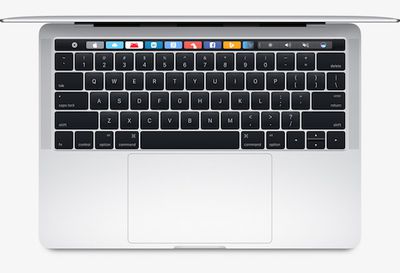
late_2016_macbook_pro_trackpad
Affected users say the gesture either works only intermittently or does not work whatsoever on both 13-inch and 15-inch late 2016 models.

MacRumors reader Luke said the three finger drag gesture does not work in the upper left side of his MacBook Pro's trackpad.

I have the news 15-inch MacBook Pro with Touch Bar, and it seems there is an issue with the trackpad. Although it is enabled, the three-finger drag feature doesn't work in the upper left side of the track pad. It's most bizarre.

Some users have speculated the trackpad's palm rejection feature could be to blame, particularly since the gesture appears to be buggiest along the edges.

A handful of topics have been posted about the issue on the MacRumors discussion forums (1, 2, 3, 4) and Apple Support Communities over the past few weeks.

MacRumors reader David:

With the 13-inch MacBook Pro, I switched to three finger drag, and the palm rejection kind of gets in the way. If you go from typing to try and drag a window, you have to hit the center of the trackpad with your finger tips, or it doesn't register.

MacRumors reader Mustafa:

I always enable 3 finger drag. Ever since OS X 10.11, Apple tucked that feature away under Accessibility. I turned it on as usual and I am finding that it does not always move the windows as intended.

Apple Support Communities user Darren:

Try to enable three finger drag and do a 3 finger drag gesture on the bottom left of the trackpad. There is a 40% chance that it's wrongly detected as a secondary click. Sometimes it failed to detect 3 finger drag at the middle of the trackpad as well.

MacRumors forum member C.clavin:

Just bought a 2016 15" MacBook Pro and I am having an issue with the 3 finger drag. Since enabling the gesture, it works about 50-60% of the time. It's strange because it works at times on one window, and not others, and sometimes not at all.

"Three finger drag" is a Multi-Touch gesture supported on both traditional and Force Touch trackpads on many MacBook Pro models. It lets you use three fingers to move the active window on your screen without clicking.

On OS X Yosemite and later, the gesture can be toggled on by clicking on System Preferences > Accessibility > Mouse & Trackpad > Trackpad Options > Enable Dragging. Select "three finger drag" from the dropdown menu and check off the box.

Apple does not appear to have publicly acknowledged the issue, while it remains unclear if the issue is software or hardware related. If related to software, the issue will likely be addressed in a future macOS Sierra update.
Related Roundup: MacBook Pro
Buyer's Guide: MacBook Pro (Buy Now)
Related Forum: MacBook Pro

Top Rated Comments

130 months ago
Has there been a single Apple product in recent memory with this many software-hardware integration problems?
Score: 36 Votes (Like | Disagree)
130 months ago
Cancelled my order yesterday and feels like a weight has been lifted off my shoulders, I'll be skipping this generation. Too many issues all around. Sad times.
Score: 34 Votes (Like | Disagree)
dannys1 Avatar
130 months ago
QUICK Rabid forum members, we've dug up another minor bug that a handful of users are experiencing....GO MAD, GO GO GO!

Next a topic on that if you press the emoji laugh icon on the touch bar twice on a Tuesday it only registers once on a small batch of 13" MacBook Pro's running 10.12.1 (16B2657) after 8pm.
Score: 26 Votes (Like | Disagree)
130 months ago
can't wait for all the comments from those who don't own said laptops.
Some people don't have to eat poop to know it sucks. But I guess some people are different.
Score: 21 Votes (Like | Disagree)
69Mustang Avatar
130 months ago
QUICK Rabid forum members, we've dug up another minor bug that a handful of users are experiencing....GO MAD, GO GO GO!

Next a topic on that if you press the emoji laugh icon on the touch bar twice on a Tuesday it only registers once on a small batch of 13" MacBook Pro's running 10.12.1 (16B2657) after 8pm.
How many threads are you going to post the same comment before realizing the "common thread" in all the threads is bugs/issues from Apple? At some point, it's going to dawn on you that maybe, just maybe the MBP is a bit buggy.

To be fair, release buggy-fix later is modus operandi for tech from any company these days. It's not just Apple. But to constantly apologize for, and be accepting of buggy releases only encourages companies to continue doing business as is.


If you were to complain that early adopters should quit batching because they know that the price of early adoption is buggy hardware/software I'd get behind that idea all day every day. But that "it's minor" meme you got going is pretty sad. Think of it like this. Each bug is a nickel. If I hit you with one, it's a minor annoyance. If I put a bunch of them in a sock (MBP) and hit you with them, you're going to be pissed... and most likely concussed, but pissed nonetheless... that is if the retrograde amnesia doesn't set in. If it does, I'll just tell you that you fell and bumped your head. Wait, where was I?

Oh yeah, please get some new material for the next inevitable bug.:D:p
Score: 19 Votes (Like | Disagree)
zorinlynx Avatar
130 months ago
I really feel like buying a refurb 2015 model now. At least then I'll have a trouble free Macbook Pro for 4-5 years until we get past this crappy generation.

Of course there's no certainty that Apple will start doing things better eventually, but.. it puts off the pain.
Score: 18 Votes (Like | Disagree)

Popular Stories

M5 MacBook Pro

RIP, MacBook Ultra

Monday October 19, 2026 9:37 am PDT by
Apple today sent out invites for an experience in Los Angeles on Wednesday, October 28, and the "Pro and tell" tagline on the invitation likely means that the rumored MacBook models with touch-enabled OLED displays will stick with MacBook Pro branding instead of the once-rumored "MacBook Ultra" name. The long-rumored "iPhone Ultra" ended up being named iPhone Duo, so speculation that Apple...
Apple MacBook Pro with PROLED XDR Display family lineup feature

Apple Announces OLED MacBook Pro With Touch Display

Wednesday October 28, 2026 10:11 am PDT by
Apple today announced a new high-end MacBook Pro, which is available in 14-inch and 16-inch sizes. The new device has a PROLED XDR display that supports touch gestures, and a glowing rear Apple logo. Pricing on the MacBook Pro starts at $2,899 for the 14-inch model and $3,399 for the 16-inch model. Apple says the MacBook Pro has the "world's best display in a pro laptop." The PROLED...
Apple MacBook Pro 14 in with M6 hero

Apple Announces New 14-Inch MacBook Pro With M6 Chip

Tuesday October 27, 2026 6:01 am PDT by
Apple today announced a refreshed 14-inch MacBook Pro featuring the M6 chip, upgraded connectivity specifications, and more. The M6 chip in the MacBook Pro features a 12-core CPU with 2 super cores, 4 performance cores, and 6 efficiency cores, paired with a 12-core GPU. This is up from the M5 chip with a 10-core CPU with 4 super cores and 6 efficiency cores, paired with a 10-core GPU. M6...
Latest Stories
Siri AI Rumored to Become 'More Like an Agent' as Early as Next Year
4 hours ago
Apple Taking New Approach to Developing iOS 28 and macOS 28
6 hours ago
Early Apple Black Friday Deals on Apple Watch, MacBook Air, and More
1 day ago
'Backglow' Lets You Customize New MacBook Pro's Glowing Apple Logo
1 day ago
Top Stories: Apple Product Launches, iOS 27.3 Beta, and More
1 day ago
More Fun iPhone Duo Apps: 30 New Picks to Try
2 days ago
Hands-On With Apple's New OLED Touchscreen MacBook Pro
2 days ago
Apple Store With All-New Design Opening Soon in Southern California
2 days ago
Control the Glowing Apple Logo on Your New MacBook Pro
2 days ago
Apple Shares New 'Apple Card: Apply and Use in Minutes' Ad
2 days ago
Apple Says More Than 100,000 Apps Optimized for iPhone Duo, Here's What's Still Missing
2 days ago
Early Black Friday Deals Kickoff With Steep Discounts on Apple Watch Ultras and More
2 days ago
The MacRumors Show: iOS 27.3 Looks Like a Huge Update
2 days ago
Best Buy's Black Friday Event Begins With Sitewide Savings on Apple, TVs, More
2 days ago
Apple Releasing Yet Another Two New Products Next Week
2 days ago
MacBook Air Drops to Lowest Price in Months With Amazon's $250 Discount
2 days ago
Apple Rumored to Drop the iPhone's Action Button Next Year
2 days ago
Apple's Extended Return Policy Now in Effect for 2026 Holiday Season
2 days ago
Apple Music Classical Updated With New Icon and Refreshed Design
2 days ago
OLED iPad Mini, M6 iMac, and New MacBook Pros Available From Today
2 days ago
Apple Surveys iPhone Duo Buyers About Crease and Camera
3 days ago
Apple's First Touchscreen Mac is Now Arriving to Customers
3 days ago
Claude Gets Personal Finance Feature With Bank Account Linking
3 days ago
Apple Arcade Adds Crossy Road Rush and NBA 2K27
3 days ago
Apple's New HomeView Smart Home Hub: Here's How Much RAM It Has
3 days ago
iPad Mini vs. iPad Air Buyer's Guide: Now Just $50 Apart
3 days ago
First iOS 27.3 and macOS Golden Gate 27.3 Public Betas Now Available
3 days ago
Apple Announces a New Mac Sales Record
3 days ago
Paid $200 for Logic Pro? Apple Says You Won't Get This New Feature
3 days ago
Instagram's Edits Video Editor is Now Available on Mac
3 days ago